Repository navigation
How do you include p5.sound? #61
Description

Not sure the ethics of submitting an issue. (let me know!)
But since the previous one has been closed, instead of tagging on questions there, I thought I should create a new one.
@jamesrweb I'm trying to get this working, just want to understand the step-by-step way of getting this working.
- Do I need to first
npm install --save @types/p5 - Can I just add
import * as p5 from "p5"andimport "p5/lib/addons/p5.sound"in my Sketch file and use it straightaway?
My code, following this tutorial: https://www.youtube.com/watch?v=8HEgeAbYphA&feature=emb_logo
export default function sketch(p5) {
    p5.setup = () => {
        p5.createCanvas(400, 400)

        env = new p5.Envelope()
        env.setADSR(0.05, 0.1, 0.5, 1)
        env.setRange(1.2, 0)

        wave = new p5.Oscillator()
        wave.setType("sine")
        wave.start()
        wave.freq(440)
        wave.amp(env)
...
I tried them and I get the errors saying:
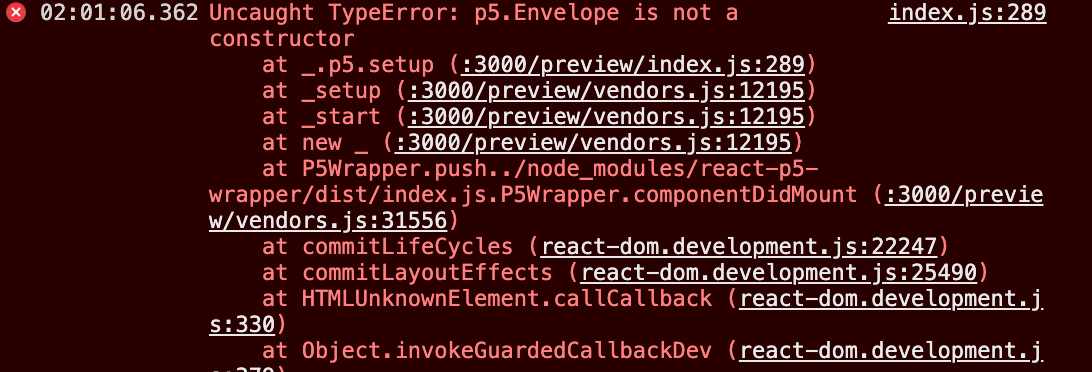
Originally posted by @vennsoh in #11 (comment)
Activity
vennsoh commentedon Nov 18, 2020
Will appreciate if someone could make a tiny demo to demonstrate how this bad boy could work. 🙏
Trying to get this to work by loading and playing a sound, https://p5js.org/examples/sound-load-and-play-sound.html
I can manage to import the library in but then all the functions/constructors can't be called.
vennsoh commentedon Nov 18, 2020
I have a workaround that only works on function calls.
I added
window.p5 = p5after callingimport * as p5 from "p5"Then I'll be able to use the p5.loadSound() function. However if I try to use new p5.Envelope() constructor it'll still throw me an error.
jamesrweb commentedon Nov 19, 2020
Hi @vennsoh, sorry for the wait in reply, I can help you here for sure.
So actually what you did was correct, you have to have the
import "p5/lib/addons/p5.sound";statement. Since sound is an external library you add on to p5, it isn't exported by default from thep5constructor you get given in the sketch function.As for having to install
p5itself, that won't be necessary after the next version is eventually released to NPM as I fixed this in pull request #56 as a solution to issue #45.So, in short:
importitp5.Vector, you can probably access it by usingp5.constructor.[thing]This is just because of how
p5itself is built and not a library issue although I agree it isn't ideal but kind of still makes sense I think overall since technically addons aren't part of the core library anyway so why shouldp5include them by default which is the reason I guess they implemented things this way.Lastly, a quick tip:
Hope all this helps and reach out again if you need further support, happy to help!
vennsoh commentedon Nov 19, 2020
Omg, you're a godsend to this community! Thanks!
By just changing
p5.Envelope() --> p5.constructor.Envelope()has fixed my problem.Although there's another problem with a recent Chrome update that requires getAudioContext() but it's well documented here how to fix that, https://github.com/processing/p5.js-sound/issues/249
Using this: https://p5js.org/reference/#/p5/userStartAudio
Can I seek more clarification on this line of sentence?
"As for having to install p5 itself, that won't be necessary after the next version is eventually released to NPM as I fixed this in pull request #56 as a solution to issue #45."
Do we mean:
Also why do we need
window.p5 = p5for this to work? Can someone educate me?jamesrweb commentedon Nov 21, 2020
Exactly, p5 will be included as a dependency once the next version of this library is released on NPM. Sadly I can't say when exactly that will be but I would assume in the coming quarter if I had to guess. It does mean though that you shouldn't have to manually install p5.
What do you mean about the
window.p5part? I don't understand why you would have to do that.vennsoh commentedon Nov 21, 2020
Thanks @jamesrweb hm, weirdly if comment out
window.p5 = p5then I'll get this error.I learn about this hack from this thread: https://stackoverflow.com/questions/39693208/using-p5-sound-js-in-instance-mode-p5-amplitude-not-a-constructor/44727829#44727829
Someone responded to how I can avoid doing window.p5 = p5 but I still get an error.
https://stackoverflow.com/questions/64887033/how-do-i-add-p5-sound-to-react-using-react-p5-wrapper/64922685#64922685
jamesrweb commentedon Nov 21, 2020
Why do you need to do this in the first place? You get access to
p5as the parameter to yoursketchfunction. Can you explain?vennsoh commentedon Nov 21, 2020
I'm using Framer to do my prototype so I wonder if this is a Framer thing where to add something on top that's causing me needing this workaround.
I created a Framer prototype that demonstrate this. https://framer.com/projects/ml5-neuralNetwork--sPis0uXjFNsgMa1VcxMD-ikuQ0 (You need to register a free framer account to see the code + preview the prototype in browser.
I tried to create a codesandbox to demonstrate the issue too to make it easier.
https://codesandbox.io/s/vigorous-lamarr-px8fs?file=/src/Sketch.js
But then now I'm getting this issue? My code is working fine if I don't need to import p5.sound but once I did it, it throw an error. Might be a webpack thing that comes with Codesandbox default template, not sure.

jamesrweb commentedon Nov 23, 2020
@vennsoh, Can you share your code for that project and / or file?
jamesrweb commentedon Nov 23, 2020
Wait, have you tried running
npm installor deleting yournode_modulesfolder and reinstalling dependencies because for some reason your codesandbox example is attempting toimportfrom the@typespackage and notp5itself 🤔...vennsoh commentedon Nov 23, 2020
Yup the 2 links I have posted above are the code.
Framer: https://framer.com/projects/ml5-neuralNetwork--sPis0uXjFNsgMa1VcxMD-ikuQ0 (working)
Codesandbox: https://codesandbox.io/s/vigorous-lamarr-px8fs?file=/src/Sketch.js (error out)
And yes, I did try your suggestion of removing node_modules. And npm install again, I still need to use my workaround otherwise I get errors. For my Framer example that is working...
I need to have:
window:p5 = p5and need to have it right afterimport * as P5Class from "p5"env = new p5.constructor.Envelope()jamesrweb commentedon Nov 23, 2020
It has to be the compile step configuration then. Only thing it could be honestly because p5 is installed (i checked), it is clearly not bundling the sound addon properly for some reason in this case. Sorry I can't be more help on this one.
For further issues, please raise a new issue though!