You signed in with another tab or window. Reload to refresh your session.You signed out in another tab or window. Reload to refresh your session.You switched accounts on another tab or window. Reload to refresh your session.Dismiss alert
{{ message }}
Repository navigation
Expand to include p5 libraries/addons eg p5.sound #11
To include the libraries, you can include the line import "p5/lib/addons/p5.sound"; in either the p5-wrapper or the sketch file. Either way you'll have access to the functions from the addons.
The issue isn't actually with this library, if you are in node_modules\@types\p5\index.d.ts you will notice that the type declarations for p5 are missing the <reference path="./lib/addons/p5.sound.d.ts" /> tag even though the file exists 🤔.. I will make a PR into the p5-types repo sometime later in the week and hopefully once that is done you can use all the p5 sound methods via the p5.constructor object that is on the p5 object provided to all sketch modules.
There is an example usage from the @types/p5 official package of using P5.sound in an app. There is also an answer for why this is, kind of, here.
Since P5.dom and P5.sound are add ons in the P5 eco-system by default anyway, it makes sense that you add them only as needed via imports or the usual script route.
With the example above and this in mind, I will now close the issue.

Activity
slin12 commentedon Jan 24, 2018
To include the libraries, you can include the line
import "p5/lib/addons/p5.sound";in either the p5-wrapper or the sketch file. Either way you'll have access to the functions from the addons.shtrih commentedon May 9, 2019
For
react-p5-wrapperversion <=0.0.4.If you write
import 'p5/lib/addons/p5.dom';in the sketch file then it throws an error:Upd: here is the solution: #23 (comment)
arsmth commentedon Jun 2, 2019
I would also like to know how to use the sound library. I get the following error when trying to use p5.FFT like so
const fft = new p.FFT()jamesrweb commentedon May 23, 2020
The issue isn't actually with this library, if you are in
node_modules\@types\p5\index.d.tsyou will notice that the type declarations for p5 are missing the<reference path="./lib/addons/p5.sound.d.ts" />tag even though the file exists 🤔.. I will make a PR into thep5-typesrepo sometime later in the week and hopefully once that is done you can use all the p5 sound methods via thep5.constructorobject that is on thep5object provided to all sketch modules.jamesrweb commentedon Sep 23, 2020
There is an example usage from the
@types/p5official package of usingP5.soundin an app. There is also an answer for why this is, kind of, here.Since
P5.domandP5.soundare add ons in the P5 eco-system by default anyway, it makes sense that you add them only as needed via imports or the usualscriptroute.With the example above and this in mind, I will now close the issue.
vennsoh commentedon Nov 17, 2020
@jamesrweb I'm trying to get this working, just want to understand the step-by-step way of getting this working.
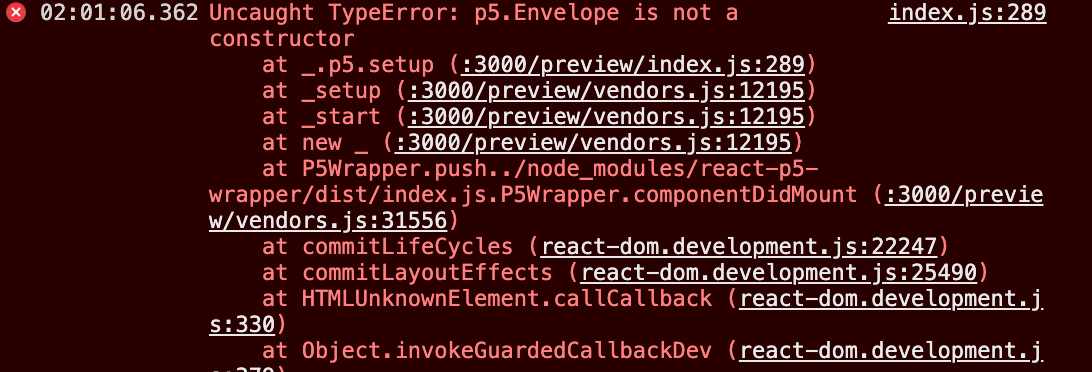
npm install --save @types/p5import * as p5 from "p5"andimport "p5/lib/addons/p5.sound"in my Sketch file and use it straightaway?My code, following this tutorial: https://www.youtube.com/watch?v=8HEgeAbYphA&feature=emb_logo
I tried them and I get the errors saying: