Skip to content

fix: Restore all matching items selected label - #99579

Merged
Valforte merged 4 commits into
Expensify:mainfrom
emkhalid:fix/restore-all-matching-selected-label
Sep 8, 2026
Merged

fix: Restore all matching items selected label#99579
Valforte merged 4 commits into
Expensify:mainfrom
emkhalid:fix/restore-all-matching-selected-label

Conversation

@emkhalid

@emkhalid emkhalid commented Aug 26, 2026

Copy link
Copy Markdown
Contributor

Explanation of Change

This PR restores the “All matching items selected” label for Spend > Expenses after selecting all matching expenses.

When one or more expenses are excluded, the button continues to show the exact numeric selection count. Rechecking all excluded expenses restores the all-matching label.

This change only affects the button label. It does not change selection state, totals, pagination, exports, or Spend > Reports behavior.

The required translation was also restored in every supported locale, with focused unit-test coverage.

Fixed Issues

$ #99567
PROPOSAL:

Tests

Precondition: Use an account with more than one page of expenses.

  1. Navigate to Spend > Expenses.
  2. Open the bulk-selection menu and choose “Select all”.
  3. Verify the button shows “All matching items selected”.
  4. Uncheck one expense.
  5. Verify the button shows the exact selected count.
  6. Recheck that expense.
  7. Verify the button returns to “All matching items selected”.
  8. Clear selection and choose “Select all on this page”.
  9. Verify the button shows a numeric count instead of the all-matching label.
  10. Navigate to Spend > Reports and verify its existing numeric behavior is unchanged.
  11. Change the app language and repeat steps 2–3.
  12. Verify the localized label appears and the app does not crash.
  • Verify that no errors appear in the JS console

Offline tests

  1. Load Spend > Expenses and go offline.
  2. Choose “Select all”.
  3. Verify the button shows “All matching items selected”.
  4. Uncheck one loaded expense.
  5. Verify the button shows the loaded numeric selection count.
  6. Recheck the expense.
  7. Verify the button returns to “All matching items selected”.

QA Steps

Same as Tests and Offline tests.

// TODO: These must be filled out, or the issue title must include "[No QA]."

  • Verify that no errors appear in the JS console

PR Author Checklist

  • I linked the correct issue in the ### Fixed Issues section above
  • I wrote clear testing steps that cover the changes made in this PR
    • I added steps for local testing in the Tests section
    • I added steps for the expected offline behavior in the Offline steps section
    • I added steps for Staging and/or Production testing in the QA steps section
    • I added steps to cover failure scenarios (i.e. verify an input displays the correct error message if the entered data is not correct)
    • I turned off my network connection and tested it while offline to ensure it matches the expected behavior (i.e. verify the default avatar icon is displayed if app is offline)
    • I tested this PR with a High Traffic account against the staging or production API to ensure there are no regressions (e.g. long loading states that impact usability).
  • I included screenshots or videos for tests on all platforms
  • I ran the tests on all platforms & verified they passed on:
    • Android: Native
    • Android: mWeb Chrome
    • iOS: Native
    • iOS: mWeb Safari
    • MacOS: Chrome / Safari
  • I verified there are no console errors (if there's a console error not related to the PR, report it or open an issue for it to be fixed)
  • I followed proper code patterns (see Reviewing the code)
    • I verified that comments were added to code that is not self explanatory
    • I verified that any new or modified comments were clear, correct English, and explained "why" the code was doing something instead of only explaining "what" the code was doing.
    • I verified any copy / text that was added to the app is grammatically correct in English. It adheres to proper capitalization guidelines (note: only the first word of header/labels should be capitalized), and is either coming verbatim from figma or has been approved by marketing (in order to get marketing approval, ask the Bug Zero team member to add the Waiting for copy label to the issue)
  • If a new code pattern is added I verified it was agreed to be used by multiple Expensify engineers
  • I followed the guidelines as stated in the Review Guidelines
  • I tested other components that can be impacted by my changes (i.e. if the PR modifies a shared library or component like Avatar, I verified the components using Avatar are working as expected)
  • If a new CSS style is added I verified that:
    • A similar style doesn't already exist
    • The style can't be created with an existing StyleUtils function (i.e. StyleUtils.getBackgroundAndBorderStyle(theme.componentBG))
  • If new assets were added or existing ones were modified, I verified that:
    • The assets are optimized and compressed (for SVG files, run npm run compress-svg)
    • The assets load correctly across all supported platforms.
  • If the PR modifies code that runs when editing or sending messages, I tested and verified there is no unexpected behavior for all supported markdown - URLs, single line code, code blocks, quotes, headings, bold, strikethrough, and italic.
  • If the PR modifies a generic component, I tested and verified that those changes do not break usages of that component in the rest of the App (i.e. if a shared library or component like Avatar is modified, I verified that Avatar is working as expected in all cases)
  • If the PR modifies a component related to any of the existing Storybook stories, I tested and verified all stories for that component are still working as expected.
  • If the PR modifies a component or page that can be accessed by a direct deeplink, I verified that the code functions as expected when the deeplink is used - from a logged in and logged out account.
  • If the PR modifies the UI (e.g. new buttons, new UI components, changing the padding/spacing/sizing, moving components, etc) or modifies the form input styles:
    • I verified that all the inputs inside a form are aligned with each other.
    • I added Design label and/or tagged @Expensify/design so the design team can review the changes.
  • I added unit tests for any new feature or bug fix in this PR to help automatically prevent regressions in this user flow.
  • If the main branch was merged into this PR after a review, I tested again and verified the outcome was still expected according to the Test steps.

Screenshots/Videos

Android: Native
android-native-fix.mov
Android: mWeb Chrome
android-web-fix.mov
iOS: Native
ios-native-fix.mov
iOS: mWeb Safari
ios-web-fix.mov
MacOS: Chrome / Safari
macos-fix.mov

@melvin-bot

melvin-bot Bot commented Aug 26, 2026

Copy link
Copy Markdown

Hey, I noticed you changed src/languages/en.ts in a PR from a fork. For security reasons, translations are not generated automatically for PRs from forks.

If you want to automatically generate translations for other locales, an Expensify employee will have to:

  1. Look at the code and make sure there are no malicious changes.
  2. Run the Generate static translations GitHub workflow. If you have write access and the K2 extension, you can simply click: [this button]

Alternatively, if you are an external contributor, you can run the translation script locally with your own OpenAI API key. To learn more, try running:

npx bun ./scripts/generateTranslations.ts --help

Typically, you'd want to translate only what you changed by running npx bun ./scripts/generateTranslations.ts --compare-ref main

@emkhalid
emkhalid marked this pull request as ready for review August 26, 2026 16:08
@emkhalid
emkhalid requested review from a team as code owners August 26, 2026 16:08
@melvin-bot
melvin-bot Bot requested review from mkhutornyi and removed request for a team August 26, 2026 16:08
@melvin-bot

melvin-bot Bot commented Aug 26, 2026

Copy link
Copy Markdown

@mkhutornyi Please copy/paste the Reviewer Checklist from here into a new comment on this PR and complete it. If you have the K2 extension, you can simply click: [this button]

@melvin-bot
melvin-bot Bot requested review from garrettmknight and removed request for a team August 26, 2026 16:08
garrettmknight
garrettmknight previously approved these changes Aug 27, 2026

@garrettmknight garrettmknight left a comment

Copy link
Copy Markdown
Contributor

Choose a reason for hiding this comment

The reason will be displayed to describe this comment to others. Learn more.

Looks good from a product perspective.

@mkhutornyi

mkhutornyi commented Sep 1, 2026

Copy link
Copy Markdown
Contributor

Reviewer Checklist

  • I have verified the author checklist is complete (all boxes are checked off).
  • I verified the correct issue is linked in the ### Fixed Issues section above
  • I verified testing steps are clear and they cover the changes made in this PR
    • I verified the steps for local testing are in the Tests section
    • I verified the steps for Staging and/or Production testing are in the QA steps section
    • I verified the steps cover any possible failure scenarios (i.e. verify an input displays the correct error message if the entered data is not correct)
    • I turned off my network connection and tested it while offline to ensure it matches the expected behavior (i.e. verify the default avatar icon is displayed if app is offline)
  • I checked that screenshots or videos are included for tests on all platforms
  • I included screenshots or videos for tests on all platforms
  • I verified that the composer does not automatically focus or open the keyboard on mobile unless explicitly intended. This includes checking that returning the app from the background does not unexpectedly open the keyboard.
  • I verified tests pass on all platforms & I tested again on:
    • Android: HybridApp
    • Android: mWeb Chrome
    • iOS: HybridApp
    • iOS: mWeb Safari
    • MacOS: Chrome / Safari
  • If there are any errors in the console that are unrelated to this PR, I either fixed them (preferred) or linked to where I reported them in Slack
  • I verified proper code patterns were followed (see Reviewing the code)
    • I verified that any callback methods that were added or modified are named for what the method does and never what callback they handle (i.e. toggleReport and not onIconClick).
    • I verified that comments were added to code that is not self explanatory
    • I verified that any new or modified comments were clear, correct English, and explained "why" the code was doing something instead of only explaining "what" the code was doing.
    • I verified any copy / text that was added to the app is grammatically correct in English. It adheres to proper capitalization guidelines (note: only the first word of header/labels should be capitalized), and is either coming verbatim from figma or has been approved by marketing (in order to get marketing approval, ask the Bug Zero team member to add the Waiting for copy label to the issue)
  • If a new code pattern is added I verified it was agreed to be used by multiple Expensify engineers
  • I verified that this PR follows the guidelines as stated in the Review Guidelines
  • I verified other components that can be impacted by these changes have been tested, and I retested again (i.e. if the PR modifies a shared library or component like Avatar, I verified the components using Avatar have been tested & I retested again)
  • If a new component is created I verified that:
    • A similar component doesn't exist in the codebase
    • All props are defined accurately and each prop has a /** comment above it */
    • The file is named correctly
    • The component has a clear name that is non-ambiguous and the purpose of the component can be inferred from the name alone
    • The only data being stored in the state is data necessary for rendering and nothing else
    • For Class Components, any internal methods passed to components event handlers are bound to this properly so there are no scoping issues (i.e. for onClick={this.submit} the method this.submit should be bound to this in the constructor)
    • Any internal methods bound to this are necessary to be bound (i.e. avoid this.submit = this.submit.bind(this); if this.submit is never passed to a component event handler like onClick)
    • All JSX used for rendering exists in the render method
    • The component has the minimum amount of code necessary for its purpose, and it is broken down into smaller components in order to separate concerns and functions
  • If any new file was added I verified that:
    • The file has a description of what it does and/or why is needed at the top of the file if the code is not self explanatory
  • If a new CSS style is added I verified that:
    • A similar style doesn't already exist
    • The style can't be created with an existing StyleUtils function (i.e. StyleUtils.getBackgroundAndBorderStyle(theme.componentBG)
  • If the PR modifies code that runs when editing or sending messages, I tested and verified there is no unexpected behavior for all supported markdown - URLs, single line code, code blocks, quotes, headings, bold, strikethrough, and italic.
  • If the PR modifies a generic component, I tested and verified that those changes do not break usages of that component in the rest of the App (i.e. if a shared library or component like Avatar is modified, I verified that Avatar is working as expected in all cases)
  • If the PR modifies a component related to any of the existing Storybook stories, I tested and verified all stories for that component are still working as expected.
  • If the PR modifies a component or page that can be accessed by a direct deeplink, I verified that the code functions as expected when the deeplink is used - from a logged in and logged out account.
  • If the PR modifies the UI (e.g. new buttons, new UI components, changing the padding/spacing/sizing, moving components, etc) or modifies the form input styles:
    • I verified that all the inputs inside a form are aligned with each other.
    • I added Design label and/or tagged @Expensify/design so the design team can review the changes.
  • For any bug fix or new feature in this PR, I verified that sufficient unit tests are included to prevent regressions in this flow.
  • If the main branch was merged into this PR after a review, I tested again and verified the outcome was still expected according to the Test steps.
  • I have checked off every checkbox in the PR reviewer checklist, including those that don't apply to this PR.

Screenshots/Videos

Android: HybridApp
Android: mWeb Chrome
iOS: HybridApp
ios.mov
iOS: mWeb Safari
MacOS: Chrome / Safari
web.mov

@chatgpt-codex-connector

Copy link
Copy Markdown

Codex Review: Didn't find any major issues. Already looking forward to the next diff.

Reviewed commit: 50022a8e1a

ℹ️ About Codex in GitHub

Codex has been enabled to automatically review pull requests in this repo. Reviews are triggered when you

  • Open a pull request for review
  • Mark a draft as ready
  • Comment "@codex review".

If Codex has suggestions, it will comment; otherwise it will react with 👍.

When you sign up for Codex through ChatGPT, Codex can also answer questions or update the PR, like "@codex address that feedback".

@MelvinBot

Copy link
Copy Markdown
Contributor

Review

The core change is correct — for expense type it reproduces exactly the semantics of #95902, and the 11 restored translation strings are byte-identical to the ones #96120 deleted. Two things worth deciding before merge.

1. The button spins and is disabled while showing the all-matching label

SearchBulkActionsButton.tsx:174 still gates loading on the server count arriving, but once shouldShowAllMatchingItemsSelected is true the label no longer uses that count. So after "Select all" on Expenses the user gets a spinner on a disabled button (with the dropdown caret hidden) until the count request returns, for a label that was already ready to render. Your own new test locks this in: {customText: 'search.exportAll.allMatchingItemsSelected', isLoading: true}.

Why it's disabled, and suggested fix

isLoading renders the text at opacity0 behind a spinner and sets disabled={isLoading || isDisabled} (Button/index.tsx:515, :548), and ButtonWithDropdownMenu/index.tsx:250 hides the caret while loading.

const isAllMatchingItemsCountLoading =
    !shouldShowAllMatchingItemsSelected && areAllMatchingItemsSelected && typeof allMatchingItemsCount !== 'number' && !isOffline && !hasSearchErrors;

This is inherited from #95902 rather than introduced here, but that PR needed the count for the label in more cases than this one does. Since you're touching this branch anyway, dropping the pointless wait is cheap.

2. isExpenseType makes the restore partial

shouldShowAllMatchingItemsSelected is gated on isExpenseType (:183). In #95902 non-expense types (Spend > Reports) did fall back to "All matching items selected" whenever the server count was unavailable — offline or on a search error. Today they show selectedItemsCount, i.e. the loaded-page count, which is misleading when all matching reports really are selected. Your description says Reports is intentionally unchanged; #99567 asks to restore #95902. Please confirm with mkhutornyi which one wins — the label reads correctly for reports too, so the gate may not be needed.

Nits

  • :183 uses Object.keys(excludedTransactions).length === 0 while :181 uses the already-memoized excludedItemsCount. Use excludedItemsCount === 0 for consistency.
  • No test covers the isExpenseType gate itself (expense-report type keeping the numeric label). The new test only flips areAllMatchingItemsSelected.

Checks

All green. The one failing check is PR Reviewer Checklist / checklist, which is just the unfilled reviewer checklist.

Translation verification

I diffed the strings this PR adds against the ones #96120 removed across de, el, en, es, fr, it, ja, nl, pl, pt-BR, zh-hans — identical in all 11. So these are the previously generated strings, not new hand-written ones, and the skipped generateTranslations workflow isn't a concern here.

Automated test run — blocked

I tried to run your 12 test steps on web. The test account has zero expenses and zero reports, so the select-all checkbox and bulk-actions button never render and steps 2–10 could not be exercised. This is not a failure of your change — it's a lack of test data.

Step Status Observation
1. Navigate to Spend > Expenses ✅ pass Expenses tab loaded, showing the "No expenses yet" empty state
2. Open bulk-selection menu, choose "Select all" ⚠️ blocked No rows and no select-all checkbox render on an empty list
3. Button shows "All matching items selected" ⚠️ blocked No bulk actions button exists
4. Uncheck one expense ⚠️ blocked No expenses to uncheck
5. Button shows exact selected count ⚠️ blocked Not reachable
6. Recheck that expense ⚠️ blocked Not reachable
7. Button returns to all-matching label ⚠️ blocked Not reachable
8. "Select all on this page" ⚠️ blocked Not reachable
9. Button shows numeric count ⚠️ blocked Not reachable
10. Spend > Reports unchanged ⚠️ blocked Reports tab also showed "No reports yet"
11. No JS console errors ✅ pass No error banners or broken layout across the navigation
Evidence (2)

Spend > Expenses empty state - no bulk-selection UI

Spend > Expenses empty state - no bulk-selection UI

Spend > Reports empty state - no bulk-selection UI

Spend > Reports empty state - no bulk-selection UI

view run

@melvin-bot
melvin-bot Bot requested a review from Valforte September 1, 2026 01:26
@MelvinBot

Copy link
Copy Markdown
Contributor

Regression hunt

No functional regression found in the changed code. The label logic is sound and self-contained: selectedItemsCount, excludedItemsCount, allMatchingItemsCount and selectedAllMatchingItemsCount are used nowhere outside SearchBulkActionsButton.tsx, no other Search surface renders an "N selected" string, and no snapshot, e2e or accessibility assertion depends on the old text. Three things are still worth acting on.

1. The new label is invisible when it first appears

:174 still blocks on the server count, but the new label never uses that count. So right after "Select all", the button is a disabled spinner with the label at opacity0 until a number arrives that is then never rendered — and the dropdown caret is hidden, so the bulk actions can't be opened during that window. This is the exact path the PR targets.

Not a regression — main behaves identically — but the PR removes the reason for it, and your new test cements it ({customText: 'search.exportAll.allMatchingItemsSelected', isLoading: true}).

const isAllMatchingItemsCountLoading =
    !shouldShowAllMatchingItemsSelected && areAllMatchingItemsSelected && typeof allMatchingItemsCount !== 'number' && !isOffline && !hasSearchErrors;
Chain

ButtonWithDropdownMenu/index.tsx:219 forwards isLoadingButton/index.tsx:515 sets disabled, :335/:364 apply opacity0ButtonWithDropdownMenu/index.tsx:250 hides the caret.

2. The label now leaks a pre-existing selection-state bug

Gating on Object.keys(excludedTransactions).length === 0 turns the label into a signal that something is excluded. There is a grouped-view path where an exclusion is orphaned, so the button sticks on a numeric count with no way back to the all-matching label.

Repro: grouped view (group-by:category), "Select all" → uncheck a collapsed group → expand it so children load → re-check it. excludedTransactions keeps the stale group_X key forever, so the label stays numeric even though everything is selected. The group checkbox also unchecks itself on the next reconcile.

The rendered number is the same as on main, so this is not a new regression — but on main a number was always shown, and now a number means "something is excluded", which here is wrong and unrecoverable.

Traced code path (static analysis, Jest could not be run in this environment)
  1. Under all-matching, reconcile stores the collapsed group under its group keySearchWriteActionsProvider.tsx:155-159.
  2. Unchecking it while collapsed takes the empty-group branch at :462-473, so SearchSelectionProvider.tsx:107-110 records excludedTransactions[group_X]. Correct so far.
  3. After the children load, re-checking falls through to the "add every child" branch at :495-522isGroupKeySelected is false and no child is selected.
  4. The removal loop at SearchSelectionProvider.tsx:112-116 only deletes exclusions matching the child keys. group_X is never touched.
  5. On the next reconcile, :155 skips the group because it is still in excludedTransactions.

Everything else I checked is symmetric and safe: flat row uncheck/recheck, group uncheck/recheck while still collapsed, "Select all on this page" (clears the flag in the same commit), and query/filter/tab changes (clearSelectedTransactions resets exclusions and the flag atomically — useSearchPageSetup.ts:59-71).

I wrote a Jest case to confirm step 4 empirically but could not execute Jest here, so this is a code trace, not a test run. Worth adding as a real test in LazyGroupSelectionTest.tsx.

Two lower-severity variants flip the label the other way — reconcile pruning an exclusion whose row left the results (already asserted at LazyGroupSelectionTest.tsx:252-257) and removeTransaction deleting your only excluded expense. Both leave areAllMatchingItemsSelected true with excludedTransactions empty, so the label reverts to "All matching items selected" — arguably correct in both cases.

3. Long-locale layout is unchecked

"172 selected" (12 chars) becomes "All matching items selected" (27 en, 49 fr, ~45 el). The wide bulk-actions button is content-sized with no truncation — searchBulkActionsButton sets only marginVertical, and the shrink at ButtonWithDropdownMenu/index.tsx:192 needs shouldUseShortForm, which this component never passes. Please screenshot fr/de/el on wide.

Clean

  • Count stays discoverable. The selection footer independently shows "Expenses: 172" (SearchPageFooter.tsx:132-135) and is force-enabled for all-matching selections, so the number is not lost.
  • No orphan modals. All-matching short-circuits the options to Export only (useSearchBulkActions.ts:2113-2115), and delete/duplicate confirmations compute their own counts.
  • Narrow can't driftSearchSelectedNarrow re-renders the same component; the narrow header reads "Select multiple", not a count.
  • Key present in all 11 locales; single live reference, so no knip risk. Its sibling search.exportAll.selectAllMatchingItems has zero references — dead already on main, not yours.

Test run — partial

I created 3 manual expenses so the list rendered. The all-matching path is unreachable at that size: the "Select all" popover is gated on hasMoreResults (SearchSelectAllMenu.tsx:39), which matches your own precondition of more than one page. Everything reachable at 3 expenses worked with no crashes.

Step Status Observation
1. List shows 3+ rows with select-all checkbox ✅ pass 3 rows (€9, €18, €25) with "Select all items" in the header
2. Choose "Select all" from the dropdown ⚠️ unreachable No dropdown — gated on hasMoreResults, false for a single-page result set
3. Button settles on "All matching items selected" ⚠️ unreachable Label was "3 selected"; areAllMatchingItemsSelected never became true
4. Caret present, button opens the actions menu ✅ pass Menu opened with Edit multiple / Export / Move to report / Duplicate / Delete
5. Uncheck one expense → numeric count ✅ pass "3 selected" → "2 selected"
6. Recheck → all-matching label ⚠️ unreachable Returned to "3 selected"; never in all-matching mode
7. "Select all on this page" → numeric count ✅ pass Showed "3 selected", never the all-matching label
8. Spend > Reports select all ⚠️ unreachable "No reports yet" — the tracked expenses are unreported
9. No console errors or crashes ✅ pass (visual) No error banners or crashes; web driver has no JS-console capture
Evidence (5)

Spend > Expenses with 3 rows and select-all checkbox
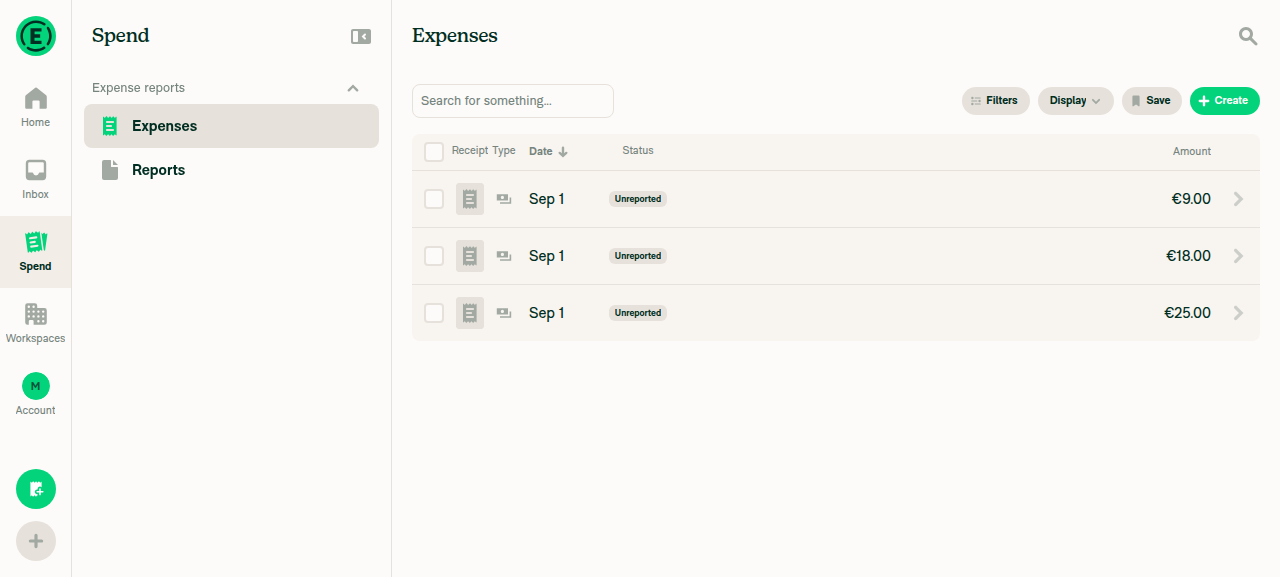
Spend > Expenses with 3 rows and select-all checkbox

Bulk-actions button showing 3 selected
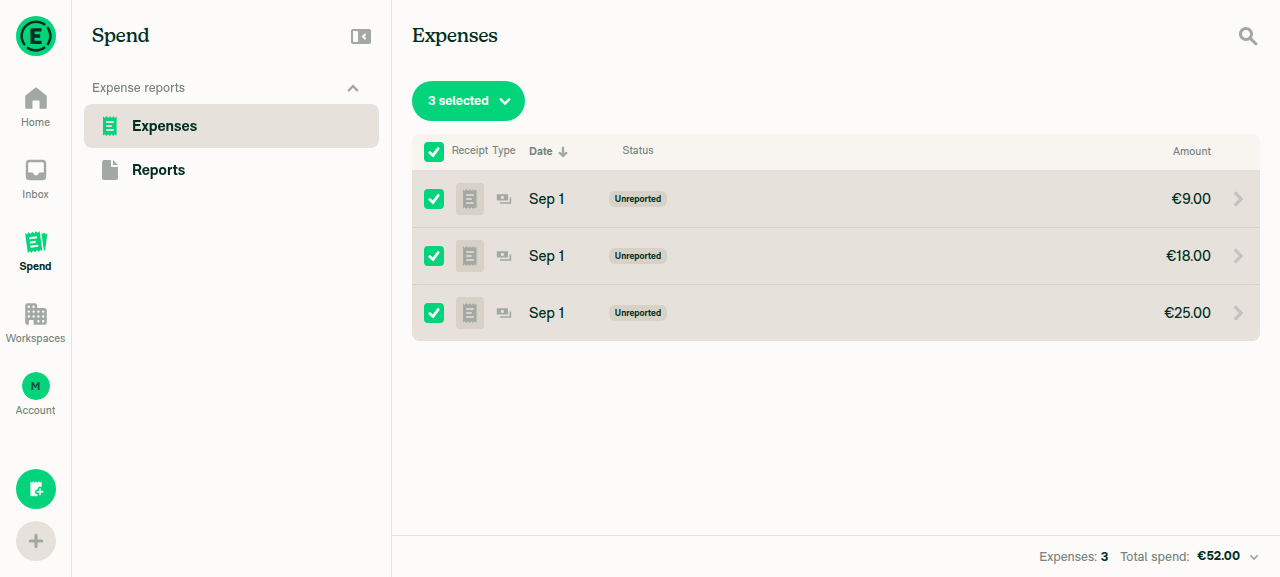
Bulk-actions button showing 3 selected

Bulk-actions dropdown menu open
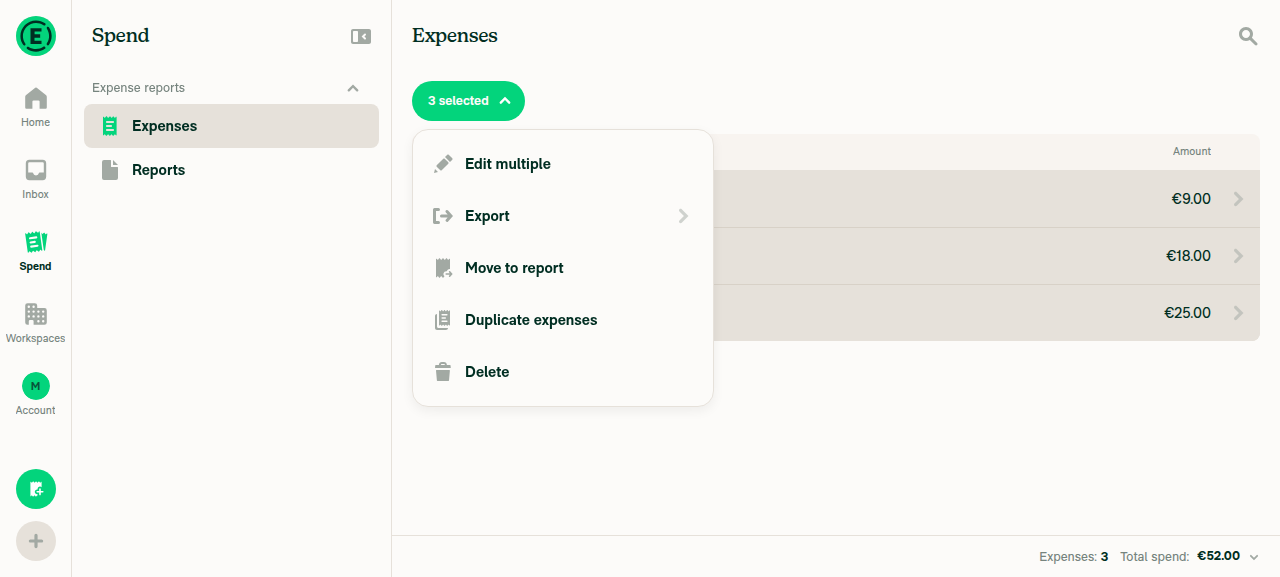
Bulk-actions dropdown menu open

Button showing 2 selected after unchecking one row
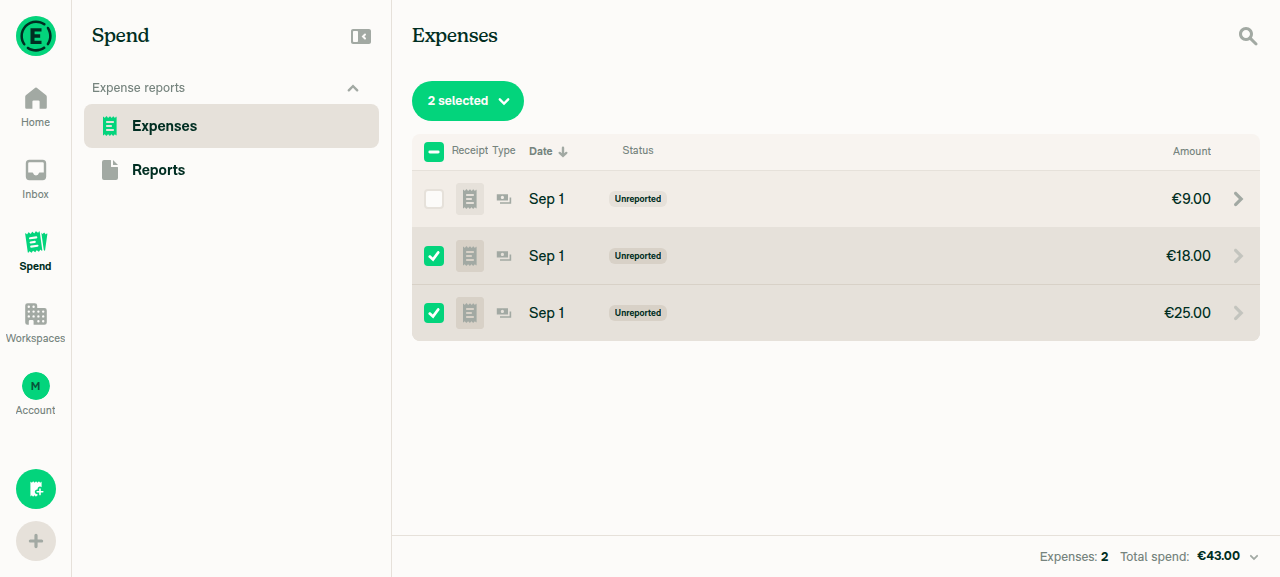
Button showing 2 selected after unchecking one row

Spend > Reports empty state
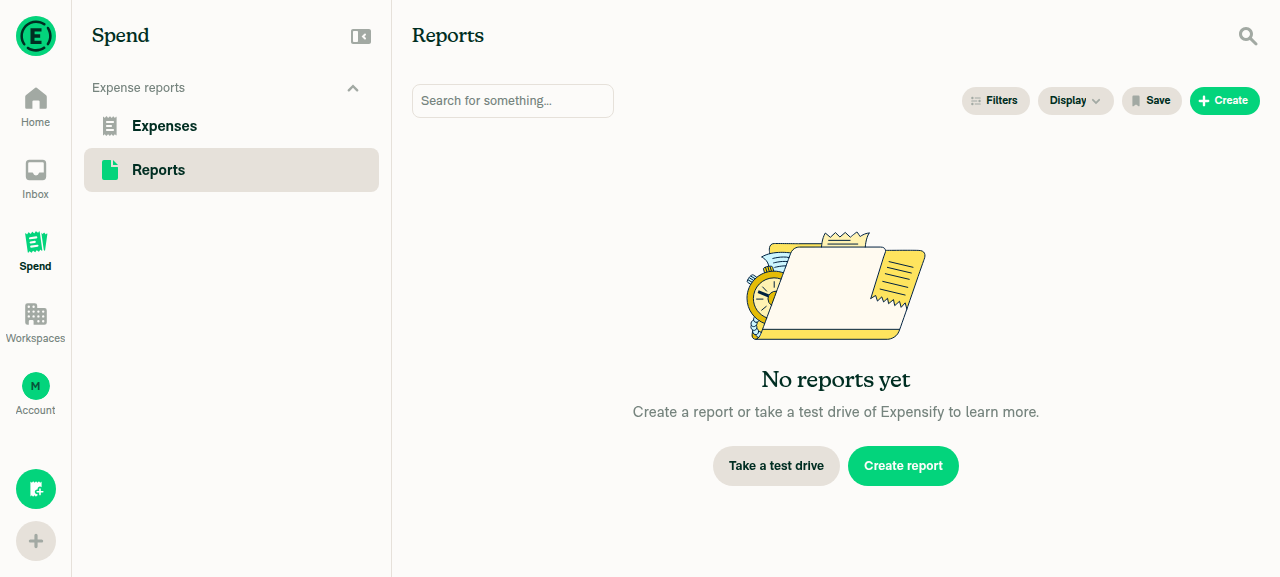
Spend > Reports empty state

view run

@emkhalid

emkhalid commented Sep 1, 2026

Copy link
Copy Markdown
Contributor Author

Found a regression in the PR and fixed it, stil testing some new flows and will finish by end of the day 😃

@emkhalid

emkhalid commented Sep 3, 2026

Copy link
Copy Markdown
Contributor Author

@Valforte and @mkhutornyi Done from my side.You can merge it, Thanks!

delete excludedTransactions[key];
}
if (!Object.hasOwn(prevState.selectedTransactions, key) && transaction.isSelectedViaGroup && transaction.groupKey) {
delete excludedTransactions[transaction.groupKey];

Copy link
Copy Markdown
Contributor

Choose a reason for hiding this comment

The reason will be displayed to describe this comment to others. Learn more.

I just want to make sure I'm understanding this right, this is here so that if a user Select All Matching, the remove a transaction, when they re select the transaction it treats as Select All Matching is applyed again?

Copy link
Copy Markdown
Contributor Author

Choose a reason for hiding this comment

The reason will be displayed to describe this comment to others. Learn more.

Yes. All-matching mode remains active; this removes the stale parent-group exclusion when the group is reselected, allowing the button to return to “All matching items selected.” This is covered by a regression test.

@emkhalid

emkhalid commented Sep 8, 2026

Copy link
Copy Markdown
Contributor Author

@Valforte All yours, Thanks!

@Valforte
Valforte merged commit cd0bcda into Expensify:main Sep 8, 2026
37 of 40 checks passed
@github-actions

github-actions Bot commented Sep 8, 2026

Copy link
Copy Markdown
Contributor

🚧 Valforte has triggered a test Expensify/App build. You can view the workflow run here.

@OSBotify

OSBotify commented Sep 8, 2026

Copy link
Copy Markdown
Contributor

✋ This PR was not deployed to staging yet because QA is ongoing. It will be automatically deployed to staging after the next production release.

@OSBotify

OSBotify commented Sep 8, 2026

Copy link
Copy Markdown
Contributor

🚀 Deployed to staging by https://github.com/Valforte in version: 9.4.74-0 🚀

platform result
🕸 web 🕸 success ✅
🤖 android 🤖 success ✅
🍎 iOS 🍎 success ✅

@MelvinBot

Copy link
Copy Markdown
Contributor

🤖 Help site changes are required. Draft PR: #100628

This PR restored the All matching items selected label on the selection button in Spend > Expenses. The help site never documented that label, and three step lists told members to select a button named Selected, which does not exist — the selection button always shows either a count (3 selected) or All matching items selected.

Files updated in the docs PR

File Change
docs/articles/new-expensify/reports-and-expenses/How-to-Export-Expenses.md Replaced "Select Selected at the top" in all three bulk flows with the real selection button labels, documented the Select all on this page / Select all menu, and added an FAQ entry on when the button reads All matching items selected
docs/articles/new-expensify/reports-and-expenses/Search-and-Download-Expenses.md Added the All matching items selected case to the grouped-expenses export flow, which runs on Spend > Expenses
docs/articles/new-expensify/reports-and-expenses/Getting-Started-with-the-Spend-Page.md Added one sentence under How filtering works on the Spend page confirming the selection covers every expense matching the active filters
Label verification and scope decisions

Where the labels came from. The Melvin web test account has no expenses ("No expenses yet"), so the bulk-selection UI does not render and the labels could not be captured live. The live UI did confirm the navigation labels Spend and Expenses. The remaining strings were read from src/languages/en.ts:

  • All matching items selectedsearch.exportAll.allMatchingItemsSelected
  • Select all on this pagesearch.exportAll.selectAllOnThisPage
  • Select allworkspace.people.selectAll, the second item in the top-checkbox menu (src/components/Search/SearchList/SearchSelectAllMenu.tsx:55-56)
  • 1 selected / N selectedworkspace.common.selected

Worth a second look: the menu appears only when hasMoreResults is true, so on a single page of expenses the top checkbox selects the page directly with no menu. The docs now say that explicitly.

Left out on purpose. The restored label only applies to expenses, so Spend > Reports wording was not touched. Separately, How-to-Export-Reports.md still says "Select Selected at the top" in four flows — a pre-existing inaccuracy unrelated to this PR, worth a separate docs pass.

Guidelines applied. docs/HELPSITE_NAMING_CONVENTIONS.md, docs/HELP_AUTHORING_GUIDELINES.md, and docs/TEMPLATE.md: exact UI labels in bold sentence case, no quotation marks around labels, unified web/mobile navigation phrasing, question-style FAQ heading, no new # or ### headings. npm run spell-changed passes on all three files.

The HelpDot label is applied. I could not assign you — GitHub reports emkhalid as not assignable on Expensify/App, so please self-assign on the docs PR.

@emkhalid, please review the linked help site PR and confirm it reflects the current behavior. Then mark the linked help site PR Ready for review

Sign up for free to join this conversation on GitHub. Already have an account? Sign in to comment

Labels

None yet

Projects

None yet

Development

Successfully merging this pull request may close these issues.

6 participants