Repository navigation
How can I use ConvertExtensionToFileType for custom extensions? #7
Description

Hi!
For example, I have .psp extension in my app.
I've also set Custom Types:

Then I'm using
allowedFileTypes.Add(NativeFilePicker.ConvertExtensionToFileType("png"));
allowedFileTypes.Add(NativeFilePicker.ConvertExtensionToFileType("jpg"));
...
allowedFileTypes.Add(NativeFilePicker.ConvertExtensionToFileType("psp"));
As a result, I can't pick .psp files both on iOS and Android, they are greyed. On Android - it seem's custom types are simply unsupported.
Activity
yasirkula commentedon Jan 14, 2021
What is the output of
NativeFilePicker.ConvertExtensionToFileType("psp")?hippogamesunity commentedon Jan 15, 2021
Hello! It returns com.pixelstudio.psp. I've also tried removing all other extensions and using only "com.pixelstudio.psp" directly without ConvertExtensionToFileType. Still unable to pick psp file. Is it correct to use public.image as Conforms To in my case when psp is just a custom binary file that only my app can read? Thank you for your time.
yasirkula commentedon Jan 15, 2021
Does changing public.image to public.data make any difference? If not, please give the Manual Setup a shot: https://github.com/yasirkula/UnityNativeFilePicker/wiki/Manual-Setup-for-iOS
If it still doesn't work, check out the Document Types that is mentioned here: #1. Maybe it will resolve the issue, despite its mentioned downside.
hippogamesunity commentedon Jan 15, 2021
At first I want to note that my type is both exported and imported. But if I check "Is Exported" it will only appear in Xcode in Exported Type Identifiers. I think there should be two checkboxes in Custom Types declaration window. As a workaround it seems I have to specify my item twice (as imported and as exported). I've also tried manual setup but it didn't work for me.
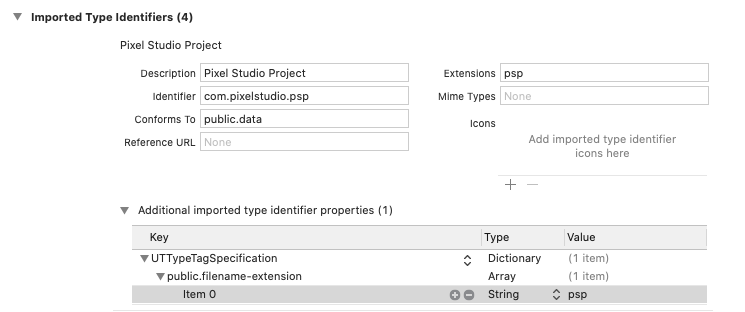
I'll try the suggested workaround (still in progress).
hippogamesunity commentedon Jan 15, 2021
Unfortunately I was enable to make this functionality work. For unknown reason "additional imported type identifier properties" are empty after Unity build and reset to null after building in Xcode even if I specify them manually. I wonder if you could accept my paid request to prepare and upload dummy Xcode project that will open files with .psp extension, so I could use it as a working example. Thank you!
yasirkula commentedon Jan 15, 2021
I can't because I don't have access to Mac workstation. Even if I did, I don't think I could help you because all I did during my own tests was filling the properties of Window-NativeFilePicker Custom Types. I didn't do anything special.
I'd like to quote "Is Exported"s tooltip:
So it isn't about app's capability of importing/exporting those files. Don't declare 2 custom types for the same extension. Simply have a single one and enable its Is Exported option. You can also try disabling that option.
orangeagain commentedon Aug 13, 2021
I add this code to Info.plist:
works for me, If you have any problem please @ me.
andysdds commentedon Aug 22, 2022
I fixed it by changing
UTIs[I]to Your IdentifierId like"com.yasirkula.nativefilepicker"and it work.UnityNativeFilePicker/Plugins/NativeFilePicker/iOS/NativeFilePicker.mm
Line 187 in 320d444
yasirkula commentedon Aug 22, 2022
Passing "com.yasirkula.nativefilepicker" to NativeFilePicker.PickFile should've done the same thing because allowedFileTypes parameter is passed directly to the native
_NativeFilePicker_PickFilefunction. Did you try passing hardcoded "com.yasirkula.nativefilepicker" (your own UTI) to NativeFilePicker.PickFile function's allowedFileTypes parameter?andysdds commentedon Aug 22, 2022
Yeah, it work. In your example code, the
pdfFileTypestill show nothing, and the file will grey out, if I don't hardcoded "com.yasirkula.nativefilepicker" (I am using custom file extension)yasirkula commentedon Aug 22, 2022
In the example code, did you pass the custom file extension to
pdfFileType = NativeFilePicker.ConvertExtensionToFileType( "pdf" );?andysdds commentedon Aug 23, 2022
Yes, I did.
Edit:If I don't hardcode the
"com.yasirkula.nativefilepicker"in NativeFilePicker.PickFile ,pdfFileTypewill be emptyorange3134 commentedon Mar 21, 2023
I have the same problem.
I am trying to use this to import a BVH file.
I have tried orangeagain's method and andysdds's method, but after opening the file picker, the file is grayed out and cannot be selected.
orange3134 commentedon Mar 21, 2023
Solved, Conforms To needed to be set to "public.data".
marvpaul commentedon Mar 27, 2023
FYI: if you want to import custom filetypes eg on Android, I found this plugin doing the job: https://github.com/keiwando/nativefileso
yasirkula commentedon Mar 27, 2023
One should inspect its license before using it, I'd recommend.