A simple modular RESTful microservice built with Express, PostgreSQL, and the core-ts ecosystem.
This project demonstrates how to build a clean, lightweight, and maintainable SQL-based microservice without using heavy frameworks, decorators, or dependency injection containers. It showcases explicit dependency composition, generic repositories, reusable CRUD use cases, request validation, and structured logging.
Unlike the more opinionated samples, this project keeps the request-processing flow explicit, making it an excellent starting point for learning how the Core TS libraries work together.
- Modular project structure
- RESTful CRUD APIs
- Configuration management
- Structured logging
- Health check endpoint
- Localization support
- Request validation
- Generic CRUD services
- Generic SQL repositories
- PostgreSQL support
- Express 5 compatible
Runs the app in the development mode.
Builds the app for production to the dist folder.
Runs the app for production in the dist folder.
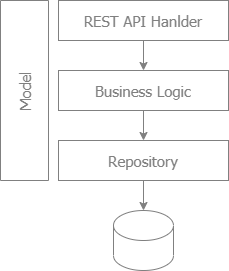
Business logic is independent of the PostgreSQL driver. Repositories depend on the generic DB abstraction provided by sql-core.
   HTTP Request
         │
         ▼
 Express Controller
         │
         ▼
   Service Layer
         │
         ▼
  Repository Layer
         │
         ▼
     sql-core
         │
         ▼
    postgres-kit
         │
         ▼
     PostgreSQL
- TypeScript
- Node.js
- Express 5
- PostgreSQL
Core TS libraries:
- config-plus
- logger-core
- middleware-logging
- express-web-kit
- types-validation
- validation-core
- postgres-kit
- sql-core
- onecore
src
│
├── app.ts                 # Application bootstrap
├── config.ts              # Application configuration
├── context.ts             # Dependency composition
├── route.ts               # Route registration
│
├── resources/             # Localization resources
│
└── user/
    ├── user.ts
    ├── repository.ts
    ├── service.ts
    ├── controller.ts
    └── index.ts
Each business feature is organized into its own module, making the project easy to extend and maintain.
Controllers are responsible for:
- Receiving HTTP requests
- Parsing request parameters
- Validating input
- Calling business services
- Returning HTTP responses
Business logic remains inside the use case layer.
The service layer contains application business logic.
Most CRUD functionality is inherited from reusable generic implementations provided by onecore, allowing services to stay small and focused.
export class UserUseCase
extends UseCase<User, string, UserFilter> implements UserServiceThe repository implementation is remarkably concise:
export class SqlUserRepository
    extends Repository<User, string, UserFilter>
Each repository extends reusable SQL repository implementations provided by sql-core, requiring only:
- Database connection
- Table name
- Entity model
Everything else is inherited from sql-core.
Custom queries can easily be added when needed.
This greatly reduces boilerplate while keeping the repository extensible for custom queries.
Models define:
- Entity structure
- Validation rules
- Metadata
Validation rules are centralized using validation-core, keeping controllers concise and consistent.
Dependencies are wired explicitly rather than using a dependency injection framework.
PostgreSQL
    │
    ▼
Repository
    │
    ▼
 Service
    │
    ▼
Controller
All dependencies are created in context.ts, serving as the application's composition root.
One of the best aspects is the use of sql-core.
Instead of repositories depending directly on PostgreSQL APIs, they depend on the generic DB interface:
constructor(db: DB)This means repositories are written against an abstraction rather than a specific database driver.
Benefits include:
- Database independence
- Reusable repositories
- Reduced infrastructure coupling
- Cleaner architecture
- Improved testability
Unlike more abstract samples, this project keeps the HTTP flow explicit.
HTTP Request
      │
      ▼
 Controller
      │
      ▼
Parse Request
      │
      ▼
Validate Model
      │
      ▼
   Service
      │
      ▼
  Repository
      │
      ▼
  PostgreSQL
      │
      ▼
HTTP Response
This makes the project particularly useful for developers learning the Core TS ecosystem.
Validation and application messages support multiple languages.
const resource = getResource(req)The project supports:
- English
- Vietnamese
Localization resources are located under:
src/resources/
Validation messages automatically use the selected language.
This is a nice feature that many samples omit.
New languages can be added without changing business logic.
Validation is handled by validation-core, with rules defined in the model.
const resource = getResource(req)

const errors = validate<User>(user, userModel, resource)
Validation rules are defined alongside the entity model rather than inside controllers.
Examples include:
- Required fields
- Email validation
- Length constraints
- Pattern validation
- Primary key validation
Type validation is also integrated into routing through:
const checkUser = check(userModel)and reinforced in controller methods. This shows both middleware-based and controller-level validation approaches.
The application uses MiddlewareLogger from middleware-logging together with logger-core for structured request logging. This provides a consistent logging strategy across the application.
The sample uses structured request logging through middleware-logging.
Middleware logging is configurable:
- HTTP method
- Request URL
- Request
- Response
- Status code
- Response size
- Execution time
It also propagates:
- Request ID
- Correlation ID
which is useful in distributed systems.
Sensitive request and response data can be masked before logging.
The sample includes a health endpoint suitable for containerized deployments.
The endpoint checks:
- PostgreSQL connectivity
They can easily be extended to include additional infrastructure services.
Example response
{
  "status": "UP",
  "details": {
    "sql": {
      "status": "UP"
    }
  }
}
Configuration is managed using config-plus, merging:
          Default Configuration
                   │
                   ▼
Environment Configuration (SIT, UAT, PRD)
                   │
                   ▼
   Environment Variables (process.env)
                   │
                   ▼
          Final Configuration
Typical configuration includes:
- HTTP server
- PostgreSQL connection
- Logging
- Localization
- Application settings
Environment variables can override default values for different deployment environments.
Each business module follows the same structure.
customer/
    controller.ts
    service.ts
    repository.ts
    customer.ts
    index.ts
To add a new module:
- Define the entity model.
- Create the repository.
- Create the use case.
- Create the controller.
- Register routes.
- Add the controller to the application context.
This consistent approach keeps the application modular and easy to maintain.
This project is designed to be the simplest SQL sample in the Core TS ecosystem.
It demonstrates:
- Explicit request processing
- Layered architecture
- Structured logging
- Request validation
- Reusable CRUD services
- Generic repositories
- PostgreSQL integration
without introducing unnecessary complexity.
It is an excellent starting point for developers who want to understand how the ecosystem works before adopting more advanced abstractions.
This sample demonstrates how several core-ts libraries work together.
| Library | Purpose |
|---|---|
express-web-kit |
Express utilities and REST helpers |
middleware-logging |
HTTP request and response logging |
validation-core |
High-performance validation library |
onecore |
Generic CRUD use cases and common abstractions |
sql-core |
Generic SQL repositories and data access abstractions |
postgres-kit |
PostgreSQL adapter for sql-core |
logger-core |
Structured logging |
config-plus |
Configuration management |
Each library focuses on a single responsibility.
That demonstrates the intended layering very well.
- sql-modular-sample — SQL modular microservice using MySQL
- mongo-modular-sample — MongoDB modular microservice
These samples share the same architecture, allowing developers to switch databases while keeping the application structure consistent.
- Simple
- Lightweight
- Modular
- Database-independent
- Enterprise-friendly
- Production-ready
- Explicit
- Testable
The project stands out for several reasons:
- Very explicit flow from HTTP request to database.
- Clear layered architecture with well-defined responsibilities.
- Minimal boilerplate thanks to generic repositories and use cases.
- Database abstraction through
sql-core. - Good observability with structured logging and health checks.
- Simple dependency composition without a DI container.
To check if the service is available
{
  "status": "UP",
  "details": {
    "sql": {
      "status": "UP"
    }
  }
}In the below sample, search users with these criteria:
- get users of page "1", with page size "20"
- email="tony": get users with email starting with "tony"
- dateOfBirth between "min" and "max" (between 1953-11-16 and 1976-11-16)
- sort by phone ascending, id descending
{
  "page": 1,
  "limit": 20,
  "sort": "phone,-id",
  "email": "tony",
  "dateOfBirth": {
    "min": "1953-11-16T00:00:00+07:00",
    "max": "1976-11-16T00:00:00+07:00"
  }
}
GET /users/search?page=1&limit=2&email=tony&dateOfBirth.min=1953-11-16T00:00:00+07:00&dateOfBirth.max=1976-11-16T00:00:00+07:00&sort=phone,-id
In this sample, search users with these criteria:
- get users of page "1", with page size "20"
- email="tony": get users with email starting with "tony"
- dateOfBirth between "min" and "max" (between 1953-11-16 and 1976-11-16)
- sort by phone ascending, id descending
- total: total of users, which is used to calculate numbers of pages at client
- list: list of users
{
  "list": [
    {
      "id": "ironman",
      "username": "tony.stark",
      "email": "tony.stark@gmail.com",
      "phone": "0987654321",
      "dateOfBirth": "1963-03-24T17:00:00Z"
    }
  ],
  "total": 1
}[
{
"id": "spiderman",
"username": "peter.parker",
"email": "peter.parker@gmail.com",
"phone": "0987654321",
"dateOfBirth": "1962-08-25T16:59:59.999Z"
},
{
  "id": "wolverine",
  "username": "james.howlett",
  "email": "james.howlett@gmail.com",
  "phone": "0987654321",
  "dateOfBirth": "1974-11-16T16:59:59.999Z"
}
]GET /users/wolverine{
"id": "wolverine",
"username": "james.howlett",
"email": "james.howlett@gmail.com",
"phone": "0987654321",
"dateOfBirth": "1974-11-16T16:59:59.999Z"
}{
"id": "wolverine",
"username": "james.howlett",
"email": "james.howlett@gmail.com",
"phone": "0987654321",
"dateOfBirth": "1974-11-16T16:59:59.999Z"
}- status: configurable; 1: success, 0: duplicate key, 4: error
{
  "status": 1,
  "value": {
    "id": "wolverine",
    "username": "james.howlett",
    "email": "james.howlett@gmail.com",
    "phone": "0987654321",
    "dateOfBirth": "1974-11-16T00:00:00+07:00"
  }
}- Request:
{
  "id": "wolverine",
  "username": "james.howlett",
  "email": "james.howlett",
  "phone": "0987654321a",
  "dateOfBirth": "1974-11-16T16:59:59.999Z"
}- Response: in this below sample, email and phone are not valid
{
  "status": 4,
  "errors": [
    {
      "field": "email",
      "code": "email"
    },
    {
      "field": "phone",
      "code": "phone"
    }
  ]
}PUT /users/wolverine{
"username": "james.howlett",
"email": "james.howlett@gmail.com",
"phone": "0987654321",
"dateOfBirth": "1974-11-16T16:59:59.999Z"
}- status: configurable; 1: success, 0: duplicate key, 2: version error, 4: error
{
  "status": 1,
  "value": {
    "id": "wolverine",
    "username": "james.howlett",
    "email": "james.howlett@gmail.com",
    "phone": "0987654321",
    "dateOfBirth": "1974-11-16T00:00:00+07:00"
  }
}Perform a partial update of user. For example, if you want to update 2 fields: email and phone, you can send the request body of below.
PATCH /users/wolverine{
"email": "james.howlett@gmail.com",
"phone": "0987654321"
}- status: configurable; 1: success, 0: duplicate key, 2: version error, 4: error
{
  "status": 1,
  "value": {
    "email": "james.howlett@gmail.com",
    "phone": "0987654321"
  }
}DELETE /users/wolverine1MIT