LiveMapServer와 연동을 위한 API 라이브러리. LiveMapServer가 제공하는 기능을 쉽게 사용할 수 있는 API 라이브러리 입니다. LiveMapServer와 연결하여 자신의 서비스를 구축하고 싶은 Android Application 프로젝트에 서브모듈로 이 프로젝트를 추가해 사용할 수 있습니다.
LiveMapServer와 SSL 소켓으로 암호화된 통신을 합니다.
LiveMapServer로부터 특정한 ID를 부여받을 수 있습니다. ID는 32bit 정수 값이고 접속 할때마다 값이 달라질 수 있습니다.
LiveMapServer로 GPS정보를 업로드할 수 있습니다. LiveMapServer로 GPS 정보를 업로드 하게 되면 LiveMapServer는 해당 GPS로부터 가까운 위치에 다른 클라이언트의 정보를 알려줍니다. LiveMapServer가 알려주는 타 클라이언트들의 정보는 가장 최근에 업데이트된 정보입니다.
LiveMapServer에 접속하고 있는 다른 클라이언트로 메시지를 전송할 수 있고, 다른 클라이언트 가 내 자신으로 송신한 메시지도 수신할 수 있습니다.
-
LiveMapClient API를 사용할 Android Studio Project가 git을 사용하고 있다면, 해당 프로젝트의 루트 디렉토리에서 submodule로 불러옵니다.
$ git submodule add https://github.com/interruping/android_livemap_client_api -
git을 사용하고 있지 않다면 git clone으로 해당프로젝트의 루트 디렉토리로 불러옵니다.
$ git clone https://github.com/interruping/android_livemap_client_api -
안드로이드 스튜디오 프로젝트의 setting.gradle에 include 해줍니다.
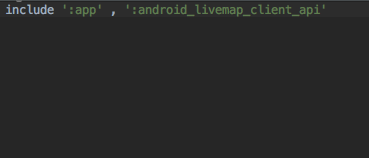
- Gradle sync를 실시합니다.
- Module setting 창으로 들어가 프로젝트 app의 dependecies 탭에 들어가 라이브러리를 추가합니다.
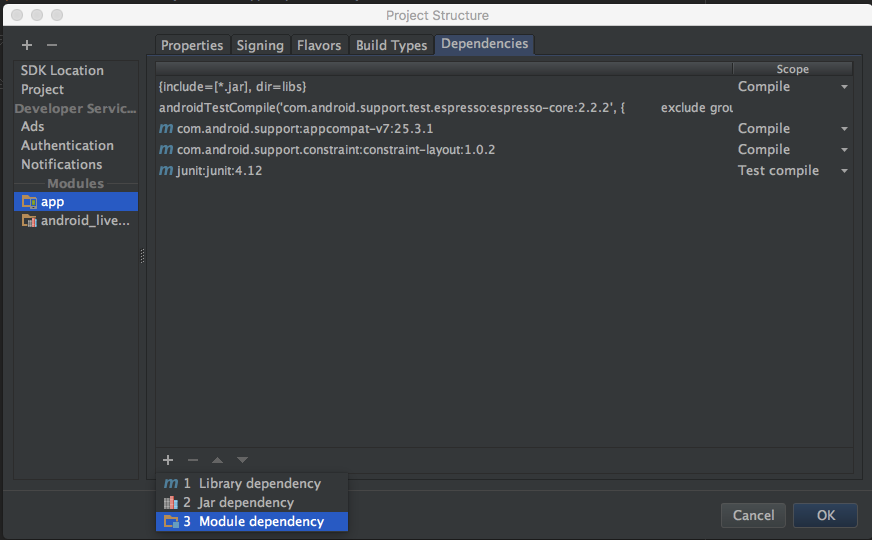
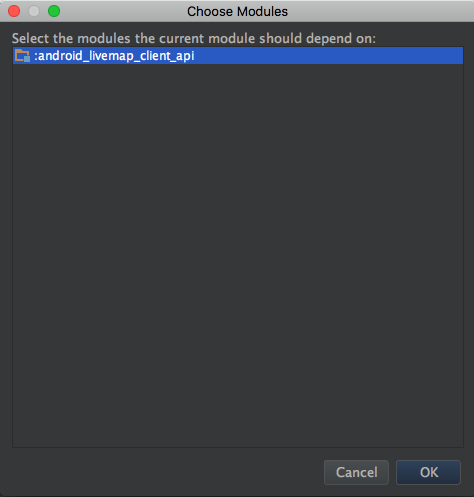
Android LiveMapClient API를 사용하는 Android Studio 프로젝트가 git을 사용하고 있고, android_livemap_client_api를 submodule로 추가하였다면 android_livemap_client_api의 부모 프로젝트에서 submodule update git 명령을 실행합니다.
$ git submodule update android_livemap_client_api --remote
프로젝트가 android_livemap_client_api를 단독으로 clone 한 경우, android_livemap_client_api 폴더로 이동하여 Release 브랜치를 pull 리모트 로부터 pull해줍니다.
$ git pull origin Release
LiveMapSerivce 객체 생성 및 LiveMapServer와 통신 시작.
import net.solarcode.livemapserviceclient.*;

public class XXX... implements LiveMapServiceListener {

    ...
    public void someMethod() {
        //LiveMapService 객체 생성 & LiveMapServiceListener 객체 설정.
        LiveMapService livemapService = new LiveMapService;
        livemapService.setListener(this);
        livemapService.setHost("이 곳에 라이브맵 서버 주소를 적으세요.");
        //LiveMapService 서비스 비동기 시작.
        livemapService.asyncStart();
    }

    // livemapService.asyncStart(); 호출 이후, LiveMapServer와 연결이 되고 LiveMapServer로부터 id를 부여받으면 호출됨.
    @Override
    public void onServiceReady(LiveMapService livemapService, LiveMapClientNode livemapClientNode) {

        //서버로부터 발급받은 id 값 읽기.
        Integer idFromLiveMapServer = livemapClientNode.getID();

        ...

        // 좌표 값 서버로 업데이트
        livemapService.updateUserNode(livemapClientNode);

        // 사용자의 좌표 값과 다른 노드들이 존재하는지 알고 싶은 좌표 업데이트
        livemapService.updateUserNode(livemapClientNode, 보고싶은 위도, 보고싶은 경도);

        // 다른 사용자 노드에게 메시지 전송
        livemapService.sendMessage(idFromLiveMapServer, [다른 클라이언트 id], "Hello there!");

    }

    ///LiveMapServiceListener
    ///서버에 연결 실패했을경우 호출되는 콜백
    void connectionFailToLiveMapServer(LiveMapService livemapService, Error err) {
        ...
    }

    ///LiveMapServiceListener
    ///LiveMapService가 LiveMapServer에 연결되었고 서비스 이용할 준비가 되었을때 호출됨
    void connectionLostFromLiveMapServer(LiveMapService livemapService, Error err) {
        ...
    }

    ///LiveMapServiceListener
    /// 사용자가 최근 업데이트한 위치로부터 가까운 노드정보를 서버로부터 받았을때 호출됨
    void nearNodesFromLiveMapServer(LiveMapService livemapService, LiveMapClientNode[] nearNodes) {
        ...
    }

    ///LiveMapServiceListener
    /// 다른 사용자 노드가 사용자에게 메시지를 보냈을 때 호출됨.
    void receivedMessage(int senderId, String message) {
        ...
    }
}
Android LiveMapClient API의 문서는 Doxygen으로 자동 생성하도록 작성하였습니다. 프로젝트의 루트 디렉토리에서 doxygen 명령을 실행하여 doc/폴더에 html 과 latex 포멧으로 API문서를 볼 수 있습니다.
$ doxygen
이 프로젝트는 Apache License 2.0 라이센스를 따릅니다. 자세한 사항은 LICENSE.txt파일을 참조하세요.