Synthetic user research for apps, CLIs, and agent-facing product flows. AI participants with a persona and a task use your app on real desktops, and each run leaves evidence you can verify: what they did, where they got stuck, and what it cost.
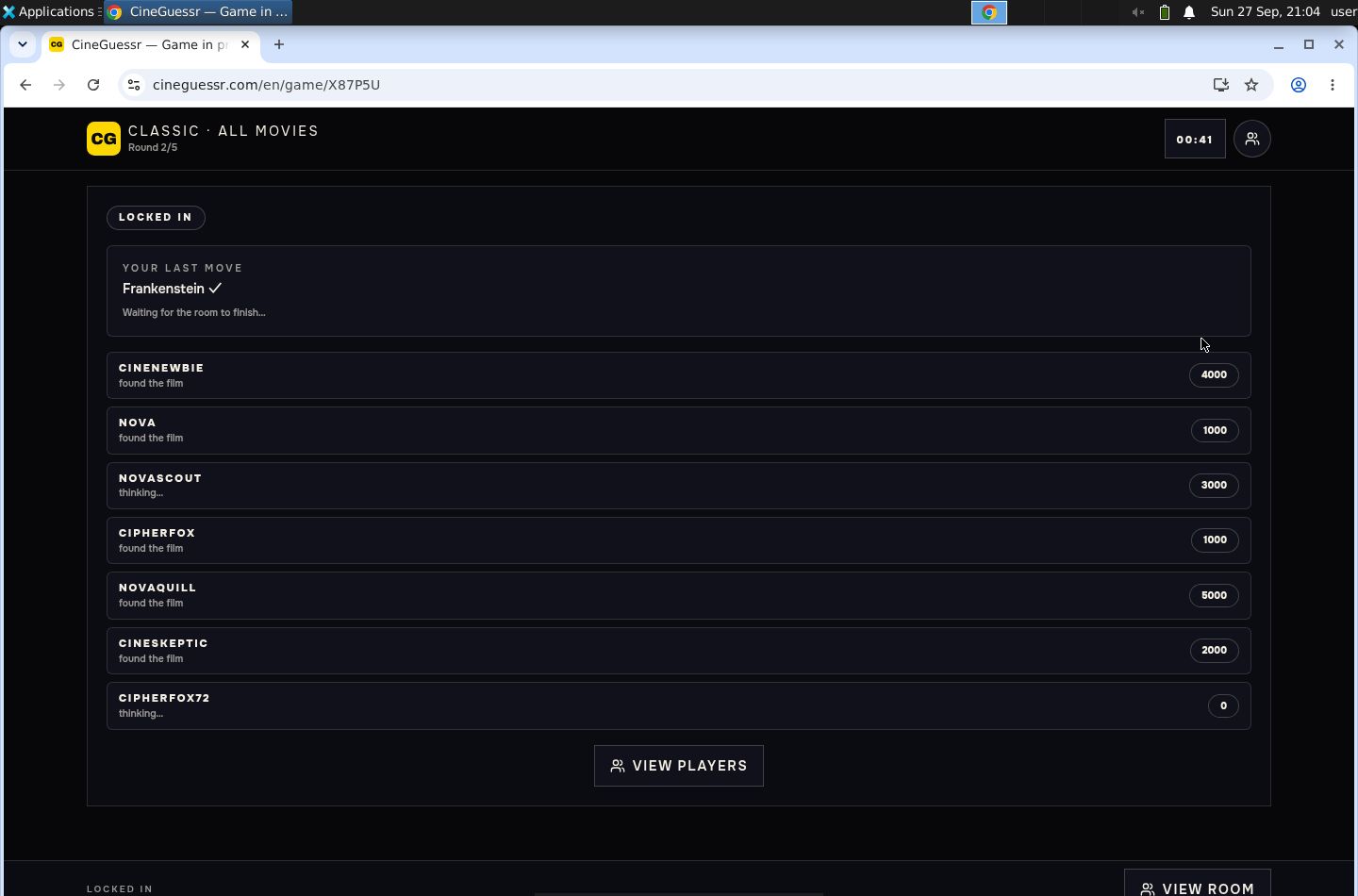
Watch a saved run. Eight synthetic participants joined one lobby of a multiplayer game on its live deployment, each on its own hosted desktop. The page replays the real Observer; nothing runs from it.
A study is a YAML file in your project. It names the app under study, the task, the participants and a spend limit. Each participant has a persona: a file that sets who they are and traits such as patience and keyboard use.
humanish run <study> gives each participant a desktop, either a hosted E2B desktop or a
disposable browser VM on your machine. On the computer-use route a model drives each
participant: every turn it reads a screenshot and answers with mouse and keyboard actions, until
the participant finishes, gets stuck or reaches a limit.
The run writes its evidence to gitignored .humanish/runs/<run id>/: screenshots, every
action, each participant's report and the estimated cost. The Observer replays it,
humanish review prints the findings of the analysis that follows a live run, and
humanish verify grades whether the evidence is safe to share.
How a study works walks through one annotated study file,
and the study file reference lists every field.
In a project directory, with Node.js 22.19 or newer:
npm install --save-dev humanish
npx humanish init --yes
npx humanish run first-run
init writes starter studies and personas under humanish/, adds .humanish/ to
.gitignore, and adds humanish:* scripts to package.json and a humanish section to
AGENTS.md, and lists each file it created or changed. It never overwrites an existing study
file; a rerun replaces only its own AGENTS.md section. run first-run is a dry run: four
synthetic participants, with no browser, model, key or spend. It prints:
humanish run dry-run
run: dryrun-2026-10-04T07-11-55-932Z-d11afab6
participants: 4
bundle: .humanish/runs/dryrun-2026-10-04T07-11-55-932Z-d11afab6/run.json
review: .humanish/runs/dryrun-2026-10-04T07-11-55-932Z-d11afab6/review.md
Replay the run in the Observer, then check its evidence:
npx humanish observe --run latest --open
npx humanish verify
verified dryrun-2026-10-04T07-11-55-932Z-d11afab6 · share_ready · 16 checks passed
A dry run shows the evidence format and tests no product behavior. To run participants against your own app, follow the own-app guide.
Quickstart · How a study works · Study your app · What a study costs · Trust boundaries · CLI reference · Limits and evidence
A live study gives each participant a computer to use. By default that computer is a hosted
desktop from E2B, which humanish drives through the @e2b/desktop package. Install it in the
same project: npm install --save-dev @e2b/desktop. A one-shot npx humanish@latest cannot see
a copy installed elsewhere. The keyless preview and a study in a local browser do not need it.
Choose how the participant runs:
| Setup | Participant authentication | Desktop | Automatic findings |
|---|---|---|---|
first-run preview |
None; synthetic evidence only | None | No model analysis |
| Local browser study | Codex ChatGPT login; remote inference | Linux x64 + Docker/KVM or M3+ Mac + Lima; no E2B key | Separate Codex account analyst by default |
openai-computer-use |
OPENAI_API_KEY |
E2B_API_KEY + desktop SDK |
Separate OpenAI request |
local-agent |
Codex or Claude Code's own login | E2B_API_KEY + desktop SDK |
Still needs OPENAI_API_KEY; skipped without it |
A Codex ChatGPT login can power a local-agent participant. It does not
authenticate humanish's OpenAI API requests. Choose the actor explicitly in
your study; installing Codex does not change an openai-computer-use study.
For local browsers, install only humanish and follow the
local study setup. The first live
run downloads a verified runtime image; npx humanish runtime setup prepares it
ahead of time. Supported Macs use Lima instead of Docker Desktop.
Optional camera and spoken conversation
use a separate media runtime. Optional desktop video/audio
adds continuous Observer playback; screenshots remain the default. Local captured inboxes support email verification without mailbox-provider credentials.
For a new local study, initialize with your app URL and task:
npx humanish init --yes \
  --local-browser http://127.0.0.1:3000 \
  --local-mission "Complete the primary flow and explain anything confusing"
npx humanish doctor --study local-browser
npx humanish run local-browser
npx humanish verify
Start your app before running the study. verify checks the saved run bundle, and its
share-safety line says whether the evidence can be shared as-is. If you already initialized this
project, edit humanish/studies/local-browser.yaml to change its URL or mission; init
preserves existing files and warns when supplied settings cannot be applied.
init also adds humanish:* scripts to package.json. npm run humanish:doctor and
npm run humanish:verify run those commands, and humanish:watch runs a study and keeps the
Observer attached. humanish:run is humanish run --dry-run: a dry run with no
browser or model, not the live study above.
doctor only inspects setup. It does not install or start the runtime, open a
browser, or use Codex account quota. The local study needs a supported Codex CLI
version and ChatGPT login. Linux x64 also needs local rootful Docker, KVM and
TUN; M3-or-newer Apple Silicon Macs need native ARM64 Node and Lima 2.2+.
Set the desktop and model keys with hidden prompts, then send one synthetic participant into the included drawDB study:
npx humanish keys set e2b
npx humanish keys set openai
npx humanish init --yes
npx humanish doctor --study try-live
npx humanish study check try-live
npx humanish run try-live
npx humanish observe --run latest --open
Existing E2B_API_KEY and OPENAI_API_KEY environment variables also work.
doctor --study checks the study's local setup without launching a
desktop or making a model request. It reports key presence, not remote key
validity, model access, or quota. study check checks manifest metadata by default.
try-live clones and studies drawDB, not your project. Set the keys before init:
init writes try-live for the participant this machine can run, and it never
overwrites an existing study file. With an OpenAI key, from the environment or the
keys set store, the participant is openai-computer-use and its $2 cap covers
estimated participant model spend. With no OpenAI key and a signed-in Codex or
Claude Code, it is local-agent, bounded by a ten-minute session limit with no
dollar cap. Automatic analysis after the run is a separate request;
Read the results gives its limit and how to turn it off.
Hosted desktop time is additional. Participant caps are checked
between turns and are not provider billing ceilings. Allow a few minutes for
the app to build and the participant to work. See what a study costs.
A study's evidence includes per-task completion funnels and participant outcomes with the
denominator attached. The share-safety gate decides what goes into feedback drafts, export
bundles and an observe --all --safe library, and the end of the pipeline is a public-safe
feedback draft you can turn into a real issue. ARCHITECTURE.md traces
humanish run <study> through the code.
The researcher declares the study, the participant tries the product, and the stakeholder reads what happened. Three roles explains the design; the email-gated signup study records show a completed two-participant study and a reported keyboard-accessibility finding.
In the saved run, eight participants played five rounds. Six
reached the final standings, two were blocked, and humanish analyze turned the 13-minute
recording into seven findings, each linked to the capture behind it.
Numbers so far, every one with its run ids. Recall on five planted defects in a small task app: 15 of 15 across three live runs (benchmark). Precision on apps the maintainer did not write: TodoMVC 5 of 6 findings confirmed against the source, drawDB 11 of 12, none invented (TodoMVC, drawDB). Cold install to a live study: 9 of 9 fresh directories reached the goal in 108 to 200 seconds; the five with an OpenAI key cost $0.16 to $0.35 each, and the four on Codex or Claude Code are unpriced (study record). Same mission, different personas: keyboard-first participants reported drawDB's database modal 5 of 5 times and TodoMVC's mouse-only rename 6 of 6; mouse newcomers reported them 0 of 5 and 0 of 6 (study record). Planted defects are more legible than real ones and the largest cell is six runs; read these as what the machinery found, not as rates for your users.
After a run, read its findings and verification grade:
npx humanish runs --json
npx humanish review --run latest --json
npx humanish verify --run latest --json
npx humanish feedback issue --run latest --repo owner/repo --format markdown
review lists each analysis finding with its impact, confidence, recovery,
affected participants and cited captures; --json has them under analysis.
feedback issue prints a draft and requires share_ready evidence. A live run
with raw screenshots can be valid local evidence and still fail that sharing
gate. humanish export --run latest --format bundle --redact-screenshots creates
a separately verified copy while preserving the readable original.
Read results explains the
participant's report, task outcomes, costs, and how to turn a finding into an issue.
For a ranked review of a completed live study, run
npx humanish analyze --run latest --max-cost 3 --dry-run --json to inspect
admission, then remove --dry-run to generate findings. This sends selected
retained evidence to OpenAI and requires OPENAI_API_KEY. Findings appear
beside Participants in Observer, with evidence links and separate participant
feedback. You can explicitly select a restricted Codex account analyst with
npx humanish analyze --run latest --provider codex; it uses remote inference,
requires the qualified CLI and account login, and reports dollar cost as unknown.
The OpenAI API default stays unchanged. See the analysis contract for
coverage limits, estimated cost controls, corrections and sharing behavior.
Supported live studies generate findings automatically after participants finish,
using a separate $3 admission estimate limit with gpt-6-astra and high reasoning.
This is additional to participant execution costs, and is not a hard provider
billing cap. To disable the extra request:
review:
  analysis: false
humanish run <study>, humanish watch <study>, and live
starts in the TUI share this default. Dry runs and unsupported routes dispatch
nothing. Without OPENAI_API_KEY, default analysis is skipped and a successful
recording stays successful. A default analysis whose admission estimate is over
its limit is skipped the same way, and the CLI prints the humanish analyze
command that runs it. Opening the TUI or Observer never starts a request.
See automatic analysis for configuration,
cancellation, and failure behavior.
humanish is designed for public repositories and public issue queues.
1. This repo and the published package are kept public-safe by CI. Every push runs a public-surface scan (secret/key/path shapes, a sha256 binary-asset allowlist, over both tracked files and the packed npm payload) plus a full-history gitleaks scan. That protects what we ship; it does not scan your repo.
2. Persisted text is scrubbed for known values and secret patterns. humanish uses literal matching for provisioned secret values and pattern redaction for secret-shaped text in logs, errors, and model narration. Environment provenance records variable names. These checks have coverage limits: unknown values, unrecognized formats, and implementation defects can escape them. Raw screenshots contain whatever was on screen. Use synthetic data, verify the bundle, and review the actual text and pixels before sharing.
3. Run bundles are local by default. Evidence lands under gitignored
.humanish/. No command uploads a bundle or files an issue. Two commands serve
evidence over the network when you pass --expose, and humanish has no auth of
its own behind either one:
humanish watch <study> --exposestreams a live run, which is nevershare_ready, to whoever your edge admits. It requires edge auth:--tunnel ngrok --oauth google, or--public-urlfor an edge you run. Without--allow-emailor--allow-domain, the OAuth edge admits any Google account.humanish observe --all --exposeserves your run library. With edge auth and no--safe, everyone the edge admits sees every run, raw screenshots included. With--safe, it serves onlyshare_readyruns, and edge auth is optional.
Sharing evidence (committing screenshots, pasting transcripts, attaching bundles to issues, exposing a server) is a deliberate act, and reviewing what you share is on you. Use synthetic personas and synthetic data so there is nothing sensitive to capture in the first place.
What the automated gate enforces. humanish verify scans public-bound
artifacts and fails closed on secret, key, and token shapes and on known local
path shapes. It reads text only, judged by a file's bytes rather than its name:
any file in the run folder that is not UTF-8 text, other than a stream
screenshot or recording, keeps the run local_only (UNSCANNED_ARTIFACT). It
matches after undoing escapes, percent-encoding, HTML entities and base64. It
does not yet detect free-form PII or PHI such as names, emails,
phone numbers, dates of birth, or medical identifiers. Keeping those out depends
on using synthetic data and on review, so redaction: passed means the
automated secret and path scan found no matches, not that the artifact was
certified free of PII or PHI. A first-class PII/PHI detector is
planned.
humanish verify --json also reports shareSafety.status:
share_ready: the verified bundle is eligible for public feedback drafts;local_only: the bundle is valid local evidence, but should not be shared as-is (for example, full-fidelity raw screenshots are present);blocked: the bundle failed verification or public-safety gates.
Feedback commands require share_ready. A valid local run can still be
reviewed in Observer without being promoted into a public issue draft.
humanish is 0.x, so a minor release can break things. These rules limit how. They cover CLI
commands and flags, study file fields, the run bundle, --json output, exit and error codes,
and the library exports.
- A deprecated name keeps working for at least 30 days and through at least one minor release before a release removes it.
- Breaking changes ship together in one minor release. Its release notes carry a migration table: each old form, its new form, and the change to make.
- The study file and the run bundle carry versioned schemas,
humanish.study.v3andhumanish.run-bundle.v1. A breaking change to either one bumps its version.
Pin the exact version in package.json and read CHANGELOG.md before upgrading.
CI runs nothing live. CI runs the offline test suite, the Observer browser
proofs and, when guest files change, a guest-desktop container proof. It passes
no provider keys, so no CI job makes a model request, creates a hosted desktop
or runs a signed-in agent. The *.live.test.ts suites run only when a
HUMANISH_LIVE_* variable and real keys are set. Live behavior is checked only
by runs made outside CI.
Codex versions. Codex participants (local browser studies and
local-agent with Codex) and the Codex account analyst run any stable Codex CLI release from
0.154.0 on, except releases humanish refuses, listed in
codex-admission.ts.
A new release runs the day it ships, including one Codex updated itself to. Each launch checks
the release's app-server schema against the fields humanish uses and refuses one that changed
them. Prereleases and releases below 0.154.0 are refused, and the refusal names the release and
why. A hosted participant on a release humanish has not tested records a warning.
Mobile emulation. Mobile viewport and touch flags do not certify gesture equivalence.
Credentials. humanish fills each provider key that is not already set from the first of these sources that has it. It prints the name and source of a key it fills from sources 2 to 4, never the value:
- the process environment, including a file passed with
--dotenv; .humanish/local/provider.env;- the vendor's own store:
~/.e2b/config.jsonforE2B_API_KEY, andgh auth tokenforGH_TOKEN; $XDG_CONFIG_HOME/humanish/keys.env(by default~/.config/humanish/keys.env), whichhumanish keys setwrites as plain text with mode0600.
A dry run reads no provider key, so run and watch consult sources 2 to 4 only
for a live study. A live run fills every key it finds and prints the ones its plan reads: its model,
desktop and runtime keys, its subject.env names, the variable
comms.email.external.authTokenEnv names, ANTHROPIC_API_KEY for a Claude Code participant, and
OPENAI_API_KEY when its automatic analysis runs on OpenAI. With a declared scorer it prints
every key it fills, since the scorer's code may read any. study check, doctor, tui and the
comms commands still consult them.
humanish analyze consults them for a live OpenAI analysis, and not for --dry-run or the
Codex analyst.
HUMANISH_STRICT_KEYS=1 turns off sources 2 to 4. init and doctor also run
codex login status and claude auth status to see which agent is signed in. A live
computer-use or shared-world run with a local-agent participant runs them too, and a live
computer-use run without OPENAI_API_KEY runs them to suggest a signed-in agent. humanish
never reads the subject app's own .env files.
What leaves your machine. Trust boundaries has the providers' retention terms.
| Party | What it receives | When |
|---|---|---|
| OpenAI | Each step's screenshot, the persona, the mission and the actions so far; after a run, selected text and captures for analysis; for an external-public shared-world study, the host participant's screen while its lobby code is read; for a terminal study, the agent's requests from the E2B sandbox | openai-computer-use participants; automatic or humanish analyze runs; external-public shared-world studies; terminal studies |
| Codex or Claude Code | The same screenshots and prompts, through your signed-in agent and its provider | local-agent participants, local browser studies, the Codex analyst |
| E2B | A desktop or shell running your app and everything on its screen; the repository a clone subject names; your working tree for a local-tree subject, minus gitignored files, .env* and other secret-shaped files; the credentials you declare for the subject app; for a terminal study with execution.runtimeAuth: openai-env, your OpenAI key |
Every hosted study |
| PostHog | Telemetry events, described below | By default |
Use npx humanish from your project. Full arguments and options are generated
from the shipped CLI in the command reference.
| Command | Purpose |
|---|---|
humanish init --yes |
Scaffold study source and ignored runtime state. |
humanish doctor --study <study> --json |
Check a study's setup without exposing key values or spending. |
humanish study list --json |
List available studies. |
humanish study show <study> --json |
Read a study before running it. |
humanish study check <study> --json |
Check configuration and route warnings. |
humanish run <study> |
Run the named preview or live study. |
humanish watch <study> |
Run a study with an attached Observer. |
humanish runs --json |
List local run history. |
humanish review --run latest --json |
Read a run's outcome and its analysis findings. |
humanish verify --run latest --json |
Check evidence and share-safety gates. |
humanish feedback issue --run latest --repo owner/repo |
Print an eligible feedback draft. |
| Code | Meaning |
|---|---|
0 |
Success. |
1 |
Usage error: unknown command, unknown option, or a missing/invalid argument. |
2 |
humanish domain or validation failure. Check the JSON envelope's error.code for detail. |
128+N |
Terminated by signal N: 130 for SIGINT, 143 for SIGTERM, 129 for SIGHUP. |
humanish tui is for a person browsing studies and runs. It needs an
interactive stdin/stdout, and refuses detected coding-agent sessions even with
a TTY. Agents should use study list --json, study show <study> --json, and
runs --json. Read TUI behavior and JSON alternatives.
Its Connections screen (c) adds an AgentMail key for real email receiving, which gives each participant a fresh hosted inbox.
For coding agents, install the companion skill:
npx skills add danielgwilson/humanish --skill humanishSource: skills/humanish/SKILL.md.
- How a study works: study, run, participant, persona, actor, subject, route and the verify grades, on one annotated study file.
- Study files: every field with its type and default, persona files and traits, ignored private studies and scripted browser scenarios.
- Computer use: subjects, screenshots, devices, mobile emulation, stop rules, dwell windows and reruns of failed participants. The cost model explains model selection, dated estimates, and study and per-participant caps.
- A signed-in coding agent: Codex or Claude Code supplies the participant's model on your existing plan. E2B still needs a key and bills for desktops.
- The run library:
humanish observe --allserves your runs on loopback, with authenticated remote access, live viewing from a phone and share-safe public exposure.
Use a custom executor and non-vision provider to drive your app's state contract without E2B. The runnable npm example includes a synthetic loopback app, deterministic provider, verification and cleanup:
node node_modules/humanish/examples/participant/run.mjsRun it after installing humanish. It makes no model calls; it proves the
integration, not persona behavior. See state-driven local adapters
for the supported library seam.
import ... from "humanish" covers four things:
- run a study:
runStudy,RunStudyOptions,StudyOutcome,StudyResult,StudyEvent,routeOf,parseStudy,STUDY_SCHEMA; - read a run:
verifyRun,renderObserver,RunBundle,ActorTrace; - bring a participant:
ComputerUseProvider,ComputerUseExecutor,ProviderContext,createOpenAiResponsesProvider,runComputerUseLoop,defaultRedactionHooks; - score a run:
AdapterScorerModuleand its scoring contexts.
Everything else runs through the humanish command. The
library page has an example for each, and
the options contract lists which routes
take which option.
humanish sends anonymous usage events to PostHog by default. Each event carries
the command, the humanish version, your OS and Node major version, whether it
ran in CI, the exit code, a duration bucket and a random machine id made on
first use. A study adds whether it was a dry run, an outcome word, where the
participant's model comes from (brain), stop and diagnostic categories, and humanish's error
code when it fails. The study id is sent only when it is a starter study that
humanish init writes; any other study is sent as custom. Your study ids,
subjects, personas, prompts, paths, run ids and evidence are never sent.
humanish telemetry status prints the exact event, and humanish telemetry disable or DO_NOT_TRACK=1 turns it off. TELEMETRY.md lists
every field.
Contributors: read CONTRIBUTING.md first. It gives the reading order, the commands CI runs and what a pull request needs.
pnpm install --frozen-lockfile
pnpm vitest run tests/<file>   # while editing
pnpm release:check             # once before pushing
Try the CLI from source:
pnpm humanish watch
pnpm humanish verify
pnpm humanish study list