You signed in with another tab or window. Reload to refresh your session.You signed out in another tab or window. Reload to refresh your session.You switched accounts on another tab or window. Reload to refresh your session.Dismiss alert
I am using this software.
I have another idea that you can add the feature to encode the file extensions.
Currently, the app has the option to encrypt file names. But with file name encryption, if that person deletes a character in the encrypted file name, the file will be corrupted.
Therefore, to be safe, I think we just need to encode the file name extension into a similar extension name, such as .cpp.
Hope you will develop this app for a long time.
I don't understand the meaning of this request.
Do you need optional encryption for the real extension? But the file cannot be opened.
Adding an extension does not resolve the corruption if the name is changed manually.
Alternatively, it is not secure to encrypt only the extension. Saving encrypted things to extension is not appropriate because they are too long.
#. I use your app to encrypt my data. But the File names I chose are Plain text. I have some reason for not encrypting the filename.
1- I often have to copy and transfer files so I want to keep the file names. That way I can select the file that needs to be moved
2- when encrypting file names, if someone changes the encrypted file name then the file cannot be opened again.
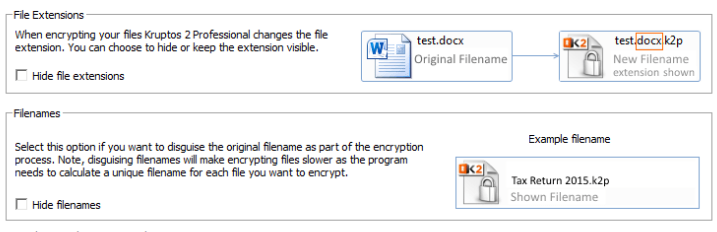
#. As I know, Ransomware is usually attacked on certain file types like . doc, xlsx, PDF....so if you don't use encrypted file names, We will be attacked by Ransomware. Some encryption software also works well to change the extension like Kruptos 2 which added the extension to .K2p or Boxcryptor which added the extension .Bc ....... So we don't need to encode the file name. so I want you to add such feature to CPPcryptfs. In my opinion you can add an extension to all encrypted files like .cpp and hide the default extension. Doing so will not affect filename encoding.
This is the way of Kruptos 2
This is the way of Boxcryptor
I agree, this is a very important feature that must be added. The final file extension could also be encrypted and appended to the encrypted file name and then accordingly, can identify and decrypt to the correct file extension.
While I don't think it's a critical feature (for a great piece of software, by the way, thanks - had to migrate from my prior solution and quite liking this so far!), I do also think it would be useful for "plain text" filenames to add a generic extension (e.g., .cfs) when encrypted - not only for the ransomware concerns raised earlier, but also to prevent mixing up encrypted files & folders with unencrypted ones in day-to-day use: Scenario 1: I might accidentally select a "recent file" to attach to an email that is in fact the encrypted version and thus useless to the recipient Scenario 2: I might mess up some copy/pasting of files, putting an unencrypted file into the encrypted folder structure, which won't stand out in any way until I try to open it
An important question here, though, I guess, is whether introducing such a file-extension feature would still preserve the compatibility with gocryptfs - and since I guess it would not, this is likely a feature request that should go "upstream" first?
I am still using this software that has encrypted my data. I've always been following this issue. Hopefully, DEV can consider adding this feature to make the software complete
I am using this software. I have another idea that you can add the feature to encode the file extensions. Currently, the app has the option to encrypt file names. But with file name encryption, if that person deletes a character in the encrypted file name, the file will be corrupted. Therefore, to be safe, I think we just need to encode the file name extension into a similar extension name, such as .cpp. Hope you will develop this app for a long time.
why you say so?
for my understanding,
u just need the .conf file, the diriv, and then the encrypted file.
suppose your encrypted file is ajhsdfljkahsdf8asda etc,
u can rename it, then it wont appear in the unencrypted window;
after that you simply rename it back and it will become normal? thanks
I am using this software. I have another idea that you can add the feature to encode the file extensions. Currently, the app has the option to encrypt file names. But with file name encryption, if that person deletes a character in the encrypted file name, the file will be corrupted. Therefore, to be safe, I think we just need to encode the file name extension into a similar extension name, such as .cpp. Hope you will develop this app for a long time.
why you say so?
for my understanding,
u just need the .conf file, the diriv, and then the encrypted file.
suppose your encrypted file is ajhsdfljkahsdf8asda etc,
u can rename it, then it wont appear in the unencrypted window; after that you simply rename it back and it will become normal? thanks
But do you remember a name like that "suppose your encrypted file is ajhsdfljkahsdf8asda etc," ? When you can't remember it, you will never be able to retrieve that file.
Activity
yfdyh000 commentedon Nov 12, 2023
I don't understand the meaning of this request.
Do you need optional encryption for the real extension? But the file cannot be opened.
Adding an extension does not resolve the corruption if the name is changed manually.
Alternatively, it is not secure to encrypt only the extension. Saving encrypted things to extension is not appropriate because they are too long.
6677028 commentedon Nov 12, 2023
Thank you for your very quick reply.
#. I use your app to encrypt my data. But the File names I chose are Plain text. I have some reason for not encrypting the filename.
#. As I know, Ransomware is usually attacked on certain file types like . doc, xlsx, PDF....so if you don't use encrypted file names, We will be attacked by Ransomware. Some encryption software also works well to change the extension like Kruptos 2 which added the extension to .K2p or Boxcryptor which added the extension .Bc ....... So we don't need to encode the file name. so I want you to add such feature to CPPcryptfs. In my opinion you can add an extension to all encrypted files like .cpp and hide the default extension. Doing so will not affect filename encoding.
This is the way of Kruptos 2

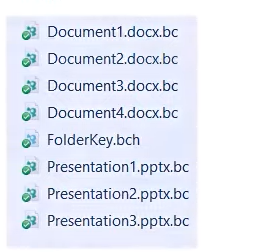
This is the way of Boxcryptor
[-]Proposed extension encoding[/-][+]Add extension to encrypted file.[/+]6677028 commentedon Nov 25, 2023
Who can help me?
red0888 commentedon Dec 7, 2023
I agree, this is a very important feature that must be added. The final file extension could also be encrypted and appended to the encrypted file name and then accordingly, can identify and decrypt to the correct file extension.
I see no reason why this shouldn't be added...
tew42 commentedon Oct 17, 2024
While I don't think it's a critical feature (for a great piece of software, by the way, thanks - had to migrate from my prior solution and quite liking this so far!), I do also think it would be useful for "plain text" filenames to add a generic extension (e.g., .cfs) when encrypted - not only for the ransomware concerns raised earlier, but also to prevent mixing up encrypted files & folders with unencrypted ones in day-to-day use:
Scenario 1: I might accidentally select a "recent file" to attach to an email that is in fact the encrypted version and thus useless to the recipient
Scenario 2: I might mess up some copy/pasting of files, putting an unencrypted file into the encrypted folder structure, which won't stand out in any way until I try to open it
An important question here, though, I guess, is whether introducing such a file-extension feature would still preserve the compatibility with gocryptfs - and since I guess it would not, this is likely a feature request that should go "upstream" first?
6677028 commentedon Nov 9, 2024
I am still using this software that has encrypted my data. I've always been following this issue. Hopefully, DEV can consider adding this feature to make the software complete
ccchan234 commentedon Jul 25, 2025
why you say so?
for my understanding,
u just need the .conf file, the diriv, and then the encrypted file.
suppose your encrypted file is ajhsdfljkahsdf8asda etc,
u can rename it, then it wont appear in the unencrypted window;
after that you simply rename it back and it will become normal? thanks
6677028 commentedon Sep 24, 2025
But do you remember a name like that "suppose your encrypted file is ajhsdfljkahsdf8asda etc," ? When you can't remember it, you will never be able to retrieve that file.