
One Harness. All Models.
Shadowfetch Linux is an independent Debian testing derivative with KDE Plasma 6, a creative desktop, reviewed updates and recovery tools. Version 5.0 is built around ShadowCode, a coding agent that comes preinstalled: open a project, pick a model, describe the change, watch the agent work, then review the diff.
What that means on this desktop. ShadowCode runs the models you already have access to, from one window:
- Subscriptions — Codex, Claude Code, Cursor, Antigravity or Grok, through each vendor's own command-line tool and sign-in. You install the vendor's CLI; ShadowCode's Connect runs the vendor's login. It does not read or store vendor credentials, and it never buys credits.
- API keys — an OpenRouter key if you have no subscription, billed per token to your OpenRouter account.
- On this computer — a bundled local model runtime (Vulkan GPU or CPU) and a short list of free models to download, one recommended for your hardware. Until you connect a subscription, the model picker lists these free models first. Nothing downloads until you choose it.
ShadowCode 1.0 explains itself: every approval card says what the action does, how much it can affect and whether Rewind can undo it; a failed task says why in plain words and offers the next step. Commits and pushes made from ShadowCode are checked for secrets first, paid models have spending limits, another model can give a second opinion on your changes, and Settings › Your data backs up and restores your profile.
Nothing is connected until you sign in. Welcome's last step opens ShadowCode so you can connect what you have. 5.0 also changes behaviour that 4.1 setups depend on: Fire and Ice are gone, several commands are removed, and the Fire/Ice network switch is now a separate setting. Read the release notes before upgrading.
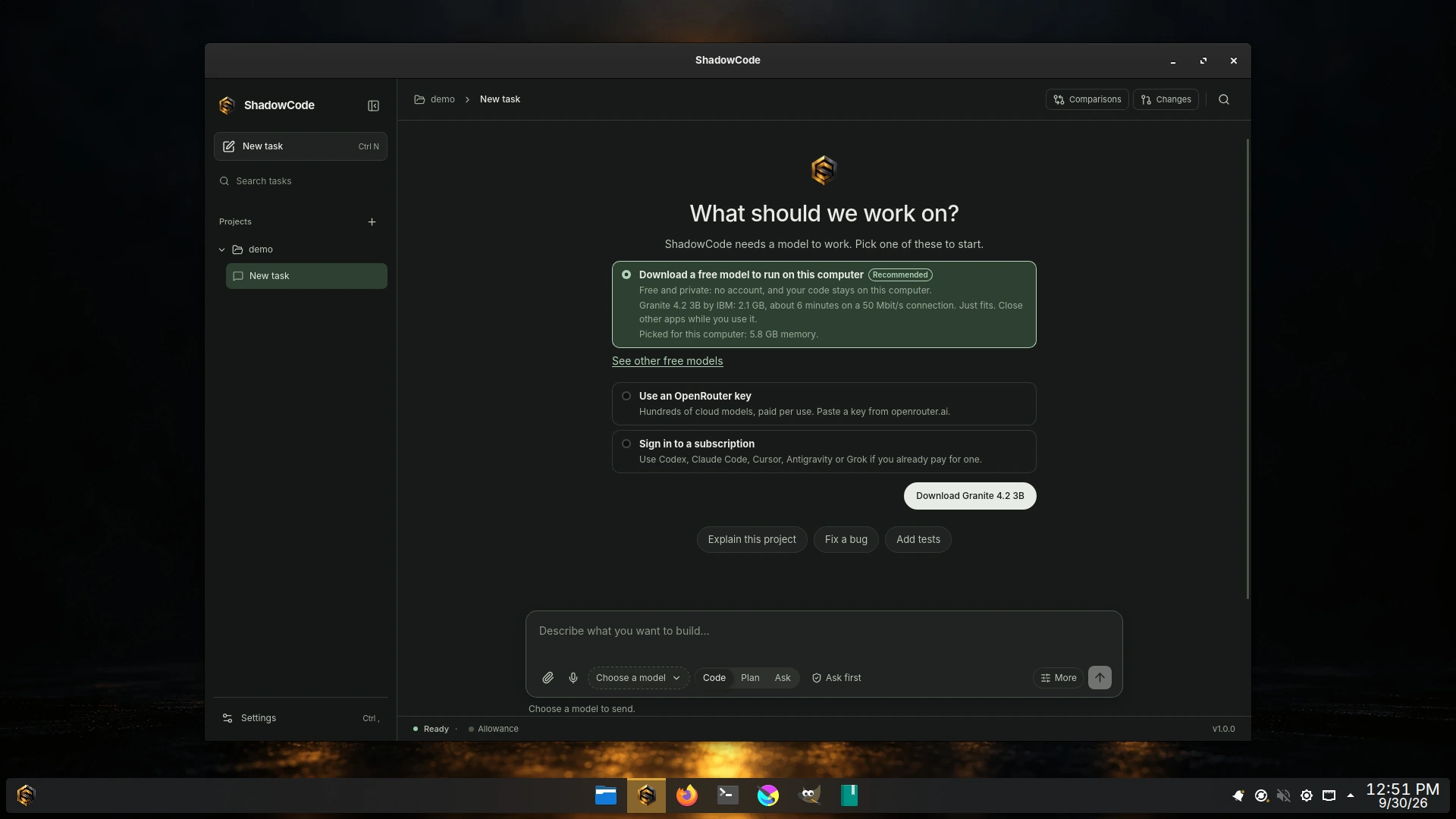
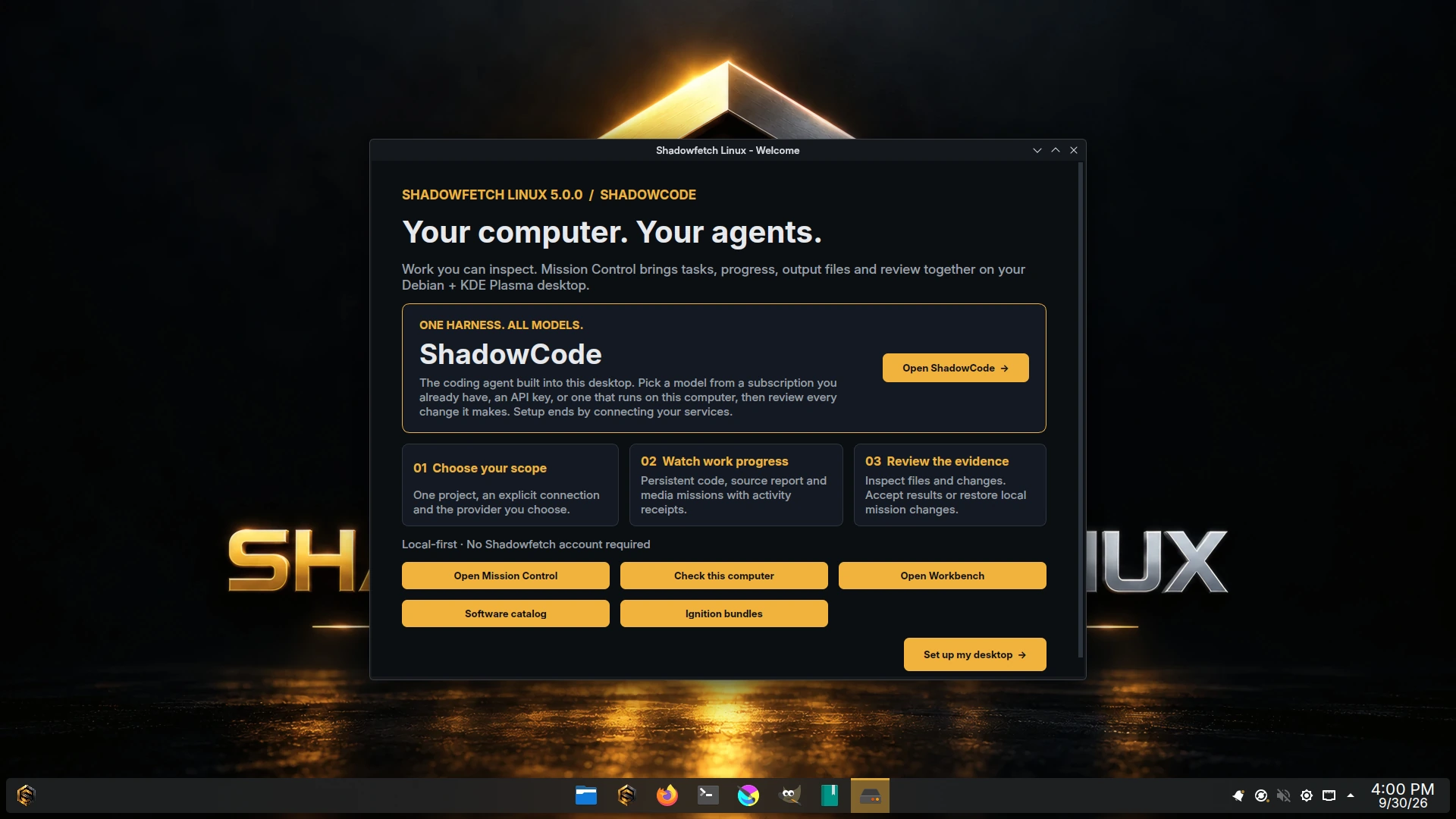
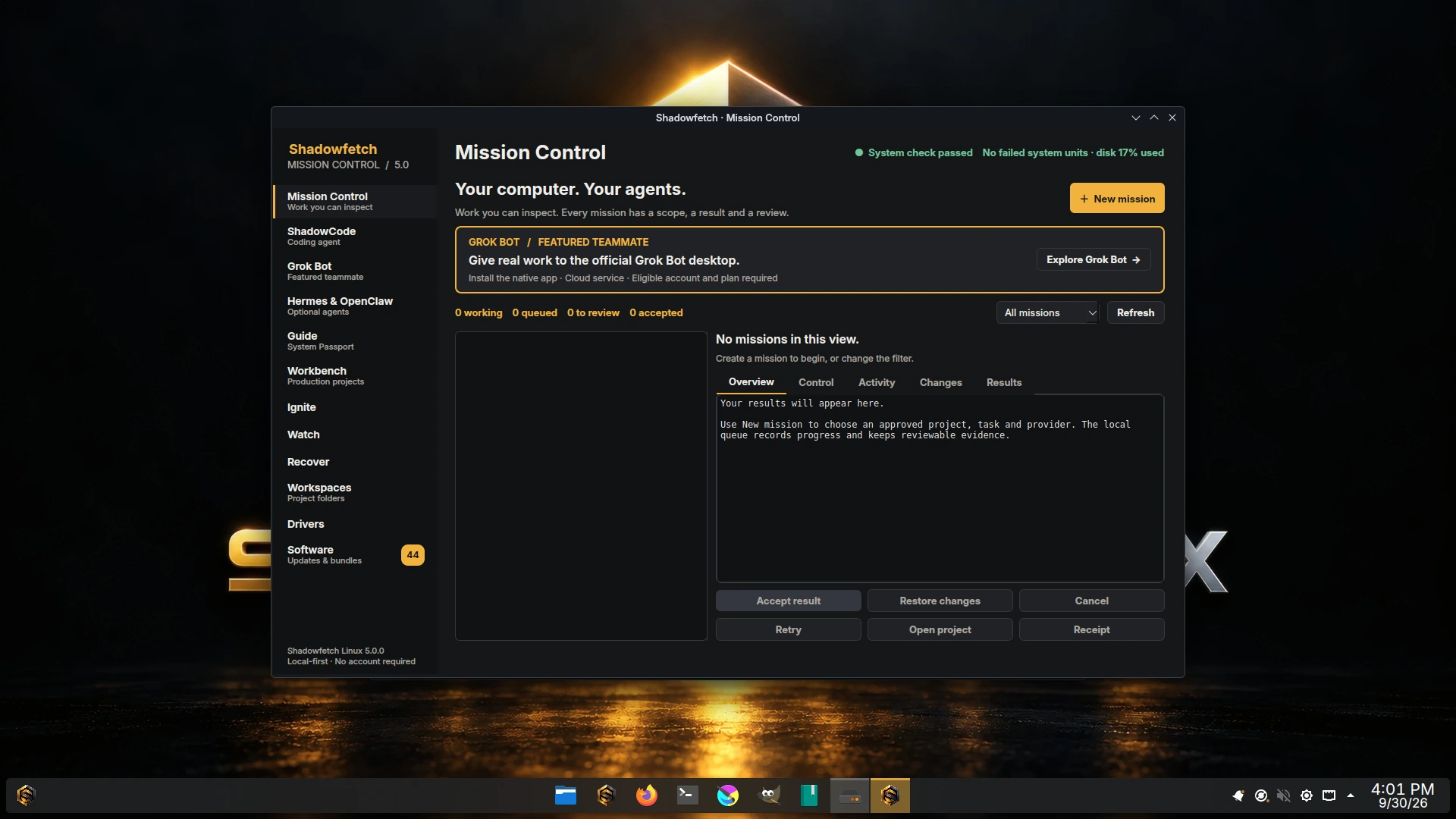
Download · Screenshots · Release notes · ShadowCode
| Fact | Value |
|---|---|
| Version / codename | 5.0.1 / Umbra |
| Edition | ShadowCode — "One Harness. All Models." |
| Publication date / channel | 2026-09-30 / stable |
| ISO | shadowfetch-5.0.0-amd64.iso |
| Size | 4085778432 bytes |
| SHA-256 | 2d8a72e044e8061bd616b2b4668425cc4d4ec0480a98975f961c0e58cba95e21 |
| ISO product source commit / tree | 9587a7ca348e817870baffa9d390754acf331266 / 2986e02421fc6af1353ce7e7b7695a390c724acf |
| Base / desktop | Debian testing snapshot 20260929T000000Z / KDE Plasma 6.7.4 |
| Kernel | Linux 7.2.6 |
| ShadowCode | 1.0.0 (shadow-code, republished unmodified from the signed upstream .deb) |
| Architecture / APT suite | amd64 / umbra |
| Final boot acceptance | 18 prepublication cases in qa/5.0.0/acceptance.json, recorded against this ISO: 12 pass, 6 waived by the release owner with written reasons; PUB-01 is proven after publication |
Signing-key fingerprint: 8F13 CE15 35EE 1F4A 2916 A1F7 3C5C 900B 7BE8 0CA1.
| Feature | What you can do |
|---|---|
| ShadowCode | Preinstalled coding agent (1.0). Connect subscriptions, an OpenRouter key or a local model in Settings › Accounts; approve actions that explain themselves, review changes grouped by risk, ask another model for a second opinion, and rewind or undo. Secret checks before commit and push, spending limits for paid models, backups under Settings › Your data. See /usr/share/doc/shadowfetch/SHADOWCODE.md. |
| Agent network | shadowfetch-agent-network online|offline decides whether Firebreak agent sandboxes start with network. Offline also pauses Grok Bot, Hermes and OpenClaw. Choose it in Welcome, at the boot menu, or later from a terminal. |
| Optional agents | Welcome offers exactly three, each downloaded only if you pick it: Grok Bot (official native app), Hermes Agent 0.21.5 and OpenClaw 2026.9.6. Hermes and OpenClaw install into your home folder without root; OpenClaw opens only inside a Firebreak sandbox, with its Gateway off. |
| Mission Control | Create work in a Workbench project, watch the persistent queue, and review files, receipts and changes before accepting them. Code missions need codex or claude (each with the vendor's paid account); localmodel's bridge is chat-only, so it writes cited reports from a model service you supply but leaves code unchanged. Media exports run offline. |
| Review and recovery | Accept, cancel, retry or restore a mission's local checkpoint. Fireproof simulates and rechecks updates; supported Btrfs layouts give Phoenix snapshot recovery. |
| Workbench, Guide, Ember, Firewatch | Unchanged from 4.1 apart from the agent network replacing Fire/Ice; "Element Workbench" is now just Workbench. |
There is one look, ShadowCode: gold and steel on black. shadowfetch-doctor checks that ShadowCode is installed and warns when a user-level copy in ~/.local shadows the system one.
ShadowCode has its own network setting (Settings › Permissions & network: Online, Web tools off, Offline). shadowfetch-agent-network is a separate Shadowfetch setting for Firebreak sandboxes and the optional agents; it does not change ShadowCode's. Vendor CLIs that ShadowCode drives follow their own execution rules and sandboxes.
Hermes runs commands and edits files as you and is not sandboxed. OpenClaw has a long security-advisory record (700+ GitHub advisories since early 2026); Shadowfetch discloses it before setup, pins its dependencies, runs it in Firebreak, never starts its Gateway unless you enable it (loopback only), and recommends updating it often.
No Shadowfetch account is required. No API keys, account sessions or model weights are bundled. Optional vendor applications and services keep their own network behaviour, terms and account requirements. Receipts, prompts and source material can be private; review files before sharing them. Local restoration cannot reverse external effects of an approved network action.
The download page links the ISO, checksum and detached signature. The SBOM (sbom-5.0.0.cdx.json), package manifest (packages-5.0.0.manifest) and QA evidence bundle (evidence-bundle-5.0.0.tar.gz) are attached to the v5.0.0 GitHub release. Use the exact accepted filename below. These commands download and verify files; they do not write a USB device.
ISO='shadowfetch-5.0.0-amd64.iso'
ARTIFACT_BASE='https://www.shadowfetch.com/linux/download'
curl --fail --location --remote-name "$ARTIFACT_BASE/$ISO"
curl --fail --location --remote-name "$ARTIFACT_BASE/$ISO.sha256"
curl --fail --location --remote-name "$ARTIFACT_BASE/$ISO.asc"
curl --fail --location --remote-name https://www.shadowfetch.com/linux/shadowfetch.gpg.asc
gpg --show-keys --with-fingerprint shadowfetch.gpg.asc
# Compare the fingerprint with the value above before importing.
gpg --import shadowfetch.gpg.asc
gpg --verify "$ISO.asc" "$ISO"
sha256sum --check "$ISO.sha256"
Continue only after the signature and checksum both verify. A GPG warning about personal key trust differs from a failed signature. Write the verified ISO with a USB image writer, then follow the installation guide.
The boot menu offers a normal entry and an "agents offline" entry; the installer carries that choice to the installed system. The live session uses shadow / shadow with passwordless sudo. The installer creates the chosen user and removes the live account. See the verification guide, Secure Boot guide and known issues.
Upgrading from 4.1 or 5.0.0 to 5.0.1: run sudo apt update then sudo apt full-upgrade for this update (not fireproof update: the Fireproof on 4.1 and 5.0.0 can stop partway when it updates itself). From 5.0.1 on, fireproof update is safe again and never removes packages. Read the release notes first; the upgrade removes shadowfetch-element, shadowfetch-codex and shadowfetch-code-agent, and moves an Ice machine to the offline agent network.
Use a 64-bit Intel/AMD computer. Plan for 8 GB RAM and 100 GB disk space for a comfortable desktop; local models and demanding creative projects need more memory and storage. GPU inference in ShadowCode needs Vulkan. These planning figures are not a physical-hardware certification.
Secure Boot has no Microsoft-trusted shim. Intel/AMD use Mesa; NVIDIA setup is an explicit, simulate-first workflow. VM rendering tests do not establish physical GPU acceleration performance, and hybrid laptops need their own validation. Phoenix Points require a supported Btrfs root; ext4 does not provide the same snapshot recovery. Debian testing can change faster than Debian stable.
Acceptance, recorded in qa/5.0.0/acceptance.json against this exact ISO: SRC-01, PKG-01, ISO-01, FIRE-01, ICE-01, INSTALL-01 (BIOS and UEFI), SCOPE-01, DURABLE-01, RECOVERY-01, VISUAL-01, RESOURCE-01 and EVIDENCE-01 (checksum, signature, SBOM, manifests and QA evidence bundle for this ISO) pass. Six are waived by the release owner. Four are for an account or harness limit: MISSION-01's code sub-part (needs a paid vendor account; the media and cited-report missions pass), GROK-01 and GROK-VISUAL-01 (need an X/Grok account; install, integrity, launch to sign-in and the URL handler are proven), and UPGRADE-01's recovery leg (the harness has none for upgrades; the 4.1 → 5.0 upgrade itself and every migration check pass). Two are for checks that did not pass, and the release owner chose to ship this ISO anyway (5.0.1 fixes the issues listed under Known issues below): SHADOWCODE-01 (ShadowCode launches cleanly and opens and closes cleanly in all 24 soak cycles, but the soak's memory check failed, traced to the live session's one-time package-list refresh rather than ShadowCode; ShadowCode 1.0.0's window also grows on each launch) and STRESS-01 (two 45-minute runs of combined stress left the system healthy, but in both runs the mission loop stopped on "database is busy" and the container loop stopped when a podman run --rm client did not exit). PUB-01 is proven after publication, against what is public. The release notes give the details.
5.0.1 is out (2026-10-01, an APT update; see RELEASE-5.0.1.md). Install it from 4.1 or 5.0.0 with sudo apt update then sudo apt full-upgrade, not fireproof update: the older Fireproof can stop partway when it installs a new Fireproof, and its plan can remove the desktop metapackages during a Debian testing transition. 5.0.1's Fireproof fixes both. If an update already stopped partway: if apt says fireproofd holds the lock, sudo systemctl kill --signal=KILL fireproofd.service (or sudo systemctl reboot -i); then sudo dpkg --configure -a, sudo apt full-upgrade, sudo apt install shadowfetch-desktop shadowfetch-creative-base, and restart.
The first two are fixed by the 5.0.1 update, which arrives through the Shadowfetch APT repository (sudo apt update, then sudo apt full-upgrade). The third affects only the live USB, which an update cannot change: 5.0.1 turns it off on the live USB, and a 5.0.0 stick keeps it, so use the workaround. The release notes list every known issue.
- ShadowCode's window grows each time it opens (Wayland) and can extend under the panel; on a 1366x768 screen even the first window is larger than the screen. Workaround: maximize the window (its maximize button, or Meta+PgUp); ShadowCode then does not save the size. Fixed in ShadowCode 1.0.1.
- "database is busy" under very heavy disk load. Mission Control or a
shadowfetch-missionscommand can briefly report it while a mission is finishing a step. Workaround: retry after a few seconds. - Live USB: a package-list refresh about five minutes after login. KDE's update notifier downloads about 200 MB of package lists, which also takes about 350 MB of RAM in the live session. Installed systems are not affected. Workaround on a low-memory machine or a metered connection: stay offline in the live session, or run
systemctl --user stop app-org.kde.discover.notifier@autostart.servicesoon after logging in. 5.0.1 turns it off on the live USB.
The project uses Debian live-build, Debian source packages and a signed reprepro repository. Build on a Debian host; privileged build steps use sudo. Package builds and source tests do not require production publishing credentials.
make deps          # install build dependencies
make test          # focused behavior checks
make source-gate   # tests, parsers, linters and secret scans
make shadowcode    # fetch and verify the pinned ShadowCode .deb
make packages      # build the Debian packages into build/
The release build uses the configured signing key:
make repo          # signed local APT repository, plus ShadowCode's published source
make package-gate  # package, repository and clean-install checks
make iso           # privileged image assembly, signature and ISO gate
make qemu          # launch the resulting image for a smoke test
make iso produces shadowfetch-5.0.1-amd64.iso in the repository root. VERSION ?= 5.0.1 and CODENAME ?= umbra live in the Makefile. The ShadowCode version lives only in tools/release/shadowcode.toml, moved by tools/bump_shadowcode.py; see vendor/shadowcode/README.md. Signing and publishing require the maintainer's private key and authorized publisher credentials, which are not in this repository. Consult make help, the release notes and FINAL_OPERATIONS_CHECKLIST.md before release operations; .github/CI-SECRETS.md records that the CI pipeline holds no secrets and why.
Source map: packages/shadowfetch-missions/ contains the queue and execution engine; packages/shadowfetch-control-center/ contains the native Qt UI; packages/shadowfetch-welcome/ contains first boot; packages/shadowfetch-defaults/ supplies integration helpers (agent network, Hermes and OpenClaw installers, doctor); packages/shadowfetch-meta/ declares the desktop, including its ShadowCode dependency; packages/shadowfetch-drkonqi-pickup/ contains the pinned KDE pickup source, correction and behavior checks. vendor/shadowcode/ holds ShadowCode's vendored trust policy and signed release metadata. live-build/ assembles the desktop, tools/ holds gates and release tooling, and qa/5.0.0/ indexes acceptance evidence.
Use GitHub Issues for bugs, installation reports and hardware notes. Include the exact ISO and checksum result, firmware/boot mode, CPU/GPU/RAM, disk layout, the failing step and redacted shadowfetch-health --json output. For mission bugs, include the workflow, state and redacted receipt. Report ShadowCode application bugs to ShadowCode's tracker. Report security-sensitive findings through SECURITY.md.
Patches to packages, build tools, tests and documentation are welcome. Run make source-gate before submitting. Do not post password exports, private keys, tokens, private source files or unredacted account logs.
The ISO aggregates upstream packages under their respective licenses. Each Shadowfetch package states its license in its debian/copyright: Shadowfetch's own packages (and the packaged grub-btrfs) are GPL-3.0-or-later, matching this repository's LICENSE; the Breeze-derived shadowfetch-themes is LGPL-2.1-or-later. The DrKonqi pickup helper's own code and packaging use GPL-3.0-only; its compiled KDE source retains GPL-3.0-only OR LicenseRef-KDE-Accepted-GPL, and its source package includes the upstream archive, signature, release key and downstream patch. ShadowCode is Apache-2.0 and its bundled components keep their own licenses; its corresponding source is published beside the APT repository under pool/third-party-source/shadow-code/. Other upstream source retains its original license notices. Shadowfetch and Umbra names, marks and artwork are reserved under TRADEMARKS.md; rebrand derivative distributions. Optional vendor applications retain their own licenses and terms. Shadowfetch Linux is independent and does not imply Debian or vendor endorsement.