Repository navigation
tool fails to restart after its stopped #30
Description

Hi guys
After building the docker container everything works great, but once its stopped and I restart the container using:
docker start container_name -a
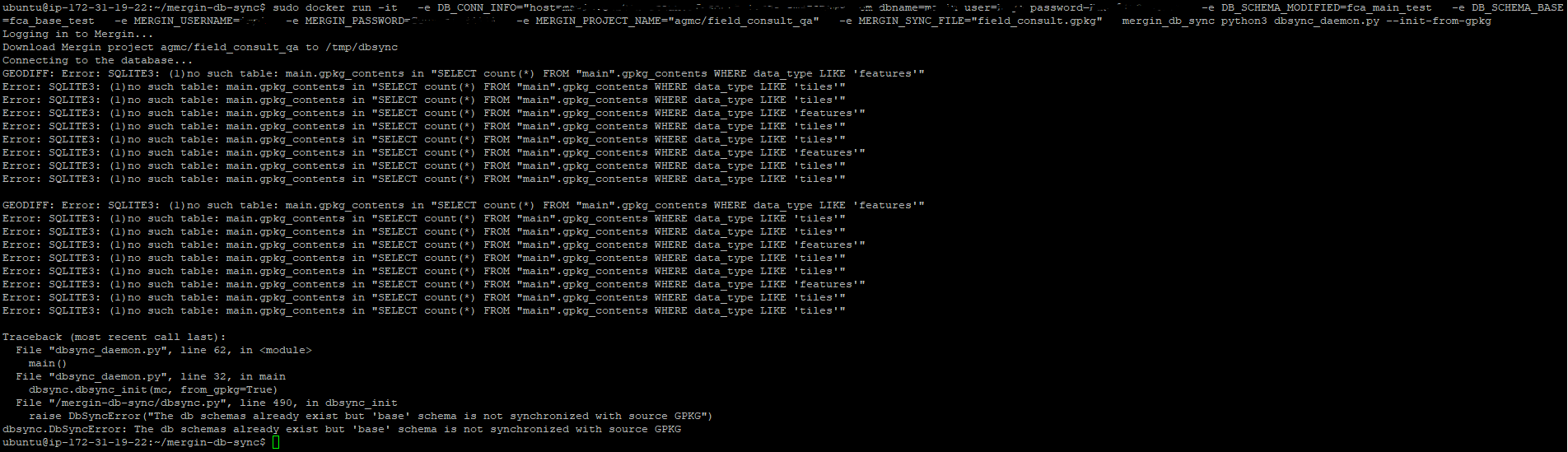
I get the error shown in the screenshot. This is a test project so its only me working on it and I did not make any changes so there shouldn't be any differences between the gpkg and db.

Activity
wonder-sk commentedon Mar 9, 2021
hi @HugoP27 - I think this is an instance of #29 - our colleague @varmar05 is looking into that now.
The error message is a bit misleading, actually the thing is that the "modified" schema has some pending changes which should be pushed to Mergin, but the db-sync does not like that. The fix (probably tomorrow) will relax the check and allow some pending modifications in "modified" schema when restarting the sync daemon.
wonder-sk commentedon Mar 10, 2021
hi @HugoP27 - #29 is now fixed, please could you update your local git repository and rebuild your container? The error should be gone now.
HugoP27 commentedon Mar 19, 2021
Hi @wonder-sk
thank you and apologies for the late response, unfortunately I still receive an error, I did the following:
Removed existing docker containers and images
removed cloned repo from ubuntu server
cloned updated repo using 'git clone --repo url--'
ran 'docker build --no-cache -t mergin_db_sync .'
after the build succeeded I deleted the existing schemas from Postgres and ran the following command:
sudo docker run -it
-e DB_CONN_INFO="host=--db_url-- dbname=--db_name-- user=--user-- password=--user_password--
-e DB_SCHEMA_MODIFIED=fca_main_test
-e DB_SCHEMA_BASE=fca_base_test
-e MERGIN_USERNAME=--mergin_user--
-e MERGIN_PASSWORD=--Mergin_Password--
-e MERGIN_PROJECT_NAME="--project_name--"
-e MERGIN_SYNC_FILE="field_consult.gpkg"
mergin_db_sync python3 dbsync_daemon.py --init-from-gpkg
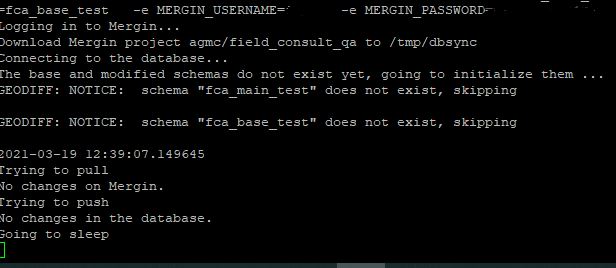
after it succeeds everything works:
I then stop the sync tool using ctrl + c and restart it using the command in point 5 and get this error:
wonder-sk commentedon Mar 22, 2021
Sorry about that - another issue has showed up related to restart - it will be fixed within #34 soon...
bartverhaar commentedon Mar 25, 2021
Hi,
I run into the same issue as HugoP27 at a restart and was glad to see your solution.
This morning i pulled the latest master and get it up and running.
But, now after a restart i get the following error:
The startscript is:
docker run -it -e DB_CONN_INFO="host=hostname dbname=dbname user=username password=password" -e DB_SCHEMA_MODIFIED=sync_main -e DB_SCHEMA_BASE=sync_base -e MERGIN_USERNAME=username -e MERGIN_PASSWORD=password -e MERGIN_PROJECT_NAME=projectname -e MERGIN_SYNC_FILE=package.gpkg mergin_db_sync python3 dbsync_daemon.py --init-from-gpkgwonder-sk commentedon Mar 25, 2021
@bartverhaar please rebuild your container with
--no-cacheoption... Or alternatively please use the now officiallutraconsulting/mergin-db-synccontainer from docker hub: https://hub.docker.com/r/lutraconsulting/mergin-db-syncYou may also need to remove your "base"+"modified" schemas in the database (but then restarting should work fine)
wonder-sk commentedon Mar 25, 2021
@HugoP27 We have just released version 1.0 - please could you try again? As noted in my comment above, we have now an official container in the docker hub, so there's no need to build the container manually anymore. The problem you have had should just go away - now the db-sync tool should be able to restart without problem even if the mergin project or the database have been modified in the meantime. Just note that you would need to delete your sync DB schemas - hopefully for the last time :-)
bartverhaar commentedon Mar 25, 2021
Thanks for the fast reply! Rebuilding makes the error go away.
Except... I got the following error now.... both with the rebuild container as with the official mergin-db-sync container from hub.docker.com.
Traceback (most recent call last): File "dbsync_daemon.py", line 62, in <module> main() File "dbsync_daemon.py", line 32, in main dbsync.dbsync_init(mc, from_gpkg=True) File "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/mergin-db-sync/dbsync.py", line 532, in dbsync_init raise DbSyncError("The db schemas already exist but 'base' schema is not synchronized with source GPKG") dbsync.DbSyncError: The db schemas already exist but 'base' schema is not synchronized with source GPKGwonder-sk commentedon Apr 12, 2021
All these issues should be hopefully fixed in the new 1.0.2 release - please try the new 1.0.2 container from Docker Hub:
https://hub.docker.com/r/lutraconsulting/mergin-db-sync/tags
I am going to close this, please feel free to reopen if you still encounter any issues.
HugoP27 commentedon Apr 12, 2021
Hi @wonder-sk
Apologies for the late response. Great stuff, thank you!! I will test it by the end of this week/early next week and let you know if there are still issues. Really appreciate all your work on this