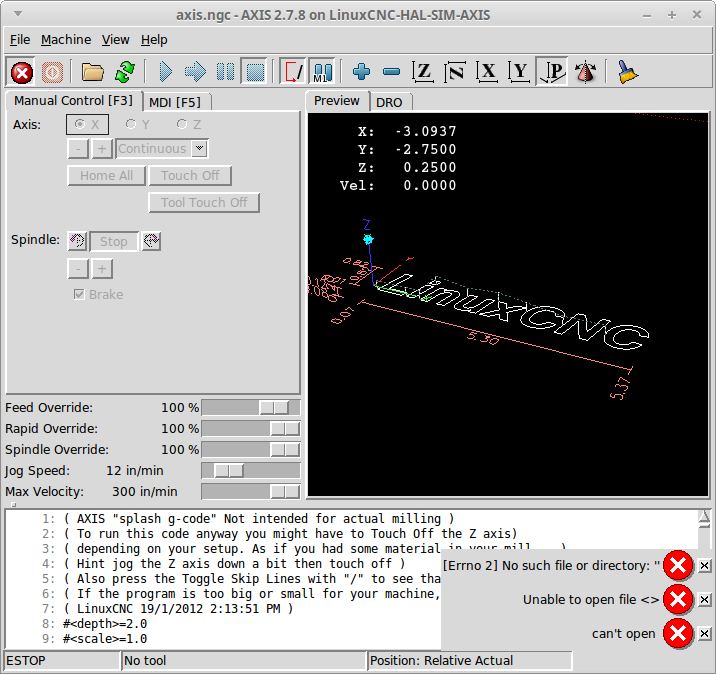
 ## Here are the steps I follow to reproduce the issue: 1. Start the Axis Simulator 2. Click on the File Open Button 3. Click on the Cancel Button ## This is what I expected to happen: I expected the File Dialog to close without an error. ## This is what happened instead: I got 3 Errors [Error 2] No such file or directory: "" Unable to open file <> can't open ## Information about my hardware and software: * I am using this Linux distribution and version Linux Mint 17.3 Rosa * I am using this kernel version 3.4-9-rtai-686-pae #1 SMP PREEMPT * I am running ... * [x] A binary version from linuxcnc.org (including buildbot.linuxcnc.org) * [ ] A binary I built myself * [ ] A binary version from some other source besides linuxcnc.org * I am using this LinuxCNC version 2.7.8 * I am using this user interface AXIS * I am using this interface Simulator
Here are the steps I follow to reproduce the issue:
This is what I expected to happen:
I expected the File Dialog to close without an error.
This is what happened instead:
I got 3 Errors
[Error 2] No such file or directory: ""
Unable to open file <>
can't open
Information about my hardware and software: