Repository navigation
[Bug]: CQP Mode quality/bitrate collapses in dark scenes #588
Description
Activity
@Wallboy Could you please share your source video ( "lossless recorded gameplay" in your report)? Thx
The source video is a lossless UtVideo 4:4:4 12GB file, so I can't practically share that. But I've re-encoded it down to ~500MB using x265, which looks nearly as good as the source, so it should do as a good enough source to run the same encodes I've been trying with it.
UPDATE
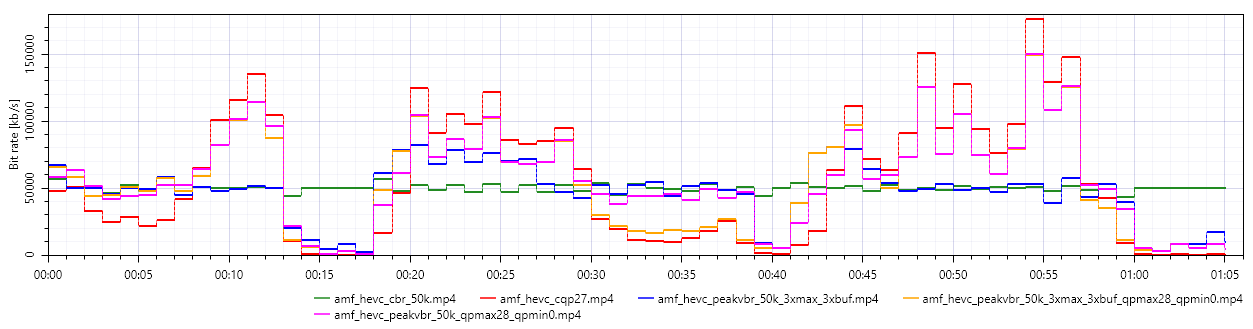
I've been doing a lot more testing with VBR Peak Mode, and got some interesting results. I initially started testing with a bitrate target of 50000k, and a maxrate and bufsize of 150000k, I got a result similar to CBR 50000k, except with better bitrates for high motion, and also the dark scenes had enough bitrate, but was getting some low quality frames mixed in
Command:
ffmpeg -i lossless.mkv -c:v hevc_amf -rc vbr_peak -b:v 50000k -maxrate 150000k -bufsize 150000k -profile:v main10 -bitdepth 10 -pix_fmt p010le -preencode 1 -benchmark -preset quality -usage transcoding -g 120 -vbaq 0 amf_hevc_peakvbr_50k_3xmax_3xbuf.mp4I then decided to try messing around with the QP setting and I set the QP Max to 28, and QP Min to 0, and the quality went way up, while being very similar to the same average bitrate. The menu scenes were still good quality, but now the dark gameplay scene took a hit in quality again.
Command:
ffmpeg -i lossless.mkv -c:v hevc_amf -rc vbr_peak -b:v 50000k -maxrate 150000k -bufsize 150000k -max_qp_i 28 -max_qp_p 28 -min_qp_i 0 -min_qp_p 0 -profile:v main10 -bitdepth 10 -pix_fmt p010le -preencode 1 -benchmark -usage transcoding -preset quality -g 120 -vbaq 0 amf_hevc_peakvbr_50k_3xmax_3xbuf_qpmax28_qpmin0.mp4I then decided to try something unusual, and keep using Peak VBR Mode, but set the target bitrate, maxrate, and bufsize all to the same of 50000k, while leaving the QP settings at QP Max 28, and QP Min 0, and BAM, 99% of the problems were fixed. The menu screen and dark scenes quality matched that of the 50000k CBR encode, while the bright scenes were very close to how CQP 27 scored.
Command:
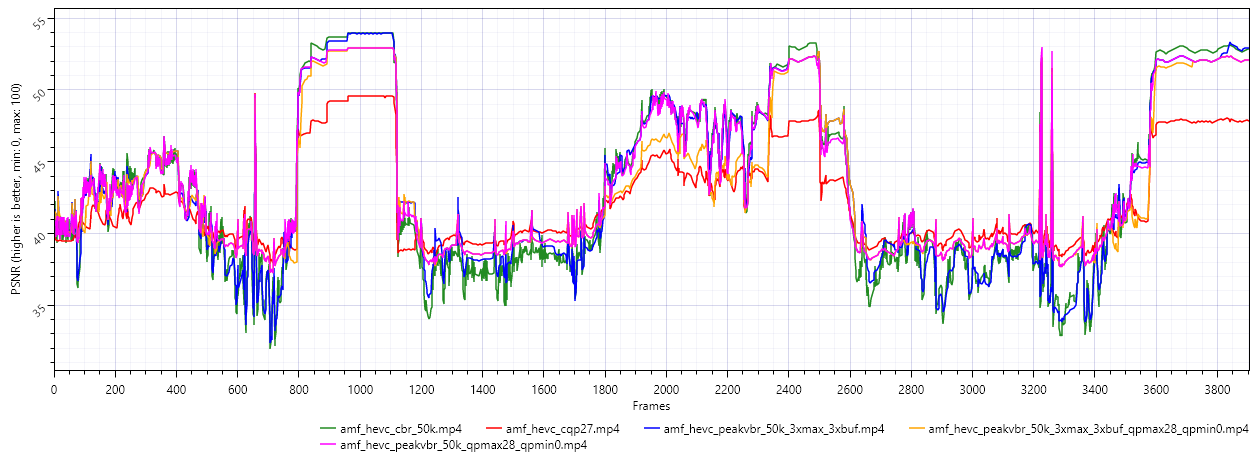
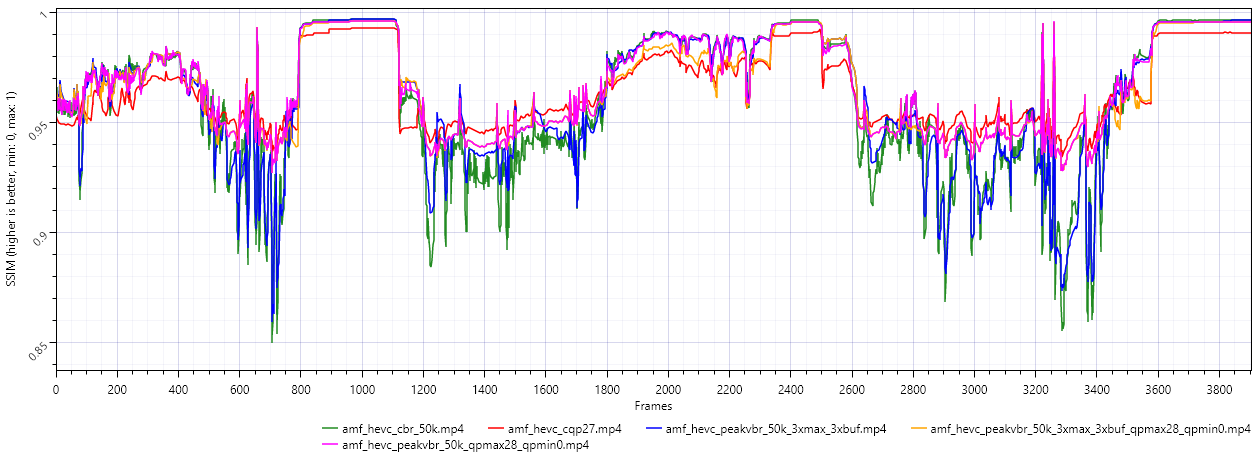
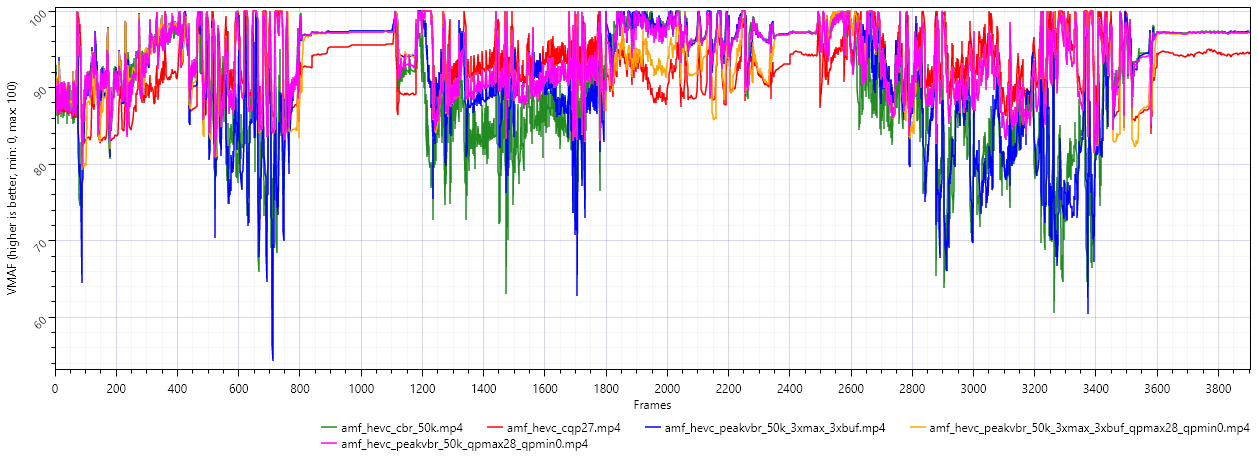
ffmpeg -i lossless.mkv -c:v hevc_amf -rc vbr_peak -b:v 50000k -maxrate 50000k -bufsize 50000k -max_qp_i 28 -max_qp_p 28 -min_qp_i 0 -min_qp_p 0 -profile:v main10 -bitdepth 10 -pix_fmt p010le -preencode 1 -benchmark -usage transcoding -preset quality -g 120 -vbaq 0 amf_hevc_peakvbr_50k_qpmax28_qpmin0.mp4Here is the Bitrate, PSNR, SSIM, VMAF, and Avg. Overall graphs for all five of these encodes within this thread to compare.
Not sure why this weird Peak VBR hack by setting the bitrate/maxrate/bufsize all to the same value works, but it clearly results in the highest quality bitstream at a very similar overall bitrate.
@Wallboy Thank you for sharing this source. We are following up this issue. I will sync with you after there is update.



Describe the bug
I'm trying to use AMD AMF HEVC to record gameplay for local archiving using the CQP Rate Control Mode, and I have been doings tests with a source video (lossless recorded gameplay) and using ffmpeg for testing purposes.
The test source video is 1 minute of gameplay of Wuchang: Fallen Feathers, where I go from playing the game in a bright area with lots of foilage and detail, and then into a dark interior, and also into the menu screen a few times which is also dark.
The ffmpeg command for the recording is simply as follows:
ffmpeg -i lossless.mkv -c:v hevc_amf -rc cqp -qp_i 27 -qp_p 27 -vbaq 0 -bitdepth 10 -profile:v main10 -pix_fmt p010le -usage transcoding -preset quality -benchmark amf_hevc_cqp_27.mp4The quality in the bright areas of gameplay are great where there is movement, as the bitrate was able to go up as appropriate, but I immediately noticed in the dark areas, the quality dropped significantly. I decided to use a different rate control method of CBR to target an average bitrate close to what CQP 27 was giving for this particular input video with the following command:
ffmpeg -i lossless.mkv -c:v hevc_amf -b:v 50000k -maxrate 50000k -bufsize 50000k -profile:v main10 -bitdepth 10 -pix_fmt p010le -usage transcoding -preset quality -rc cbr -enforce_hrd 1 -filler_data 1 -benchmark amf_hevc_cbr_50mbit.mp4Here is a bitrate view of both encodes. At around the 13 second mark is where I enter a dark menu screen and the bitrate completely collapses for the CQP encode to around 24kbps for the entire 3-4 second duration in the menu. The same happens at the end of the video clip where I'm back in the menu.
And here is a screen capture of both encodes in this menu screen:
CQP (In Menu)
CBR (In Menu)
It's easier to compare these if you download their full resolution (1440p) size and swap back and forth in your image viewer, but the upper right corner is a good spot to start. Notice how the CQP version loses a lot of the details.
And here is a comparison of the two encodes in a dark interior:
CQP (Dark Interior)
CBR (Dark Interior)
Again, notice the loss of details in the CQP encode, especially in the background.
And here is the PSNR, SSIM, and VMAF graphs referenced against the lossless input video.
The CQP version actually wins in average quality across all three metrics, but in the dark areas of gameplay/menu the CQP (green line) you can see clearly falls below the CBR version. And this drop in quality is very noticeable in real world viewing.
I've tried lowering the QP values much further to get a very high bitrate video, but the problem still remains with the dark scenes.
So is CQP just broken in AMD AMF, or am I just not using it correctly? I should also note, I did test AMF AV1 CQP as well, and the exact same problem is present with that codec too!
UPDATE: The problem doesn't seem just limited to CQP. Testing with QVBR results in the same problem with dark scenes not getting enough bitrate.
To Reproduce
Steps to reproduce the behavior:
Refer to above commands used
Setup (please complete the following information):
Debug Log (please upload or paste):
N/A
Expected behavior
Fixed quality level on all frames with RC mode of CQP, as is expected.
Screenshots
See above for many screenshots
Additional context
N/A