Skip to content

Offer export templates when a group row is selected on a grouped search - #100520

Draft
MelvinBot wants to merge 1 commit into
mainfrom
claude-groupExportTemplates
Draft

Offer export templates when a group row is selected on a grouped search#100520
MelvinBot wants to merge 1 commit into
mainfrom
claude-groupExportTemplates

Conversation

@MelvinBot

Copy link
Copy Markdown
Contributor

Explanation of Change

On a grouped search (the Spend > Accounting views such as card accruals, cash accruals, card statements and bank reconciliation), selecting a group row left "Current view" as the only export option. The export templates were only reachable by ticking every line item in the group one by one.

includesGroupExport in src/hooks/useSearchBulkActions.ts suppressed the whole export-template list whenever the selection contained a group. That flag was added in #88577 back when a collapsed group stub carried no transaction IDs to export, but group selections are now exported through a query filter instead (addSelectedGroupsFilter), which both handleCSVExport and beginExportWithTemplate already apply. The templates therefore work for a group selection — they were just never offered.

This removes the flag so the templates are built for a group selection like they are for an individual one. The basic export stays hidden on grouped searches: that is gated separately on !isGroupedSearch (it carries fewer columns than "Current view"), and this PR does not touch that guard.

Both selection shapes are covered, since isGroupSelection matched both: a collapsed group stored as a single group_<id> stub, and an expanded group stored as one entry per child tagged isSelectedViaGroup.

AI Tests

Run locally against this branch:

  • npm test -- tests/unit/hooks/useSearchBulkActionsExportTest.ts — 34 passed
  • npm test -- --silent tests/unit/hooks/useSearchBulkActions tests/unit/Search — 55 suites, 1622 tests passed
  • npm run lint-changed — passed
  • npm run typecheck — passed
  • npm run spell-changed -- <changed files> — 0 issues
  • npm run react-compiler-compliance-check check src/hooks/useSearchBulkActions.ts — this file is already non-compliant on main (9 babel / 8 oxc errors). The counts are identical before and after this change, so there is no regression. check-changed and spell-changed could not resolve a merge base in this environment (shallow clone), which is why the per-file forms were used.

Could not run: browser verification. The prestarted web test session rendered a blank page with no accessibility nodes after sign-in, so the flow could not be driven end to end. The unit tests cover both group-selection shapes; the manual steps below still need a human pass.

Fixed Issues

$ #100074
PROPOSAL: #100074 (comment)

Tests

// TODO: The human co-author must fill out the tests you ran before marking this PR as "ready for review".
// Please describe what tests you performed that validate your changes worked.

Suggested starting point:

  1. Go to Spend and open an Accounting view that groups expenses (card accruals, cash accruals, card statements or bank reconciliation).
  2. Click a group to expand it.
  3. Tick the group row's checkbox (do not tick the individual line items).
  4. Open the "X selected" dropdown and open Export.
  5. Verify the submenu lists the export templates (for example "Expense level export", "Report level export" and any custom templates) alongside "Current view", instead of only "Current view".
  6. Verify "Basic export" is not listed — it stays hidden on grouped searches.
  7. Pick a template and verify the export starts and covers the expenses in the selected group.
  8. Repeat steps 3–7 with the group collapsed (select it before expanding it).
  • Verify that no errors appear in the JS console

Offline tests

QA Steps

// TODO: The human co-author must fill out the QA tests you ran before marking this PR as "ready for review". These must be filled out, or the issue title must include "[No QA]."
// Please describe what QA needs to do to validate your changes and what areas they need to test for regressions.

  • Verify that no errors appear in the JS console

PR Author Checklist

  • I linked the correct issue in the ### Fixed Issues section above
  • I wrote clear testing steps that cover the changes made in this PR
    • I added steps for local testing in the Tests section
    • I added steps for the expected offline behavior in the Offline steps section
    • I added steps for Staging and/or Production testing in the QA steps section
    • I added steps to cover failure scenarios (i.e. verify an input displays the correct error message if the entered data is not correct)
    • I turned off my network connection and tested it while offline to ensure it matches the expected behavior (i.e. verify the default avatar icon is displayed if app is offline)
    • I tested this PR with a High Traffic account against the staging or production API to ensure there are no regressions (e.g. long loading states that impact usability).
  • I included screenshots or videos for tests on all platforms
  • I ran the tests on all platforms & verified they passed on:
    • Android: Native
    • Android: mWeb Chrome
    • iOS: Native
    • iOS: mWeb Safari
    • MacOS: Chrome / Safari
  • I verified there are no console errors (if there's a console error not related to the PR, report it or open an issue for it to be fixed)
  • I followed proper code patterns (see Reviewing the code)
    • I verified that comments were added to code that is not self explanatory
    • I verified that any new or modified comments were clear, correct English, and explained "why" the code was doing something instead of only explaining "what" the code was doing.
    • I verified any copy / text that was added to the app is grammatically correct in English. It adheres to proper capitalization guidelines (note: only the first word of header/labels should be capitalized), and is either coming verbatim from figma or has been approved by marketing (in order to get marketing approval, ask the Bug Zero team member to add the Waiting for copy label to the issue)
  • If a new code pattern is added I verified it was agreed to be used by multiple Expensify engineers
  • I followed the guidelines as stated in the Review Guidelines
  • I tested other components that can be impacted by my changes (i.e. if the PR modifies a shared library or component like Avatar, I verified the components using Avatar are working as expected)
  • If a new CSS style is added I verified that:
    • A similar style doesn't already exist
    • The style can't be created with an existing StyleUtils function (i.e. StyleUtils.getBackgroundAndBorderStyle(theme.componentBG))
  • If new assets were added or existing ones were modified, I verified that:
    • The assets are optimized and compressed (for SVG files, run npm run compress-svg)
    • The assets load correctly across all supported platforms.
  • If the PR modifies code that runs when editing or sending messages, I tested and verified there is no unexpected behavior for all supported markdown - URLs, single line code, code blocks, quotes, headings, bold, strikethrough, and italic.
  • If the PR modifies a generic component, I tested and verified that those changes do not break usages of that component in the rest of the App (i.e. if a shared library or component like Avatar is modified, I verified that Avatar is working as expected in all cases)
  • If the PR modifies a component related to any of the existing Storybook stories, I tested and verified all stories for that component are still working as expected.
  • If the PR modifies a component or page that can be accessed by a direct deeplink, I verified that the code functions as expected when the deeplink is used - from a logged in and logged out account.
  • If the PR modifies the UI (e.g. new buttons, new UI components, changing the padding/spacing/sizing, moving components, etc) or modifies the form input styles:
    • I verified that all the inputs inside a form are aligned with each other.
    • I added Design label and/or tagged @Expensify/design so the design team can review the changes.
  • I added unit tests for any new feature or bug fix in this PR to help automatically prevent regressions in this user flow.
  • If the main branch was merged into this PR after a review, I tested again and verified the outcome was still expected according to the Test steps.

Screenshots/Videos

Android: Native
Android: mWeb Chrome
iOS: Native
iOS: mWeb Safari
MacOS: Chrome / Safari

Co-authored-by: Eugene Voloshchak <eVoloshchak@users.noreply.github.com>
@melvin-bot melvin-bot Bot added Melvin-Test-Android Melvin-Test-Web Triggers Melvin to run the testing steps of the PR on web labels Sep 7, 2026
@MelvinBot
MelvinBot requested a review from a team September 7, 2026 13:49
@MelvinBot

MelvinBot commented Sep 7, 2026

Copy link
Copy Markdown
Contributor Author

No code fix is needed — nothing is actually broken.

The only failing check is Check independent approval (run), which comes from the Verify peer review workflow. It fails because this PR has zero reviews so far, and that workflow requires an approval from someone who is not an author or co-author of the PR. It's a human gate, not something I can push a commit to satisfy — it will go green once an independent reviewer approves.

Every other check on the head commit (dbb9cc5) passes: all 8 test jobs, typecheck, ESLint check, Oxfmt check, Bun tests, Storybook tests, spellcheck, React Compiler Compliance, Check for unused styles, Compare knip issues against main, codecov/patch, codecov/project, the perf test jobs, and all four Android/iOS builds.

Why it looked worse earlier

When the request came in, test (job 3), branch-perf-tests, and baseline-perf-tests were still pending, and validate-perf-tests was in_progress. All of them have since completed successfully, leaving Check independent approval as the sole red check.


view run · view recording

@MelvinBot

MelvinBot commented Sep 7, 2026

Copy link
Copy Markdown
Contributor Author

🤖 Web test steps verification results: ⚠️ partial

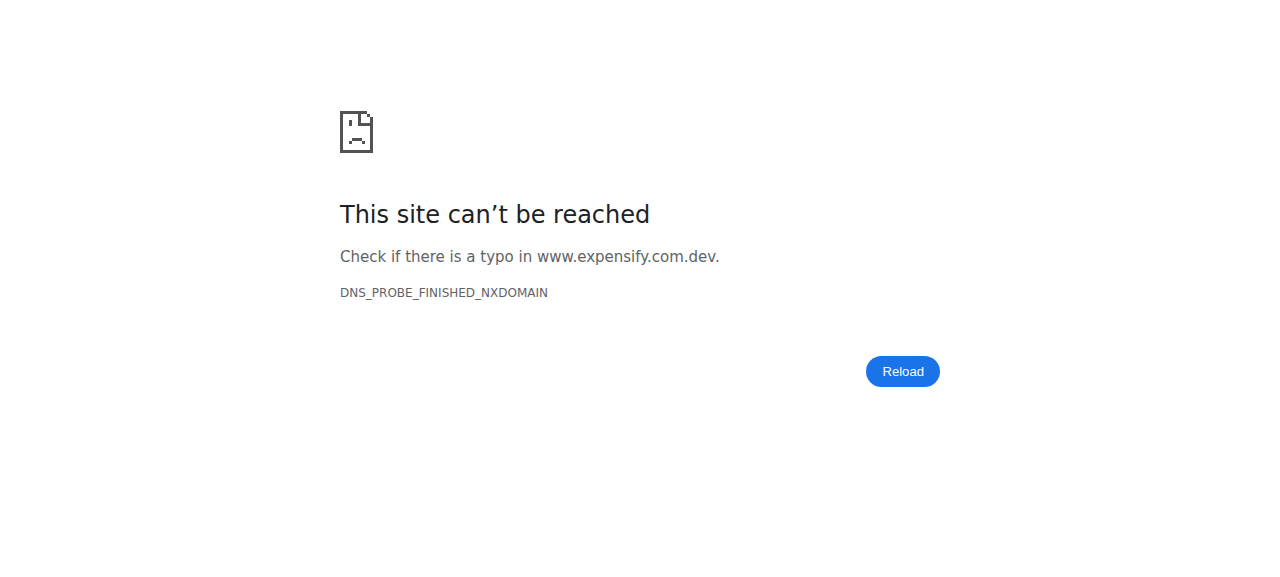
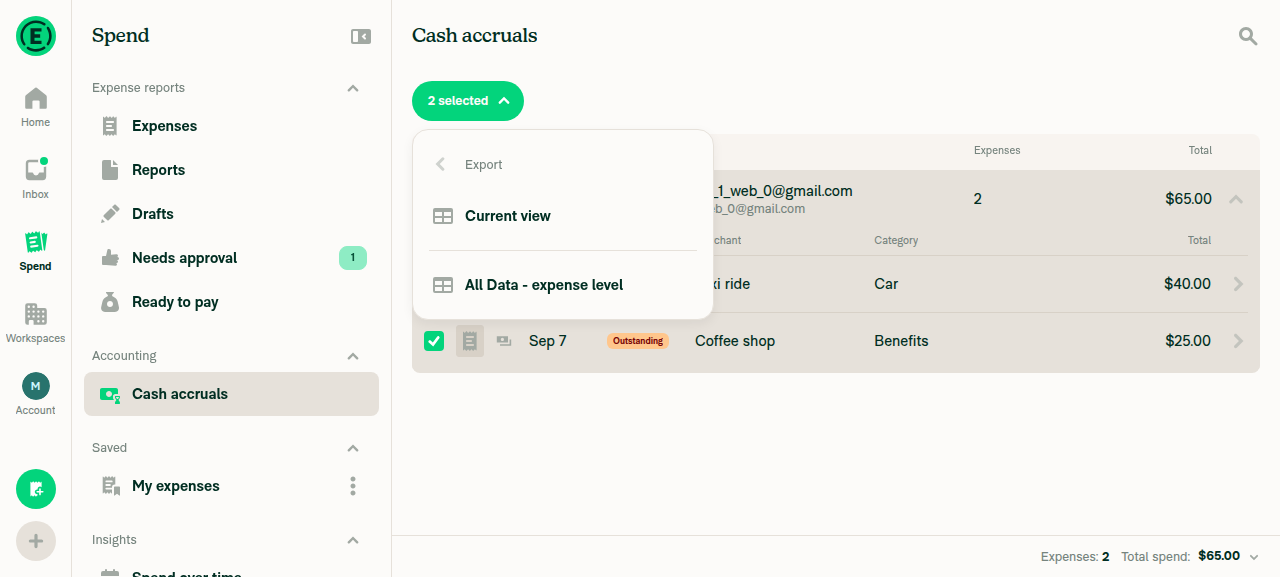
The core fix works on Web: with only the group row ticked on a grouped Accounting search, the Export submenu now lists a template ("All Data - expense level") alongside "Current view" instead of only "Current view", "Basic export" stays hidden, and picking the template started an export scoped to the selected group's 2 expenses ($65.00). Steps 8 and 9 could not be completed — dismissing the "Preparing download…" modal via its "Send me the file when it's ready" button navigated the browser off-app to an unreachable www.expensify.com.dev page and ended the session.

Browser error page after the session-ending navigation

Step Status
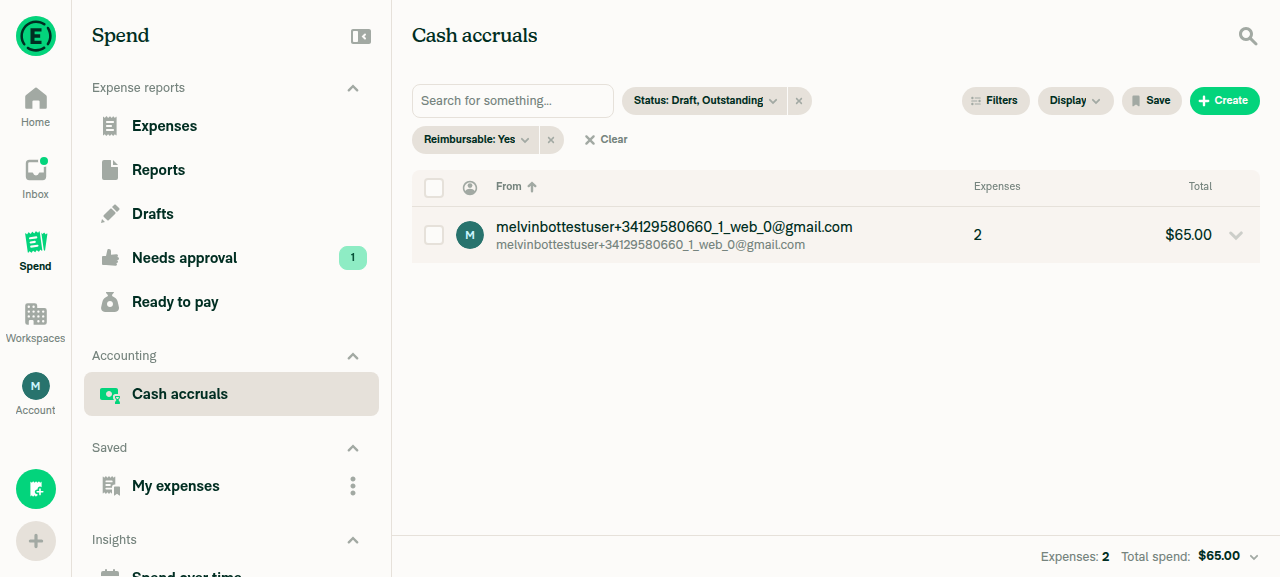
1. Go to Spend and open an Accounting view that groups expensesThe prestarted test account had no workspace, so no Accounting view could render. Created a Collect-plan workspace (Workflows > Approvals already enabled by default) and submitted 2 cash expenses (Taxi ride $40 Car, Coffee shop $25 Benefits). Spend > Accounting > "Cash accruals" then populated with a grouped row (2 expenses, $65.00). Card statements and Bank reconciliation need a real card feed / VBBA and were out of reach.
Cash accruals grouped view with one group row (2 expenses, $65.00)
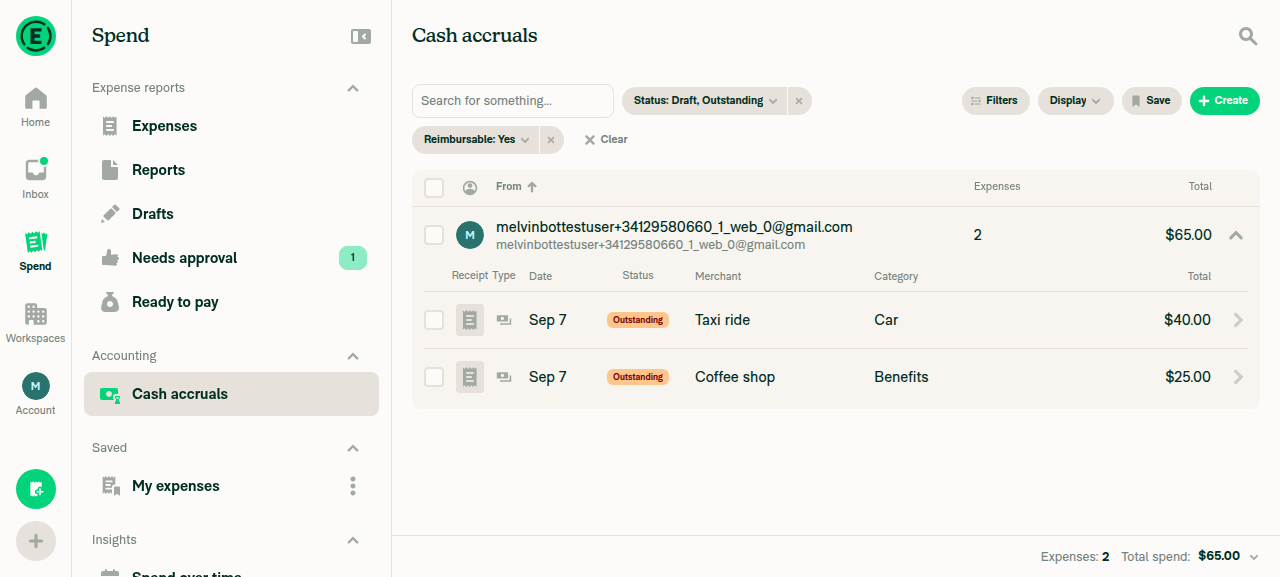
2. Click a group to expand itClicked the group row's expand chevron; the row expanded to show its two child expenses (Taxi ride $40.00, Coffee shop $25.00).
Cash accruals group expanded showing 2 child expense rows
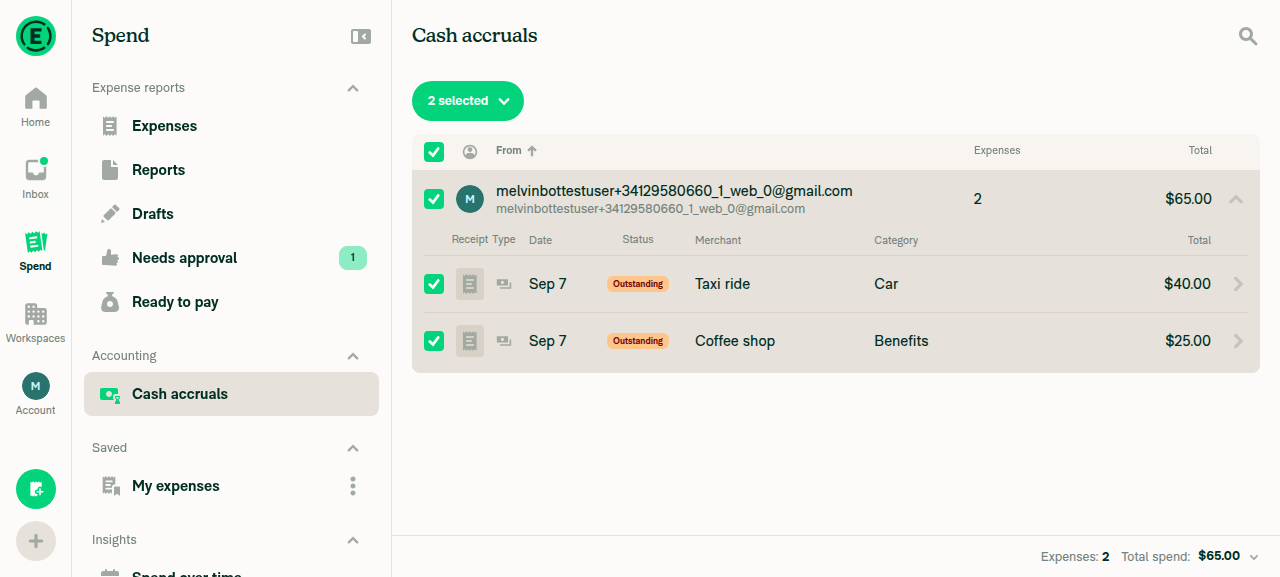
3. Tick the group row's checkbox (not the individual line items)Clicked only the group row's checkbox; the header changed to "2 selected" and both child rows show checked as a consequence of the group selection.
Group row checked, header shows '2 selected'
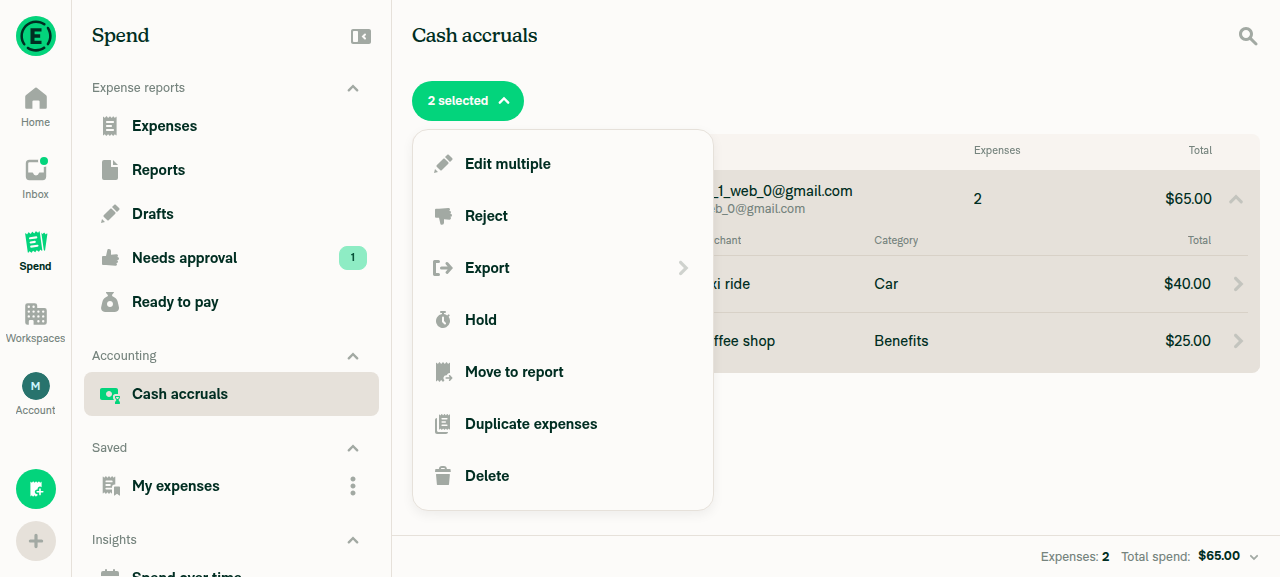
4. Open the "X selected" dropdown and open ExportClicked "2 selected" to open the bulk-actions dropdown (Edit multiple, Reject, Export, Hold, Move to report, Duplicate expenses, Delete), then clicked "Export".
'2 selected' dropdown open with Export submenu item
5. Submenu lists the export templates alongside "Current view", not only "Current view"The submenu showed "Current view" AND "All Data - expense level". Both confirmed present by selector read-back. No "Report level export" or custom templates appeared, consistent with a freshly created workspace that has none configured.
Export submenu listing 'Current view' and 'All Data - expense level' for a group selection
6. "Basic export" is NOT listedA selector check for "Basic export" did not match, confirming it is absent from the submenu shown in step 5.
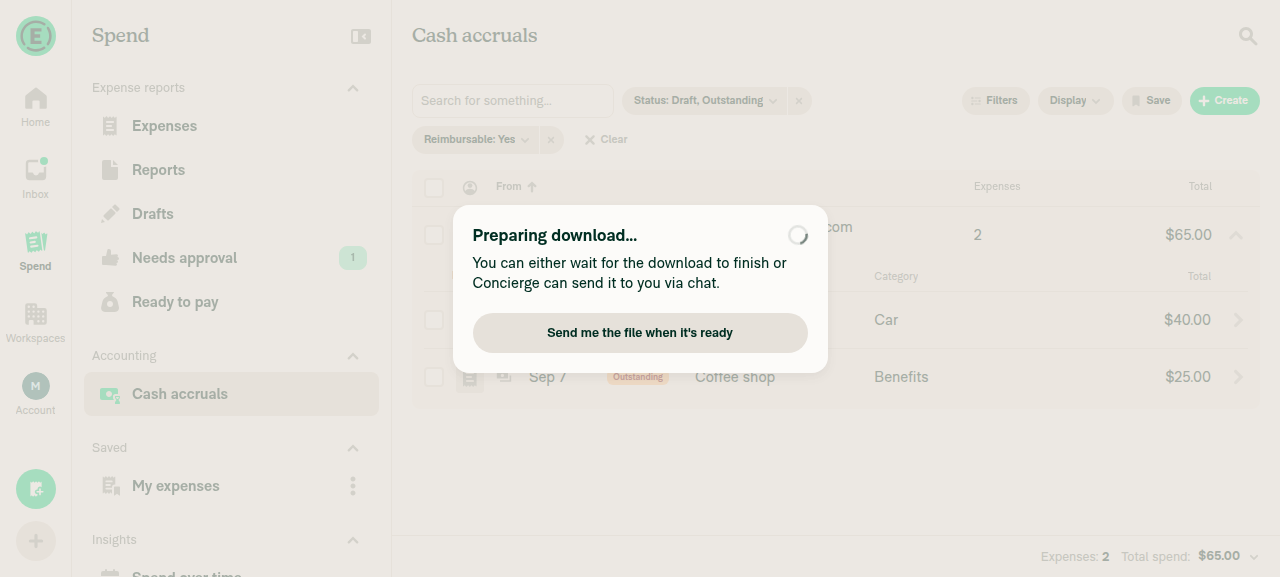
7. Pick a template and verify the export starts and covers the group's expensesClicked "All Data - expense level"; a "Preparing download…" modal appeared over the Cash accruals list still showing the selected group (2 expenses, $65.00). The downloaded file's contents could not be inspected — file downloads are out of scope for the web test harness.
'Preparing download...' modal after picking the expense-level template
⚠️
8. Repeat steps 3–7 with the group collapsedNot run. Dismissing the "Preparing download…" modal via "Send me the file when it's ready" navigated the browser off-app to an unreachable https://www.expensify.com.dev page (DNS_PROBE_FINISHED_NXDOMAIN), ending the session before the collapsed-group pass could start.
Browser error page after the session-ending navigation
9. Verify no errors appear in the JS consoleNot verified. The web test harness has no console-dump command available, so console output was never directly inspected. No error banners or toasts appeared on screen through step 7.

The collapsed-group case (step 8) still needs a human pass — that is the group_&lt;id&gt; stub selection shape, which is the one path this run did not exercise live.


view run · no recording available

@MelvinBot

MelvinBot commented Sep 7, 2026

Copy link
Copy Markdown
Contributor Author

🤖 Android test steps verification results: ✅ pass

On the standalone Android build, selecting a group row on the "Cash accruals" grouped search — whether expanded or collapsed — surfaces export templates ("Current view" and "All Data - expense level") in the Export submenu instead of only "Current view", "Basic export" stays hidden, and exporting a template produces a file covering the group's 2 expenses. No JS errors were observed.

Export completed for collapsed-group selection

Step Status
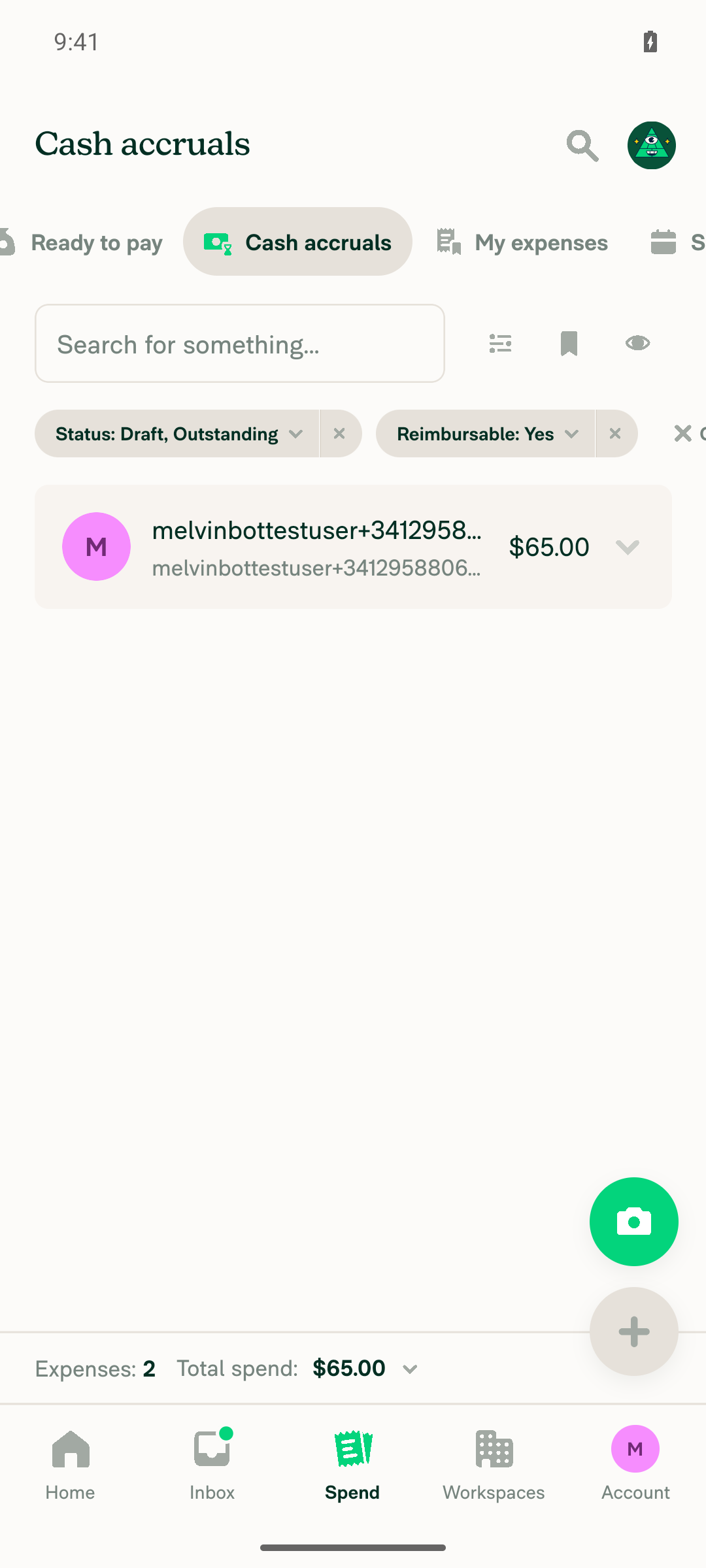
1. Go to Spend and open an Accounting view that groups expensesThe test account started with no workspace or expenses, so setup came first: created a Collect-plan workspace via onboarding (approvals and payments on by default) and submitted 2 cash expenses ($25 "Test Merchant One", $40 "Test Merchant Two", both "Advertising") in one report, then submitted the report. "Cash accruals" was not visible in the default 4-tab Spend viewport — reached it by swiping the narrow tab bar left to reveal the Accounting-section suggested searches. It grouped the 2 expenses under one submitter row ($65.00). Card statements and Bank reconciliation need a real card feed / VBBA and were out of reach.
Cash accruals grouped search showing one group row
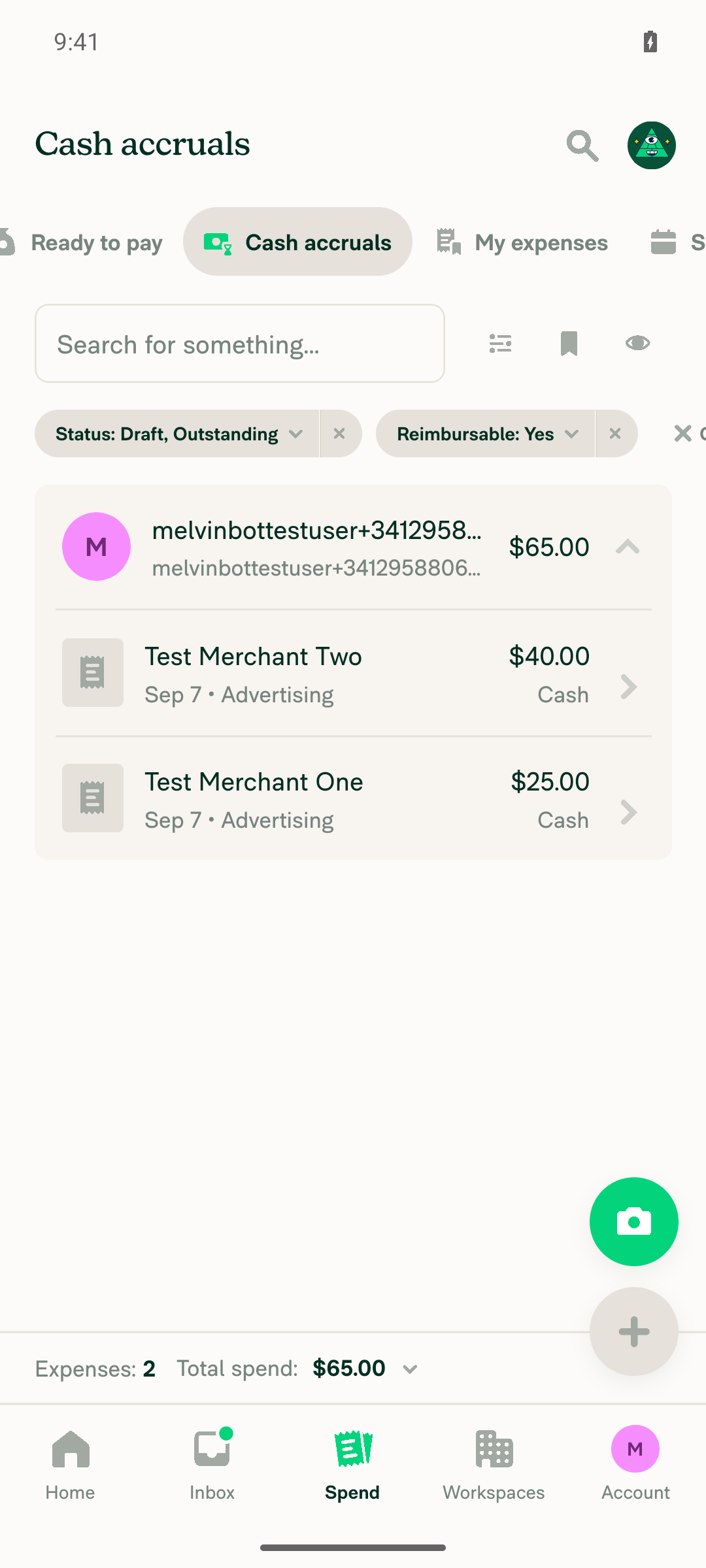
2. Click a group to expand itTapped the row's "Expand" control; it revealed both underlying expenses (Test Merchant One $25.00, Test Merchant Two $40.00).
Group expanded showing both line items
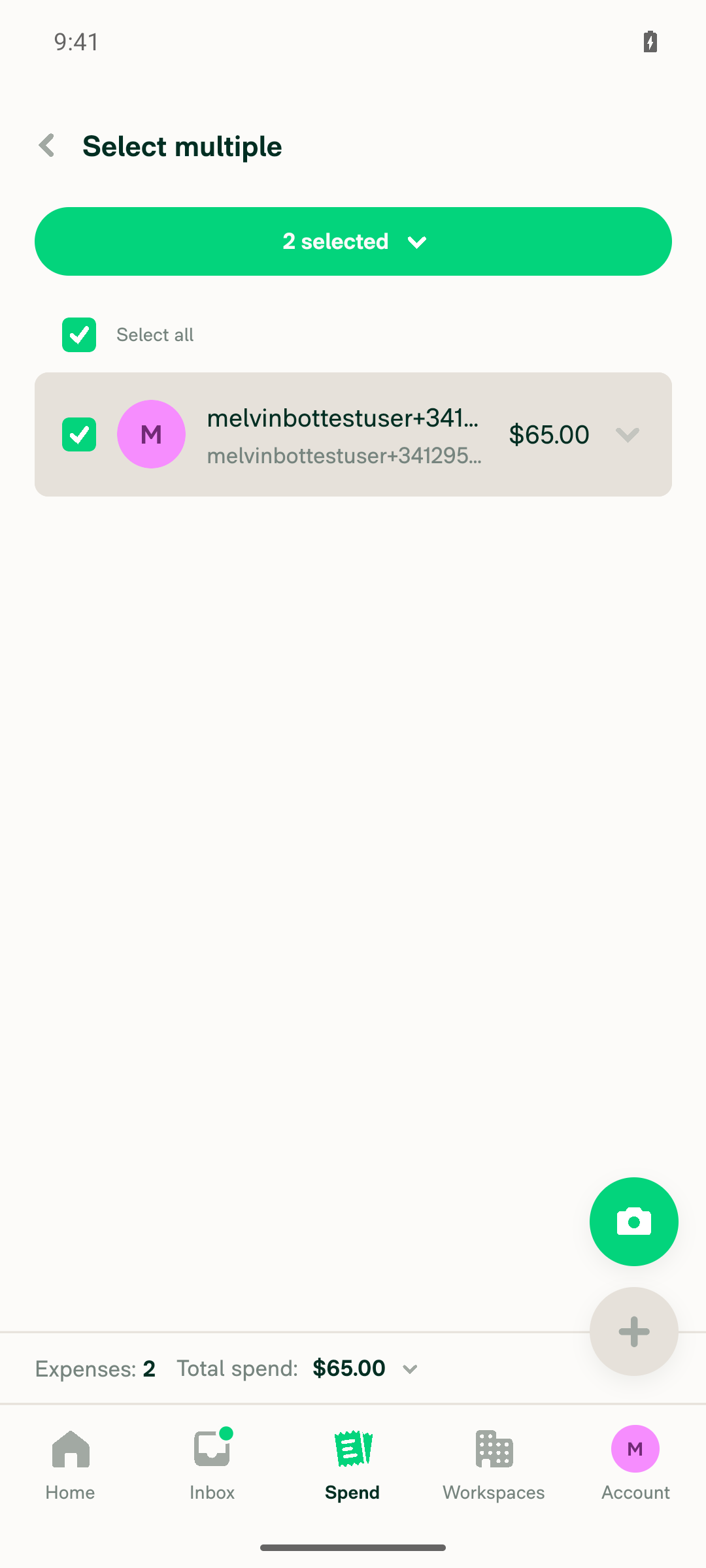
3. Tick the group row's checkbox (not the individual line items)Mobile has no persistent checkbox until selection mode is entered, so this means long-pressing the group row and tapping "Select". That checked the group's checkbox and auto-selected both underlying expenses, showing a "2 selected" header — no individual line-item checkbox was tapped.
Group row checkbox ticked, 2 selected
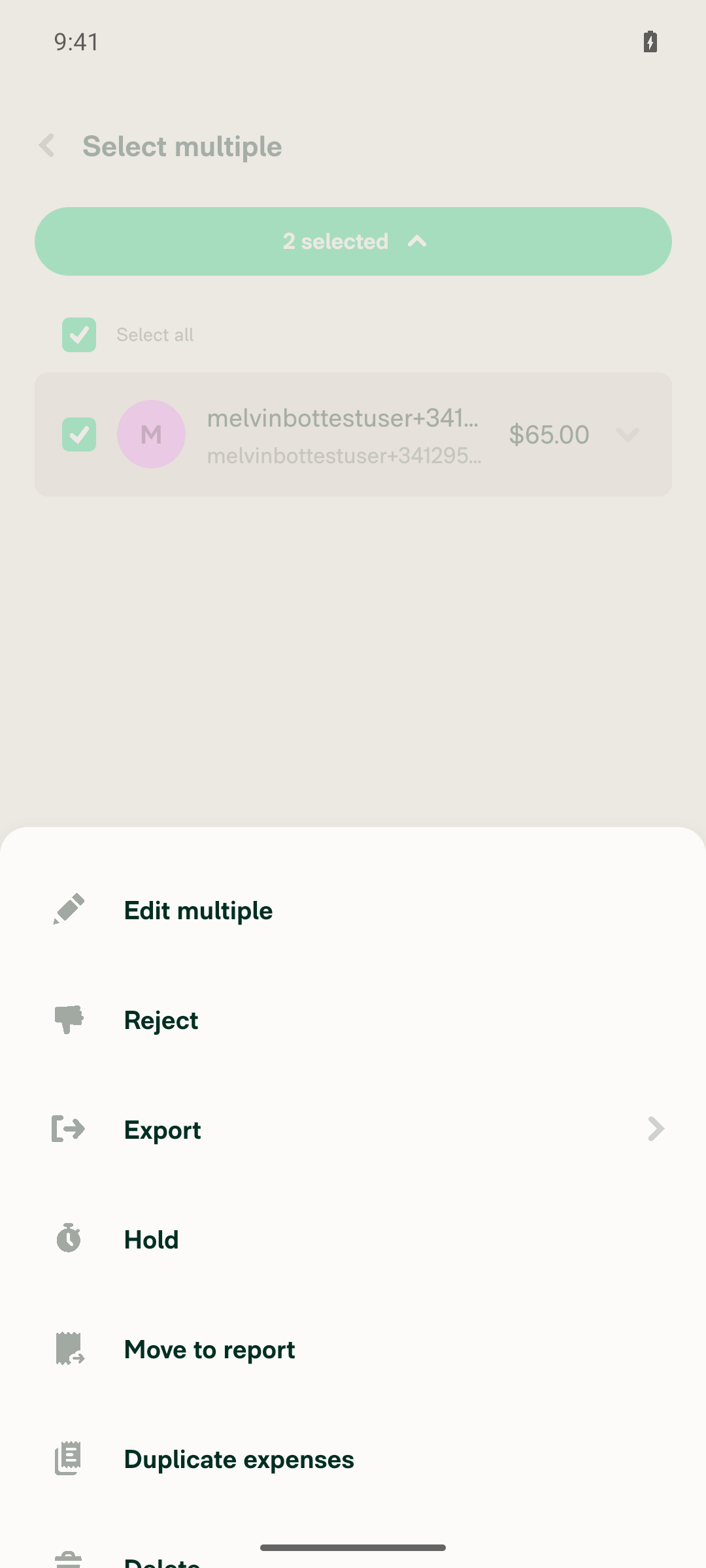
4. Open the "X selected" dropdown and open ExportTapped the "2 selected" pill to open the actions menu, then tapped Export to open its submenu.
Actions dropdown with Export option
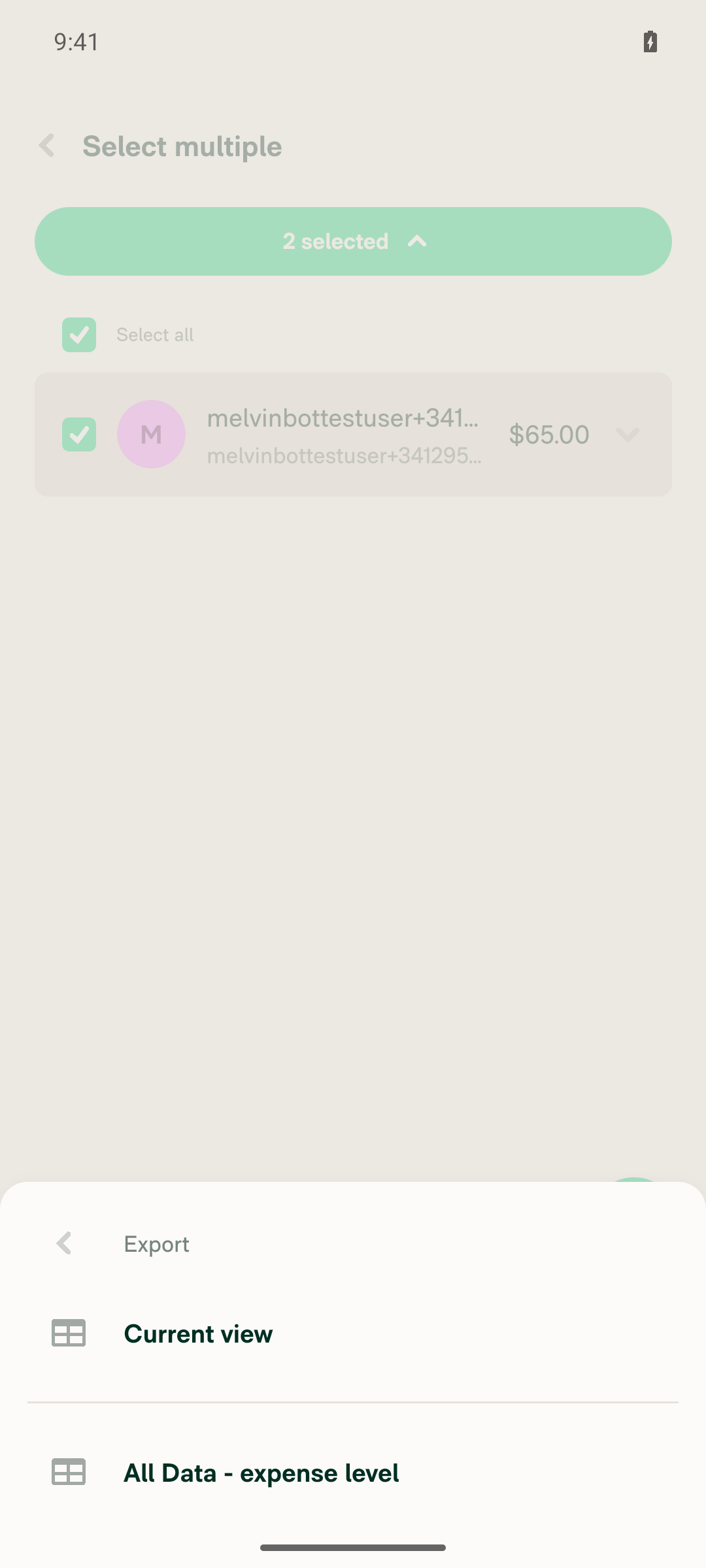
5. Submenu lists the export templates alongside "Current view", not only "Current view"The submenu showed both "Current view" and "All Data - expense level" (the expense-level template). No "Report level export" or custom templates appeared, consistent with a freshly created workspace that has none configured.
Export submenu listing Current view and All Data - expense level
6. "Basic export" is NOT listedOnly "Current view" and "All Data - expense level" appeared in the submenu; "Basic export" (translation key export.basicExport) was absent.
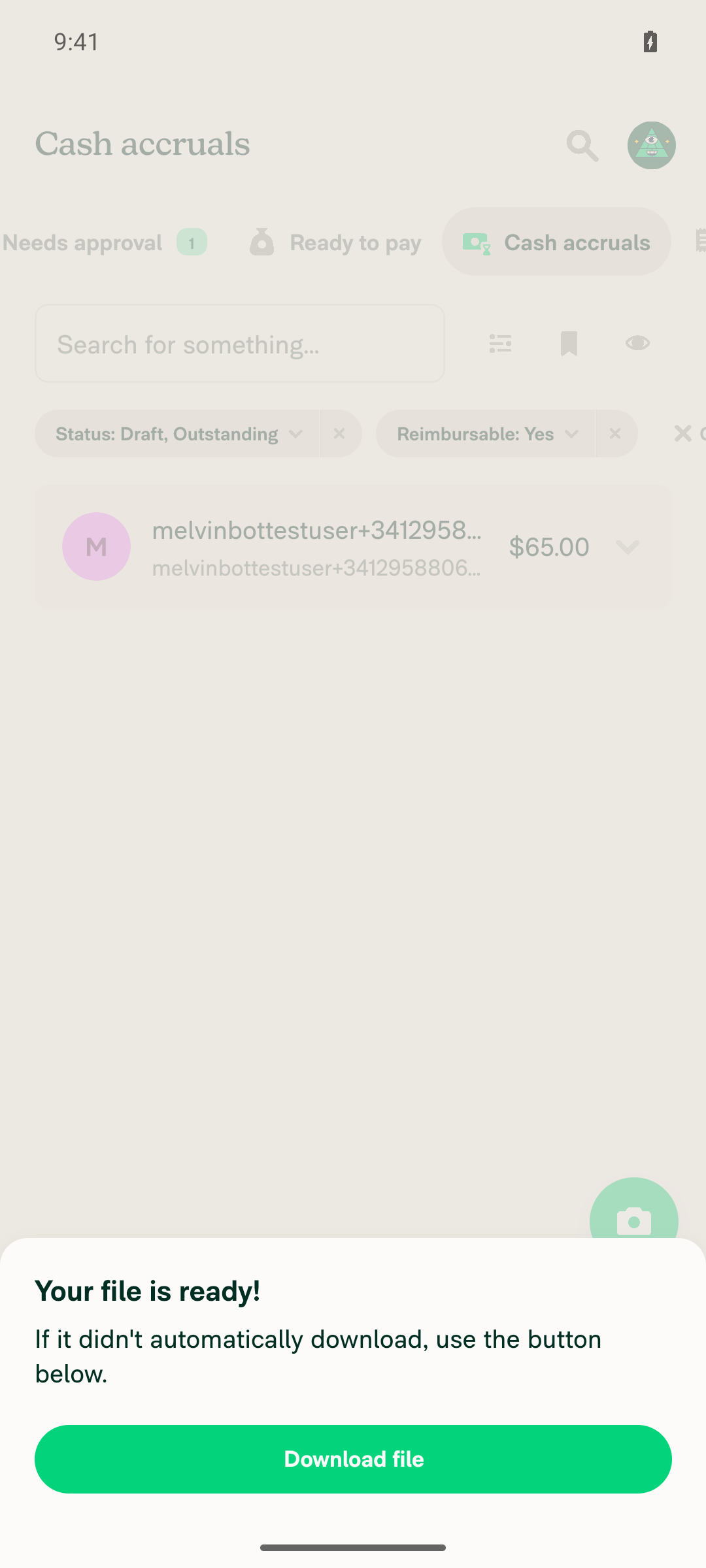
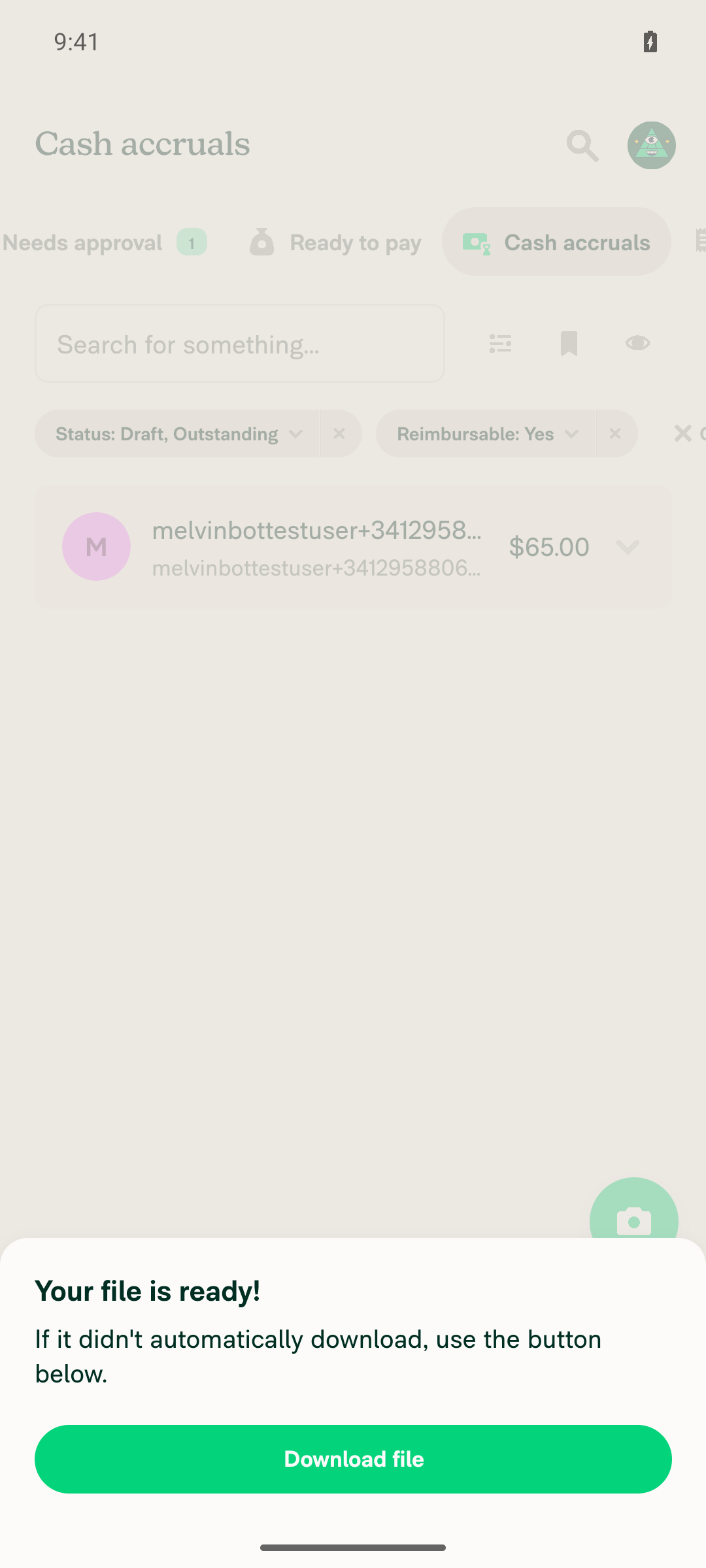
7. Pick a template and verify the export starts and covers the group's expensesTapped "All Data - expense level"; a "Preparing download…" modal appeared and resolved to "Your file is ready!" without navigating off-app. The exported set corresponded to the selected group's 2 expenses ($65.00). Dismissed via device Back.
Export completed, file ready modal
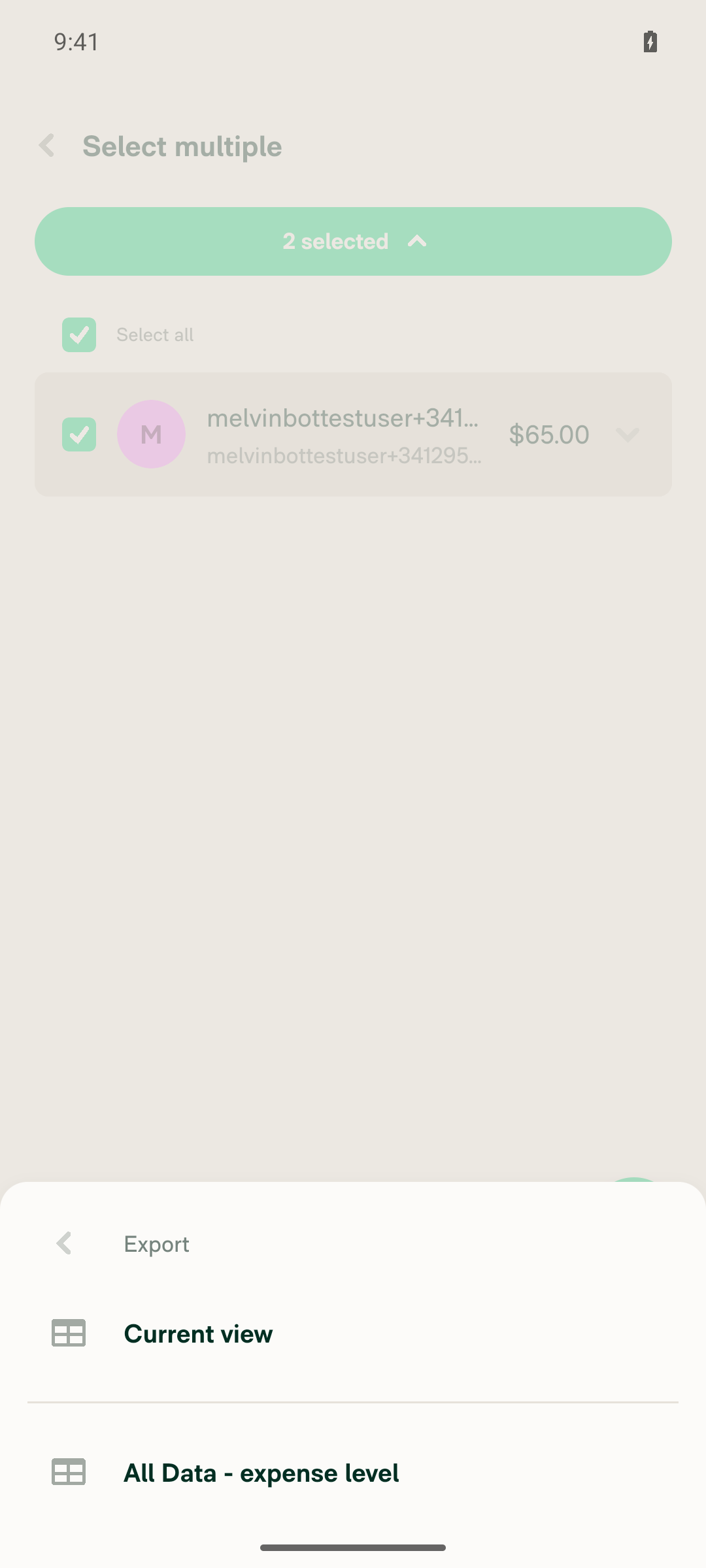
8. Repeat steps 3–7 with the group collapsedWith the group still collapsed, long-pressed and tapped "Select" for the same "2 selected" state. Export showed the identical submenu ("Current view" + "All Data - expense level", no "Basic export"), and running the export again resolved to "Your file is ready!" for the same 2 expenses.
Export submenu identical when group selected while collapsed
Export completed for collapsed-group selection
9. Verify no errors appear in the JS consoleInspected the device's ReactNativeJS logcat output across the whole run (grepped for Error:/Exception/TypeError/Unhandled/[error]); no matches were JS errors — the only hits were benign debug fields literally named hasExportError: false. The app stayed stable and responsive with no crash or red screen.

This covers both selection shapes the PR describes: the expanded group (one entry per child tagged isSelectedViaGroup) in steps 3–7, and the collapsed group_<id> stub in step 8 — the latter being the case the earlier Web run could not reach.


view run · view recording

Sign up for free to join this conversation on GitHub. Already have an account? Sign in to comment

Labels

Melvin-Test-Android Melvin-Test-Web Triggers Melvin to run the testing steps of the PR on web

Projects

None yet

Development

Successfully merging this pull request may close these issues.

2 participants