Attempted Debugging
Searched GitHub Issues
Describe the Scenario
I recently migrated from the Bookstack version set up in 2018 to the current version, and notice visual changes. The redesign happened apparently in 2019 (#1153). Now the Details and Actions show to the right side of the page, and with the left side page navigation, they just take too much space (almost half of the page). Is there a way to preserve the old look and feel, or customize the page, perhaps the size of each sections, or a way to put the vertical menu bars to the upper?
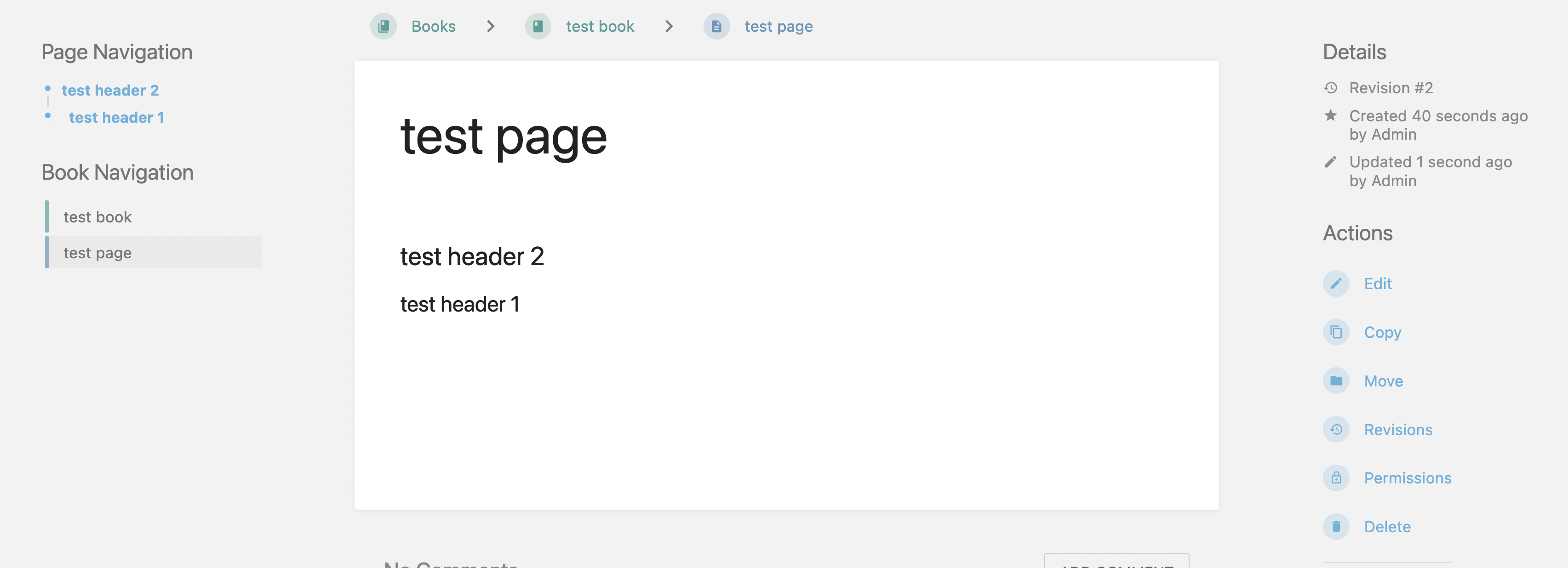
See the difference of the new page and old page (2018)
Page in current version, Details and Actions are at the right side-
Page in 2018's version, Actions are at the top and Details are at the left, which give more space to display the page content.

Exact BookStack Version
latest version
Log Content
No response
PHP Version
No response
Hosting Environment
Macbook
Attempted Debugging
Searched GitHub Issues
Describe the Scenario
I recently migrated from the Bookstack version set up in 2018 to the current version, and notice visual changes. The redesign happened apparently in 2019 (#1153). Now the Details and Actions show to the right side of the page, and with the left side page navigation, they just take too much space (almost half of the page). Is there a way to preserve the old look and feel, or customize the page, perhaps the size of each sections, or a way to put the vertical menu bars to the upper?
See the difference of the new page and old page (2018)
Page in current version, Details and Actions are at the right side-
Page in 2018's version, Actions are at the top and Details are at the left, which give more space to display the page content.

Exact BookStack Version
latest version
Log Content
No response
PHP Version
No response
Hosting Environment
Macbook